Server Enclosures
Server enclosures are essential for any business seeking to organize, protect, and manage their server equipment efficiently. Designed to house servers and related hardware, these enclosures provide a secure environment that supports optimal performance and longevity. Whether you're setting up a new data center or upgrading your existing infrastructure, investing in high-quality server enclosures ensures that your valuable technology assets are well-protected and easily accessible. Explore our range of server enclosures to find the perfect solution for your IT needs, ensuring seamless operation and enhanced security for your critical systems.
This product is not available
Check out the following recommendations.




Server Enclosures
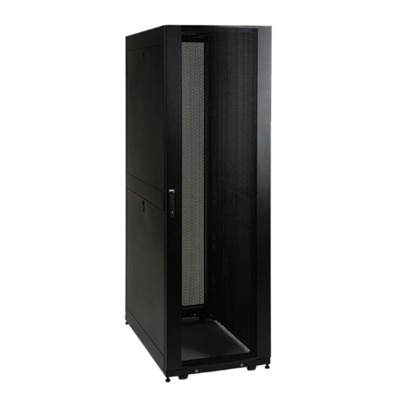
Enclosed equipment cabinets provide a practical way to organize and protect rack-mount electronics in offices, studios, classrooms, workshops and carefully planned home setups. Unlike an open-frame rack, a fully enclosed cabinet surrounds the equipment with doors and side panels, helping limit access, reduce exposure to dust and protect delicate components from accidental bumps. Lockable front and rear doors can be especially useful in shared workspaces, retail environments or rooms where children, pets and visitors may be present. A cabinet also gives a setup a more finished appearance: instead of loose equipment, tangled cords and blinking status lights scattered across a desk, everything has a defined place behind a clean, structured enclosure. When comparing options, begin with the equipment you intend to install and measure its height, width and depth rather than relying on appearance alone. Rack capacity is commonly expressed in rack units, or U, with each unit representing a standard amount of vertical mounting space. Leave room for future additions and for airflow above or between components; a cabinet filled tightly from top to bottom can become difficult to service and may restrict ventilation. Depth matters just as much as height, particularly when equipment has rear-mounted connections, power supplies or cables that extend beyond the chassis. Checking the cabinet’s maximum equipment depth, weight capacity and mounting-hole pattern before purchasing can prevent an unpleasant surprise during installation. If you are still determining which rack-mounted computing hardware belongs in your setup, explore Rackmount Servers as part of the planning process.
Airflow and cable management deserve close attention because they affect reliability, serviceability and day-to-day comfort. Look for perforated doors, ventilation openings or provisions for cooling fans that support a clear front-to-back or side-to-side airflow path. In a quiet office or media room, fan noise may be as important as cooling capacity, while a warm utility closet may call for stronger ventilation and thermostat-controlled operation. Avoid placing an enclosure directly against a wall if the rear needs regular access or if the design relies on rear exhaust. Cable-routing openings, brush panels and vertical management channels can guide power and signal cables away from vents, doors and moving equipment. A little planning here makes a noticeable difference: neatly separated cables are easier to trace when a component needs attention, and a rear door is far less frustrating to close when connectors are not pulling against one another. Consider where power distribution will sit, how much clearance is needed to open the front and rear doors, and whether the cabinet can pass through doorways, elevators and stairwells before assembly. Wall-mounted enclosures can be a good fit for smaller installations where floor space is limited, provided the wall and mounting hardware can support the loaded weight. Floor-standing cabinets offer greater capacity and easier expansion, but they require a stable, level surface and enough surrounding clearance for installation and maintenance. Casters can help with positioning, while leveling feet provide a steadier final setup. For classrooms, small businesses and home offices, enclosed cabinets can bring order to shared technology areas without requiring a dedicated equipment room. In creative studios, they can keep production hardware protected while preserving a clean workspace; in workshops, they can separate sensitive electronics from dust, tools and everyday activity. These cabinets are generally purchased for practical use rather than given as conventional gifts, although they can be a thoughtful choice for someone building a home office, recording space or small technology lab. Before choosing, confirm door swing, lock style, removable panels, included mounting hardware, grounding provisions and assembly requirements. The best enclosure is not simply the largest or most heavily built option; it is the one that fits the equipment, supports safe airflow, leaves room for maintenance and makes the entire installation easier to live with.
FAQs:
Server enclosures provide organized storage for IT equipment, help manage cables efficiently, and protect sensitive hardware from dust and tampering. They also improve airflow, which helps maintain optimal operating temperatures, and can offer additional security with lockable doors and panels. These features make them ideal for maintaining a tidy and secure office IT setup.
Server enclosures are commonly used by IT professionals, network administrators, and small business owners to house servers, switches, and related electronics. They are essential in environments such as data centers, telecom rooms, office IT closets, and even home labs where organization, protection, and scalability are important.
Server enclosures are designed with integrated cable management systems, such as vertical and horizontal cable organizers, to keep cables neatly routed and separated. This not only reduces clutter but also improves airflow and makes it easier to maintain or upgrade equipment without disrupting the entire setup.
Most server enclosures use standardized 19-inch mounting rails, making them compatible with a wide range of equipment from major brands, including Dell. This ensures that you can easily mix and match servers, switches, and other devices within the same enclosure as your needs evolve.
Key features to consider include robust construction, effective airflow design (such as perforated doors), secure locking mechanisms, and flexible cable management options. It's also helpful to choose enclosures that offer easy access for maintenance and the ability to scale as your IT requirements grow.