$3199.00
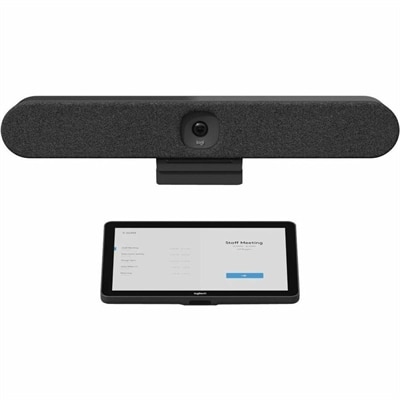
An all-in-one video bar with AI intelligence, sound pickup, and noise suppression for small meeting rooms.
Elevate your collaboration game with our expertly curated selection of team meeting tools, designed to transform the way you connect and communicate. Whether you're leading a brainstorming session, conducting a virtual workshop, or catching up with remote colleagues, having the right tools at your disposal can make all the difference. Discover innovative solutions that help streamline communication, boost productivity, and foster a seamless teamwork experience. Dive into our diverse range of products tailored to meet the dynamic needs of modern teams and ensure every meeting is as efficient and engaging as possible.
An all-in-one video bar with AI intelligence, sound pickup, and noise suppression for small meeting rooms.
Team meeting tools bring together the computing, audio, video, and display equipment that helps people communicate clearly, share information, and work through decisions from different locations. For a remote employee, that might mean a laptop, a comfortable headset, and an external monitor arranged on a small desk. In a shared office, the same purpose may call for a desktop computer, a wider display, and audio equipment suited to several people speaking around a table. The right combination depends on how meetings actually unfold: a quick morning check-in places different demands on a workspace than a lengthy training session, a client presentation, or an afternoon spent reviewing detailed documents. Clear speech is often the foundation. A microphone positioned close to the speaker can help make a voice easier to distinguish from nearby activity, while headphones keep incoming conversation from playing back into the room. Noise-reducing microphone features and active noise cancellation serve different purposes: the former can help limit background sound transmitted to other participants, while the latter can reduce distractions heard by the wearer. Neither replaces a suitable microphone position or a reasonably quiet setting. Video quality also depends on more than resolution. Lighting, camera placement, framing, and the camera’s ability to adjust to changing brightness all influence how natural a person looks on screen. A camera near eye level can create a more direct conversational angle, particularly when the main display sits above an open laptop. Field of view matters, too: a narrower frame may suit one person at a home desk, while a wider frame can accommodate multiple participants in a small meeting space. For hybrid teams, these details help remote colleagues follow expressions, hear contributions, and stay involved when part of the group is together in person. Teachers, consultants, project managers, and other frequent presenters may value a consistent setup that makes moving between conversation, demonstration, and shared content feel less disruptive.
Computers and displays provide the working space behind effective virtual meetings. A laptop supports movement between a home office, a shared workspace, and a conference room, while a desktop can anchor a more permanent arrangement with regularly connected peripherals. Processing capability and memory influence how comfortably a computer handles a video call alongside a browser, a large document, and presentation software, although actual performance depends on the applications and workload. Battery life, weight, keyboard comfort, and port selection become especially relevant for people who carry their setup throughout the day. At a desk, an external monitor can give meeting participants room to view shared content without covering their notes or losing sight of the conversation. Screen size alone does not determine readability; resolution, scaling settings, viewing distance, and the size of the text being shared also matter. A height-adjustable stand or compatible monitor arm can help position the display for a comfortable seated posture, with enough desk depth to avoid crowding the keyboard and mouse. For spreadsheet reviews, design discussions, and training sessions, a second screen can separate reference material from the meeting window. Screen sharing still requires care because the selected display or application determines what others can see. Related Presentation Collaboration Tools support the same broader workflow of showing information, discussing revisions, and keeping visual material central to a conversation. Connection compatibility is another practical consideration across a meeting setup. A connector that physically fits does not always support every expected function; video output, charging, and data capabilities depend on the computer, cable, and accessory specifications. A docking station can simplify repeated connections, but its supported displays, power delivery, and operating system compatibility need to match the intended arrangement. Accessible ports and manageable cable lengths are useful in everyday use, especially when someone needs to disconnect a laptop quickly after a call. Simple, consistent connections can make a familiar workspace easier to return to and reduce the number of adjustments required before the next discussion.
Comfort, construction, and everyday maintenance matter most when meeting equipment sees hours of repeated use. Headset fit depends on headband adjustment, ear cushion shape, clamping pressure, and overall weight, with glasses sometimes affecting the seal or creating pressure during longer sessions. Over-ear and on-ear designs feel different, and personal preference can be as important as the length of a typical call. Soft fabric surfaces and synthetic coverings also have different cleaning needs, making the manufacturer’s care instructions important, especially for shared equipment. Adjustable hinges, reinforced cable attachment points, and sturdy stands are useful construction details to consider for equipment that is frequently repositioned or packed into a bag. Wireless accessories offer freedom of movement but require charging, while wired options avoid battery management and may suit a fixed desk. Neither approach is universally better; the intended routine determines which trade-offs matter. For someone leading a workshop while standing, freedom to move can be valuable. For someone taking back-to-back calls from one chair, predictable placement and easy-to-reach controls may matter more. Physical mute buttons, clear status indicators, and camera privacy shutters can make everyday operation more straightforward, though a headset’s mute control may not synchronize with every meeting application. Hardware also works alongside software rather than replacing it. Live captions, transcripts, collaborative notes, shared digital whiteboards, and automated summaries depend on the chosen meeting platform, account permissions, and organizational settings. Clear microphone input can support more accurate captions and transcription, but accents, overlapping voices, and background sound can still affect results. Recordings and summaries also require attention to participant consent and workplace privacy requirements. Routine care helps keep the physical setup ready for those workflows: screens and lenses benefit from manufacturer-approved cleaning methods, ventilation openings need unobstructed space, and cables last better when protected from sharp bends and tension. A thoughtfully matched collection of team meeting tools supports both the visible conversation and the quieter work around it, from reading an agenda before a call to reviewing notes afterward, without making the equipment the focus of the room.
Add the products you would like to compare, and quickly determine which is best for your needs.