$474.00
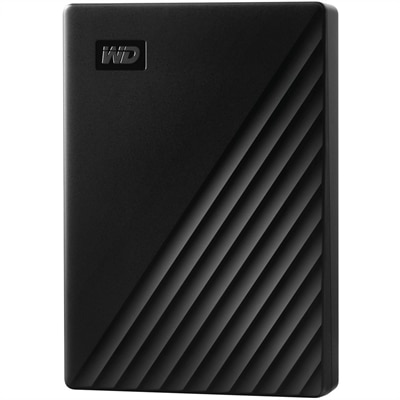
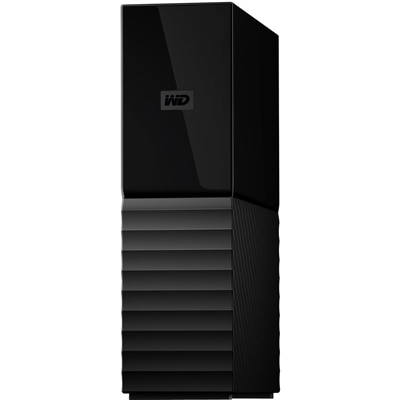
An 8TB USB 3.0 desktop hard drive with 256-bit AES encryption, password protection and automatic backups.
Upgrade your storage solutions with our selection of USB 3.0 hard drives, designed to meet the demands of modern data transfer and storage needs. These hard drives offer enhanced speed and efficiency, making them ideal for everything from backing up important files to expanding your digital library. Whether you need extra space for work, entertainment, or personal use, our USB 3.0 hard drives provide a reliable and high-performance option that seamlessly integrates with your devices. Explore our range to find the perfect match for your storage requirements.
An 8TB USB 3.0 desktop hard drive with 256-bit AES encryption, password protection and automatic backups.
USB 3.0 hard drives are external computer accessories that hold files outside a laptop or desktop and connect through a USB cable. They give photo libraries, school assignments, home videos, and personal records a separate place to live, whether the goal is clearing room on a computer or keeping an additional copy of important work. The USB 3.0 interface supports a theoretical signaling rate of up to 5 gigabits per second, but actual file transfers depend on the hard drive mechanism, the computer, the connection, and the files being moved. A mechanical hard drive uses spinning magnetic platters, so its read and write performance is typically well below the interface maximum. For everyday tasks such as copying vacation photos or backing up a semester of coursework, this connection provides useful headroom without making the drive itself faster than its internal components allow. Portable USB 3.0 hard drives commonly use a compact 2.5-inch mechanism and draw power through the USB cable, making them convenient beside a laptop at a kitchen table or tucked into a padded compartment for travel. Desktop external hard drives typically have larger enclosures, often contain a 3.5-inch mechanism, and usually require a separate power adapter. They are better suited to a consistent spot near a home computer, where a cable and nearby outlet are less of a concern. Capacity matters as much as physical size: documents generally take up relatively little room, while high-resolution photos, video projects, and full computer backups can accumulate quickly. A terabyte represents one trillion bytes, although the usable space displayed by a computer may be lower because of formatting and differences in how capacity is reported. Collections that keep growing may call for High Capacity Hard Drives, particularly when several years of photos or multiple backup versions need space. Leaving room for future additions makes an external drive easier to keep using as a household’s digital collection expands.
Connection details help distinguish USB 3.0 external hard drives that otherwise look similar. USB 3.0 is also known as USB 3.1 Gen 1 and USB 3.2 Gen 1; these names refer to the same 5 Gbps signaling tier, not three different levels of speed. The connector is a separate consideration from the protocol. A rectangular USB Type-A plug and a reversible USB Type-C plug describe physical shapes, and neither shape alone establishes the speed supported by a particular port or cable. A compatible data cable needs to fit both the drive and the computer while supporting the intended connection speed. Some external hard drives use a wide USB Micro-B connector at the drive end, so a cable already used for another accessory may not be a suitable replacement. USB 3.0 drives can generally work with older USB 2.0 connections when the cable, connector, and power requirements are met, but transfer speeds will be limited by the older interface. A slower hub or cable can also reduce performance, and a hub shared with other busy devices may affect transfer times. In practical use, one large video file often copies more efficiently than thousands of tiny files with the same combined size. Many mechanical external hard drives transfer large sequential files at roughly 100 to 200 megabytes per second, with some models reaching higher speeds and others running slower; this is distinct from the interface’s gigabit rating. Compatibility also extends beyond plugging in a cable. The drive’s file system determines how a computer can read and write its contents, and a format intended for one operating system may have limitations on another. Cross-platform formats can make exchanging files easier, while built-in backup applications may require a particular format. Reformatting erases existing contents, making a separate copy essential before any change. For a shared household computer or a drive that travels between workspaces, these details influence everyday convenience more than the appearance of the enclosure.
The enclosure, footprint, and handling requirements shape how a USB 3.0 hard drive fits into daily life. Plastic housings can keep weight down, while metal housings may feel more rigid and help distribute heat, depending on the design. Neither material alone establishes drop resistance or long-term reliability. Rubberized edges and protective sleeves can soften minor bumps, but a mechanical drive still contains moving parts that deserve careful handling, especially while it is operating. On a desk, a flat, stable surface helps prevent slips and keeps the cable from pulling against the connector. In a bag, a padded case protects the enclosure from keys and other hard objects, while a separate cable pocket reduces strain on the plug. Dimensions and weight matter for someone carrying a laptop between home and class; cable reach and access to an outlet matter more for a drive that stays beside a desktop. Any ventilation openings need clearance, and an operating drive should not be buried beneath papers or wrapped in fabric. Routine care is straightforward: keep liquids away, disconnect the drive before cleaning its exterior, and use a soft, dry cloth rather than spraying cleaner onto the housing. Safely ejecting the drive before unplugging it helps ensure pending writes have finished, and allowing it to stop before packing it away reduces unnecessary movement during operation. For family photos, creative portfolios, and other irreplaceable files, an external hard drive is most useful as part of a backup routine rather than the only place those files exist. Moving a folder off a laptop without keeping another copy frees space, but it does not create a backup. Automatic backup features, where supported, can reduce the effort of maintaining a second copy, and occasionally checking that files can be restored adds practical reassurance. A portable drive can also be a thoughtful gift for a college student, hobby photographer, or relative organizing years of digital memories, provided its connections and software requirements match the recipient’s computer. The most comfortable fit is a drive whose capacity, physical design, and everyday handling needs suit the way its owner actually works.
Add the products you would like to compare, and quickly determine which is best for your needs.