WiFi Upgrades
Enhance your home or office connectivity with WiFi upgrades designed to support seamless streaming, faster downloads, and smooth online experiences. Whether you’re looking to boost coverage, reduce dead zones, or accommodate more devices, the right WiFi upgrades can transform your network performance. Explore a wide selection of solutions to help you stay connected and productive throughout your space.
This product is not available
Check out the following recommendations.




WiFi Upgrades
A reliable WiFi connection can make a noticeable difference in the way a home feels and functions. When video calls freeze, web pages take too long to load, or a streaming show pauses whenever someone else starts using the internet, the issue may not be the speed tier purchased from an internet provider. Older wireless equipment can struggle with the growing number of connected devices found in a typical home, including laptops, desktop computers, phones, tablets, televisions, printers, smart speakers and gaming systems. WiFi upgrades are designed to help address those limitations with newer wireless standards, stronger coverage and better support for multiple devices using the connection at the same time. A modern standalone router is often a practical choice for a small or medium-sized apartment, condo or single-level home, especially when the existing provider-supplied equipment is outdated or cannot keep up with everyday demand. WiFi 6 hardware can improve efficiency in busy households, while WiFi 7 options are built for newer devices and demanding activities that benefit from faster wireless performance and reduced congestion. Compatibility still matters, so check the capabilities of your laptop, desktop, phone and other frequently used devices before choosing an upgrade. A newer router can continue working with older equipment, but the newest performance benefits are most apparent when the connected devices support the same generation of WiFi. For an overview of available options, browse WiFi Networks and compare the features that fit the way your household uses the internet.
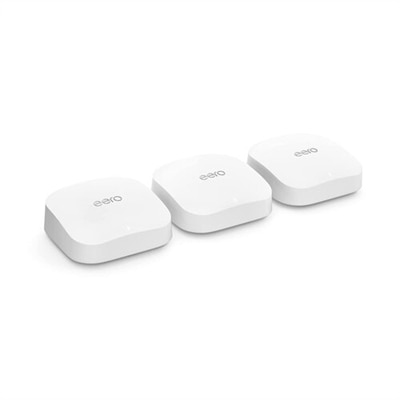
For larger homes, multistory spaces or floor plans with thick walls, a whole-home mesh WiFi system can provide a more consistent experience than a single router placed at one end of the building. Mesh systems use a primary unit and additional nodes positioned in different areas to extend coverage, helping reduce dead zones in bedrooms, finished basements, home offices and rooms separated from the main living area. They are especially useful for people who move around during the day with a laptop or phone, since compatible devices can transition between mesh points as they move through the home. When comparing systems, consider the total area listed by the manufacturer, the number of included units, the ability to add more nodes and whether the system supports wired connections between units. Coverage estimates are useful starting points, but building materials, floor levels, furniture and interference from nearby electronics can affect real-world results. A home with concrete walls or several floors may need a different arrangement than an open apartment with fewer obstacles. Placement is just as important as the hardware itself: put the primary unit in a central, open location rather than inside a cabinet, behind a television or on the floor, and position additional units where they still receive a strong signal from the main unit. Placing a node in the farthest room with no connection to the rest of the system will not extend coverage effectively. Before purchasing, note the square footage of the home, the number of floors, the rooms where the connection is weakest and the locations where people regularly stream, work or play. These details make it easier to choose between a standalone router and a mesh arrangement without paying for coverage that is unnecessary or selecting equipment that cannot reach the spaces that matter most.
The internet speed tier from the provider and the number of connected devices should also guide a WiFi upgrade. A household with a few basic devices may need only straightforward wireless coverage, while a busy home with several simultaneous video streams, cloud applications, online games, smart home products and work computers may benefit from newer equipment with greater capacity. Remember that a router cannot create internet speed beyond the plan supplied by the provider, although it can help distribute that connection more effectively throughout the home. Desktop computer users have another upgrade path: an internal wireless adapter can add newer WiFi capabilities to a compatible desktop, and some models also add Bluetooth connectivity for keyboards, mice, headphones and other accessories. Check the computer’s available expansion slot, operating system requirements and antenna placement before selecting an adapter. Many connection problems can also be improved with simple adjustments, such as moving the router away from walls and large appliances, updating its firmware, choosing an appropriate wireless band and restarting the equipment after updates. These steps are worth trying, but persistent dead zones, frequent disconnections or an aging router may indicate that replacement hardware is the better long-term solution. WiFi upgrade products can be useful for students setting up a more dependable study space, remote workers who need steady video meetings, families sharing one connection across many rooms and anyone creating a comfortable home entertainment area. They can also make practical gifts for a new homeowner, a college student moving into an apartment or a relative who has been relying on an older router for years. Focus on coverage, supported WiFi generation, device capacity, setup requirements and the layout of the home to find an upgrade that feels dependable during busy afternoons, relaxed streaming evenings and the cooler months when more time is spent indoors.
FAQs:
Upgrading to WiFi 6E or WiFi 7 offers faster speeds, increased bandwidth, and lower latency, making it ideal for homes with multiple connected devices. These newer standards also help reduce interference and congestion, providing a more stable and reliable connection for activities such as streaming, gaming, and video conferencing.
A mesh WiFi system uses multiple nodes placed throughout your home to create a single, seamless network. This approach eliminates dead zones and ensures strong, consistent coverage in every room, including hard-to-reach areas like basements, attics, or garages.
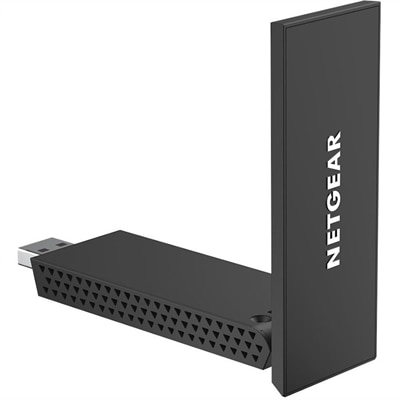
A WiFi receiver, often in the form of a USB adapter or internal card, allows devices without built-in wireless capabilities to connect to WiFi networks. It's especially useful for desktop PCs, older laptops, or devices located far from the main router, helping them access faster and more reliable wireless connections.
Placing your router in a central, elevated location away from obstructions and electronic interference can significantly enhance signal strength and coverage. Proper placement helps distribute the WiFi signal more evenly throughout your space, minimizing weak spots and improving overall connectivity.
To support multiple users and devices, consider upgrading to a router with advanced features like MU-MIMO or OFDMA, which help manage simultaneous connections efficiently. Additionally, using wired Ethernet backhaul for mesh points and keeping firmware up to date ensures smooth performance across all your devices.