NetWorker:無法登入 NMC 或使用 nsrlogin,收到:「驗證庫錯誤:GET failed with HTTP-ERROR:404"
Summary: 無法登入 NMC,或在 NetWorker 伺服器上使用 CLI 的 nsrlogin 命令。當也發現 NetWorker 伺服器上的 nsr 目錄容量為 100% 時,此知識庫會針對此問題/解決方法進行說明。
This article applies to
This article does not apply to
This article is not tied to any specific product.
Not all product versions are identified in this article.
Symptoms
- 您無法使用nsrlogin登入 NetWorker 管理主控台 (NMC) 或 CLI
- NetWorker 驗證失敗,並顯示下列錯誤:
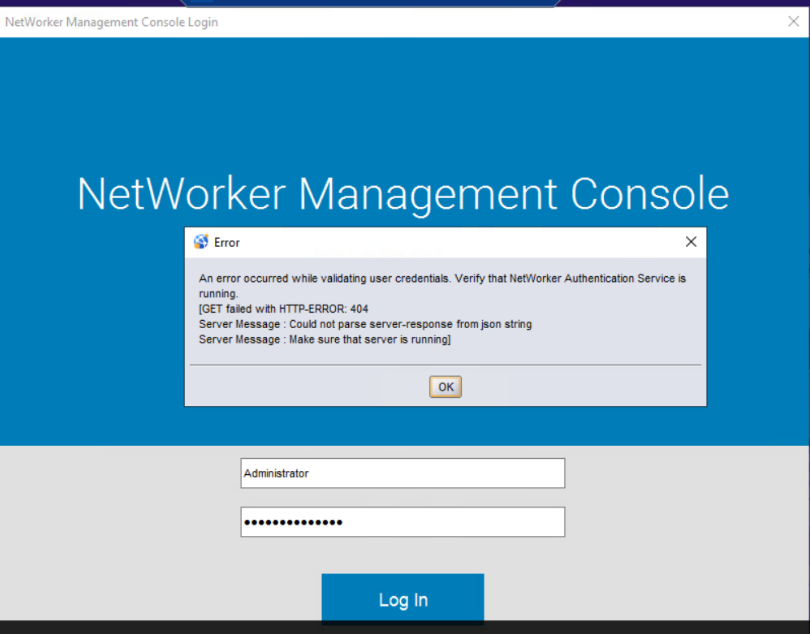
認證媒體櫃錯誤:GET failed with HTTP-ERROR:404
伺服器訊息:無法從 json 字串
伺服器訊息剖析伺服器回應:確定伺服器正在執行
- NetWorker 伺服器 (nsrd) 服務正在執行中:
- Linux:ps -ef | grep nsr
- Windows:tasklist | findstr nsr
- 埠 9090 正在聆聽:
- Linux:netstat -apno | grep 9090
- Windows: netstat -ano | findstr 9090
Cause
在不同的情況下,可能會出現此問題:
- 在 Windows 型伺服器上升級/安裝 NetWorker 之後。
- /nsr 安裝後,容量已達 100%。
- authcdb 損毀。
Resolution
在採取任何措施解決問題之前,請確認安裝磁片磁碟機的容量不是 100%。如果安裝磁片磁碟機已滿或接近容量,請據此增加磁碟空間。
需要重新設定 authcdb。
Linux:
1.關機 NetWorker 服務:
nsr_shutdown2.重新命名 authc 目錄:mv /nsr/authc /nsr/authc'date -I'.bak
3.執行 authc 組態腳本:/opt/nsr/authc-server/scripts/authc_configure.sh
5.確認 NetWorker 服務出現:ps -ef | grep nsr
6.確認埠 9090 連線成功: nsrports -t localhost -p 9090
nsr_shutdown2.重新命名 authc 目錄:mv /nsr/authc /nsr/authc'date -I'.bak
3.執行 authc 組態腳本:/opt/nsr/authc-server/scripts/authc_configure.sh
注意:系統會提示您重新設定 authc Keystore 和 NetWorker 系統管理員密碼。
4.啟動 NetWorker 服務:systemctl start networker
5.確認 NetWorker 服務出現:ps -ef | grep nsr
6.確認埠 9090 連線成功: nsrports -t localhost -p 9090
注意:authc 服務會顯示為 nsrtomcat+的 jsvc.exe 程式。您可以在「ps -ef | grep jsvc」中觀察到
7.使用 NetWorker 系統管理員帳戶登入 NMC 或 NetWorker Web 使用者介面 (NWUI)。
8.NetWorker 功能傳回後,您可以自行決定刪除舊的 authc 資料夾。
Windows:
1.卸載 NetWorker。
2.從 Windows 檔案總管流覽至 NetWorker 安裝目錄,然後重新命名 authc-server 資料夾。預設位置為「C:\Program Files\EMC NetWorker\nsr\authc-server」
3.重新安裝 NetWorker。
注意:NetWorker 安裝套件可從: HTTPs://www.dell.com/support/home/product-support/product/networker/drivers下載。在安裝期間,系統會提示您重新建立 NetWorker Keystore 和預設的系統管理員密碼。
4.確認 NetWorker 服務出現:工作清單 | findstr nsr
5.確認埠 9090 連線成功: nsrports -t localhost -p 9090
authc 程式會列為 java.exe 程式。「工作管理員」中的「Details」標籤可用來識別此程式: 
6.使用 NetWorker 系統管理員帳戶登入 NMC 或 NetWorker Web 使用者介面 (NWUI)。
7.NetWorker 功能傳回後,您可以自行決定刪除舊的 authc 資料夾。
Additional Information
如果您已將 Active Directory/LDAP 與 NetWorker 整合,則外部授權單位必須讀取至 NetWorker;但是,在完成此知識庫中的步驟之前,NMC 角色和NSR 使用者群組中所設定的任何許可權都將保留:
Affected Products
NetWorker, NetWorker Management ConsoleProducts
NetWorker Family, NetWorker, NetWorker SeriesArticle Properties
Article Number: 000031476
Article Type: Solution
Last Modified: 20 Jun 2025
Version: 5
Find answers to your questions from other Dell users
Support Services
Check if your device is covered by Support Services.