Avamar: VMware Virtual Machine image backup fails because the VM metadata (.vmx file) cannot be downloaded
Summary: Avamar VMware Virtual Machine image backups failing with "failed to download vm metadata, try later" due to insufficient permissions.
This article applies to
This article does not apply to
This article is not tied to any specific product.
Not all product versions are identified in this article.
Symptoms
A Virtual Machine (VM) image backup fails with "failed to download vm metadata."
This can be seen when reviewing the avvcbimage backup log: (either in the activity window of the Avamar UI, or on the proxy server in the /usr/local/avamarclient/var/ directory)
2020-01-24 16:37:32 avvcbimage Warning <19749>: No HTTP content was returned from datacenter from downloadFileData 'DATACENTER_NAME'.
2020-01-24 16:37:42 avvcbimage Info <41155>: Using Legacy Method
2020-01-24 16:37:42 avvcbimage Info <40756>: Attempting to Download file:/folder/{Path....}
2020-01-24 16:37:43 avvcbimage Warning <19749>: No HTTP content was returned from datacenter from downloadFileData 'DATACENTER_NAME'.
2020-01-24 16:37:53 avvcbimage Warning <40650>: Download VM .vmx file failed.
2020-01-24 16:37:53 avvcbimage Error <17821>: failed to download vm metadata, try later
2020-01-24 16:37:53 avvcbimage Info <9772>: Starting graceful (staged) termination, failed to download vm metadata (wrap-up stage)
2020-01-24 16:37:53 avvcbimage Error <0000>: [IMG0009] Create Snapshot: snapshot creation or pre/post snapshot script failed.
2020-01-24 16:37:53 avvcbimage Error <0000>: [IMG0009] Create Snapshot: snapshot creation/pre-script/post-script failed.
Cause
1. The vCenter account used to run the VMware image backup has insufficient privileges in vCenter.
2. The Virtual Machine resides in an encrypted datastore (vSAN) that requires additional encryption permissions.
Resolution
1. See "Creating a dedicated vCenter user account" section of the Avamar VMware User Guide document for the minimum required privileges.
2. If the Virtual Machine on the vCenter is in an encrypted datastore (vSAN), see the "Configure a backup to support vSAN encryption" section of the Avamar VMware User guide.
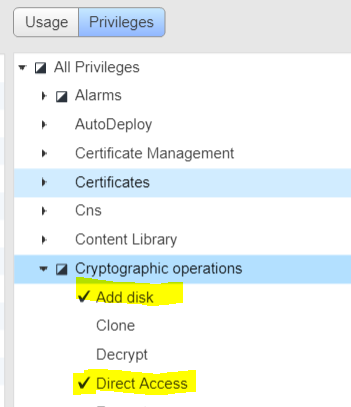
Below is a summary of the additional privileges to be added for a vSAN:
Cryptographic operations:
- Add Disk
- Direct Access
Affected Products
Avamar, Avamar Client for VMwareProducts
Avamar ServerArticle Properties
Article Number: 000059156
Article Type: Solution
Last Modified: 25 Jul 2025
Version: 3
Find answers to your questions from other Dell users
Support Services
Check if your device is covered by Support Services.