NetWorker Virtual Edition upgrade fails "Reconfiguring NetWorker Authc Service Settings"
Summary: The NetWorker Virtual Edition (NVE) installation workflow stops during the task "Reconfiguring NetWorker Authc Service Settings (36 of 47)."
This article applies to
This article does not apply to
This article is not tied to any specific product.
Not all product versions are identified in this article.
Symptoms
The NetWorker data zone is configured with the NetWorker Virtual Edition (NVE) Appliance. The NetWorker Installation Manager web page is being used to upgrade the NVE to NetWorker 19.5.0.x. The NVE installation workflow stops during the task "Reconfiguring NetWorker Authc Service Settings (36 of 47)."
The NetWorker Installation Manager web page shows:
The NetWorker Installation Manager web page shows:
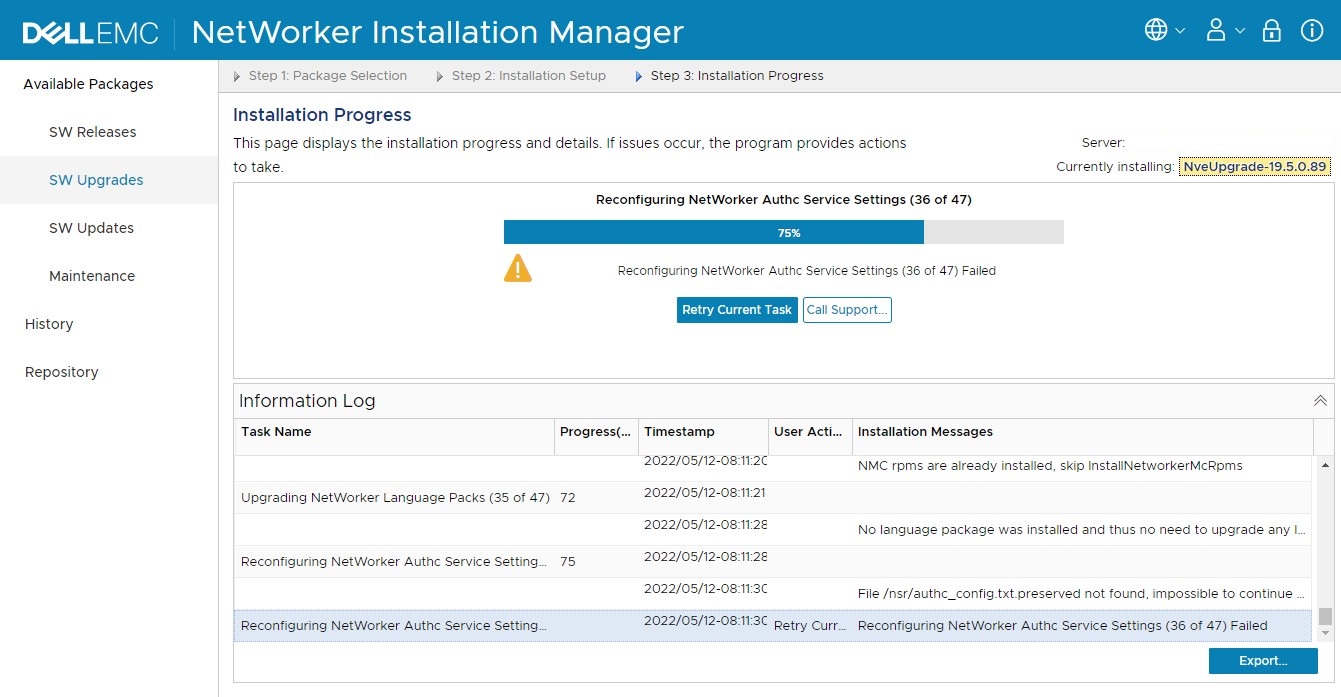
The NVE /nsr directory listing shows:
MY_NVE:~ # ls -l /nsr/
total 24
drwxrwxrwt  2 root   root     6 May 11 13:52 applogs
drwxr-xr-x 10 tomcat users  118 May 12 08:18 authc
drwxr-xr-t  3 root   root    23 May 11 13:52 cache
drwx------ 19 root   root  4096 May 12 08:21 cores
drwxr-xr-x  2 root   root     6 May 11 13:52 debug
drwxr-xr-x  3 root   root    42 May 11 13:52 index
drwxr-xr-x  6 root   root    74 May 11 13:52 lic
drwx------  3 root   root    42 May 11 13:52 lockbox
drwxr-xr-x  9 root   root  4096 May 12 08:21 logs
drwxr-xr-x  3 root   root    64 May 12 08:21 mm
drwxr-xr-x  3 root   root    18 May 11 13:52 nmc
-rw-r--r--  1 root   root    10 Feb 15  2020 nsrrc
drwxr-xr-x  2 root   root    27 May 11 13:52 rabbitmq
drwxr-xr-x  8 root   root   107 May 12 08:18 res
drwxr-xr-x  2 root   root    74 May 12 08:18 run
drw-------  3 root   root    22 May 11 13:54 sec
drwxr-xr-x  6 root   root  4096 May 12 08:21 tmp
The /usr/local/avamar/var/avi/server_log/avinstaller.log.0 shows:
MONTH DD YYYY HH:MM:SS com.avamar.avinstaller.monitor.MessageListener doPost
INFO: MessageListener forwarding message: <?xml version="1.0" encoding="UTF-8" standalone="yes" ?>
<UpdateMessage><Content><![CDATA[File /nsr/authc_config.txt.preserved not found, impossible to continue - operation failed]]></Content></UpdateMessage>
MONTH DD YYYY HH:MM:SS com.avamar.avinstaller.process.MessageReceiver receiveMessage
INFO: MessageReceiver receive message: <UpdateMessage><Timestamp>YYYY/MM/DD-HH:MM:SS</Timestamp><Content>File /nsr/authc_config.txt.preserved not found, impossible to continue - operation failed</Content></UpdateMessage>
...
MONTH DD YYYY HH:MM:SS com.avamar.avinstaller.agent.security.ShareMemoryHandler delete
INFO: File /data01/avamar/repo/temp/.rCf1xGVqqTM does not exists.
MONTH DD YYYY HH:MM:SS com.avamar.avinstaller.process.handler.ServerScriptHandler$TaskProcessor run
INFO: From std out: 1
MONTH DD YYYY HH:MM:SS com.avamar.avinstaller.process.handler.ServerScriptHandler$TaskProcessor run
WARNING: From err out: MM/DD HH:MM:SS error: File /nsr/authc_config.txt.preserved not found, impossible to continue - operation failed
MONTH DD YYYY HH:MM:SS com.avamar.avinstaller.process.handler.ServerScriptHandler$TaskProcessor run
INFO: exit code: 1
Cause
The /nsr/authc_config.txt.preserved is not available on the NVE file system. The cause of the missing file is not known.
Resolution
The /nsr/authc_config.txt.preserved may be manually re-created on the NVE file system to continue the NVE installation workflow.
- Connect to the NVE with an SSH with the admin account:
ssh admin@MY_NVE - Authenticate with the admin account.
- Switch to the root account:
sudo su - - Create the authc_config.txt.preserved in the /nsr directory.
MY_NVE:~ # vi /nsr/authc_config.txt.preserved
MY_NVE:~ # cat /nsr/authc_config.txt.preserved
EMC_JAVADIR=/usr/java/latest
EMC_TCUSER=tomcat
EMC_TCPORT=9090
EMC_CREATETCKEYSTORE=n
EMC_TCKEYSTORE=/nsr/authc/conf/authc.keystore
EMC_DATADIR=/nsr/authc/data
EMC_KEEPBOOT=y
MY_NVE:~ #
- Select the "Retry Current Task" option in the NetWorker Installation Manager web page.
- The NVE installation workflow continues to upgrade the configuration.
Article Properties
Article Number: 000199494
Article Type: Solution
Last Modified: 30 Oct 2025
Version: 3
Find answers to your questions from other Dell users
Support Services
Check if your device is covered by Support Services.