NVP vProxy: VM backups from stand-alone ESXi fail with "Received an HTTP code: 400...."
Summary: The NetWorker VMware Protection (NVP) vProxy appliance is deployed on a stand-alone VMware ESXi hypervisor (7.0U3) host. All VM backups immediately fail with the message "Failed to create BackupVmSession resource. Error logging to CIS host, not fetching guestOSImage details" ...
This article applies to
This article does not apply to
This article is not tied to any specific product.
Not all product versions are identified in this article.
Symptoms
A stand-alone ESXi host was added to NetWorker (no vCenter server).
The ESXi host is at version 7.0U3.
vProxy version is at 4.3.0-46.
The ESXi host was added using root account and "deployed in cloud" option (required):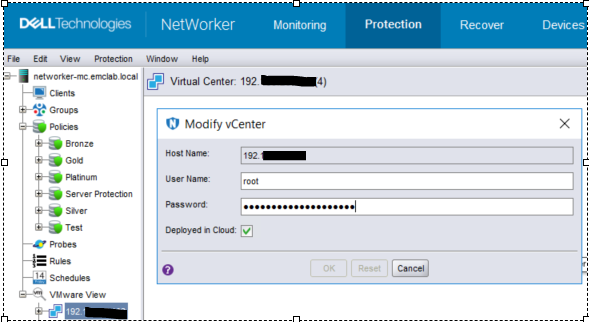
Figure 1: Screenshot of Modify vCenter page
VM backup action immediately fails with the following error message in the action log: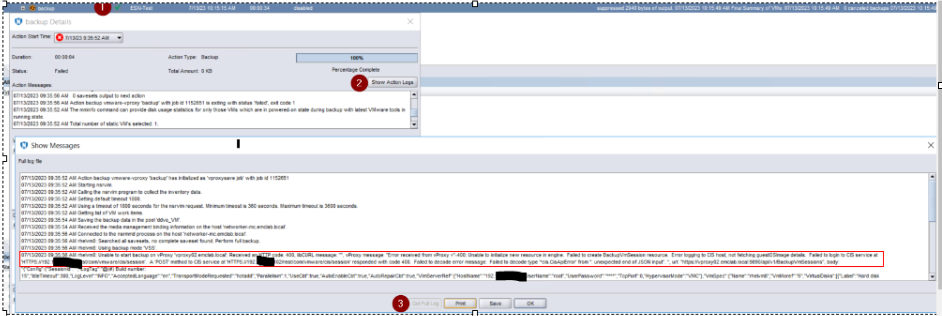
Figure 2: Back up action failure message in Action log
Error message:
07/13/2023 09:35:56 AM rhelvm8: Unable to start backup on vProxy 'vproxy02.emclab.local': Received an HTTP code: 400, libCURL message: "", vProxy message: "Error received from vProxy ="-400: Unable to initialize new resource in engine. Failed to create BackupVmSession resource. Error logging to CIS host, not fetching guestOSImage details. Failed to login to CIS service at 'HTTPS://192.xxx.xx.xxx/rest/com/vmware/cis/session'. A 'POST' method to CIS service at 'HTTPS://192.xxx.xx.xxx/rest/com/vmware/cis/session' responded with code 400. Failed to decode error message: Failed to decode type '*cis.CisApiError' from '': unexpected end of JSON input". ", url: "https://vproxy02.emclab.local:9090/api/v1/BackupVmSessions",
Cause
vProxy error in message handling
The message "Error logging to CIS host not fetching guestOSImage details" should be handled as a warning and allow backups to proceed; however, it is being treated as a failure and stops backups from running.
Resolution
A temporary workaround is to downgrade to vProxy 4.3.0-41.
This issue is expected to be addressed in an upcoming vProxy release. Check https://www.dell.com/support/home/product-support/product/networker-family/drivers for availability.
Affected Products
NetWorkerProducts
NetWorker Family, NetWorker SeriesArticle Properties
Article Number: 000215790
Article Type: Solution
Last Modified: 10 Apr 2024
Version: 7
Find answers to your questions from other Dell users
Support Services
Check if your device is covered by Support Services.