NetWorker Virtual Edition: NetWorker Management Console User Interface Stops Responding after NVE Upgrade, and shows a progress bar at 53%
Summary: NetWorker Virtual Edition was successfully upgraded, but when the NetWorker Management Console user interface is launched, it automatically goes to the Tab: Host and stops responding. The message showing is "Getting information from NetWorker Server myNVEhostname." The progress bar stops responding at 53%. ...
This article applies to
This article does not apply to
This article is not tied to any specific product.
Not all product versions are identified in this article.
Symptoms
The /opt/lgtonmc/logs/gstd.raw log reports:
The NetWorker Management Console stops responding at approximately 53%:
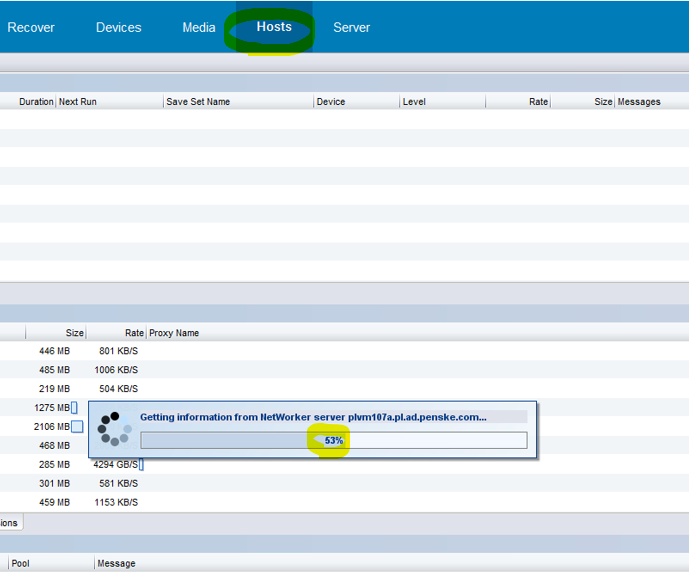
Figure 1: NetWorker Management Console stops responding at 53% Error.
0 MM/DD/YY HH:MM:SS  2 0 0 2631079744 2283 0 myNVEhostname gstd NSR warning EMC GST Trap Handler has started
0 MM/DD/YY HH:MM:SS  1 5 0 2457421568 2283 0 myNVEhostname gstd NSR notice MM/DD/YY HH:MM:SS.690938 ERROR generated: "Program not registered" in file "/disks/nasbld/nas65/nw/19.9/nsrwebui/modules/nsm/gt_server.c" line #754
0 MM/DD/YY HH:MM:SS  1 5 0 2440636160 2283 0 myNVEhostname gstd NSR notice MM/DD/YY HH:MM:SS.868902 ERROR generated: "Program not registered" in file "/disks/nasbld/nas65/nw/19.9/nsrwebui/modules/nsm/gt_server.c" line #754
0 MM/DD/YY HH:MM:SS  2 0 0 2440636160 2283 0 myNVEhostname gstd NSR warning base: Failed to fetch/store recover jobs reporting information for server myNVEhostname
0 MM/DD/YY HH:MM:SS  1 5 0 2457421568 2283 0 myNVEhostname gstd NSR notice MM/DD/YY HH:MM:SS.010707 poll: ERROR, poll_clean_error
See Dell article 22793, NetWorker: How to use nsr_render_log
The NetWorker Management Console stops responding at approximately 53%:
Figure 1: NetWorker Management Console stops responding at 53% Error.
Cause
The cpdb Folder (path /nsr/res/cpdb) is corrupt in NVE, and must be refreshed.
Resolution
The NetWorker Services on NVE must be stopped and the cpdb folder renamed to fix this issue.
- Stop NW Services:
nsr_shutdown
- Rename /nsr/res/cpdb to /nsr/res/cpdb.old:
mv /nsr/res/cpdb /nsr/res/cpdb.old
- Start NW Services:
systemctl start networker
systemctl status networker
- Validate new cpdb folder:
myNVEhostname:/nsr/logs # ls -lart /nsr/res/cpdb*
drwx------ 12 root root 4096 Nov  9  2015 cpdb.old
drwx------ 12 root root 4096 Oct  4 08:23 cpdb
- Launch NMC UI and validate.
Products
NetWorkerArticle Properties
Article Number: 000218243
Article Type: Solution
Last Modified: 23 Oct 2024
Version: 4
Find answers to your questions from other Dell users
Support Services
Check if your device is covered by Support Services.