3DMark Time Spy Performance Drop After Computer Sits Idle
Summary: Learn why 3DMark Time Spy benchmark scores may drop after a Dell laptop sits idle for about fifteen minutes.
This article applies to
This article does not apply to
This article is not tied to any specific product.
Not all product versions are identified in this article.
Symptoms
Running the 3DMark Time Spy benchmark may show a performance score drop of more than 10% after starting the computer, connecting to the Internet, and then leaving the computer idle for approximately 15 minutes.
Affected Platforms:
- Dell 14S DS14265
- Dell 16S DS16265
- Dell Pro 3 14 P314265
- Dell Pro 3 16 P316265
- Dell Pro 5 14 P514265
- Dell Pro 5 16 P516265
- Dell Pro 7 13 P703265
- Dell Pro 7 13 P713265
- Dell Pro 7 14 2-in-1 P704265
- Dell Pro 7 14 P714265
- Dell Pro Precision 5 14S PW514265
- Dell Pro Precision 5 16S PW516265
Cause
A built-in Windows AI feature runs in the background and uses a significant amount of computer’s memory. This occurs even when the computer is idle. On computers with 16 GB of memory, this feature can use up to 60–65% of the total memory.
The affected Dell laptops use shared memory for graphics. This means that the graphics processor shares memory with the rest of the computer rather than having its own dedicated memory. When available memory is low, graphics performance can suffer.
Note: Microsoft has confirmed this background memory usage is expected behavior.
Resolution
Long-term solution:
The engineering department is working on a fix to be released in a future BIOS version. The updated BIOS is posted to the computer’s support page once it is made available. The BIOS is expected to be released on August 11, 2026.
Workaround:
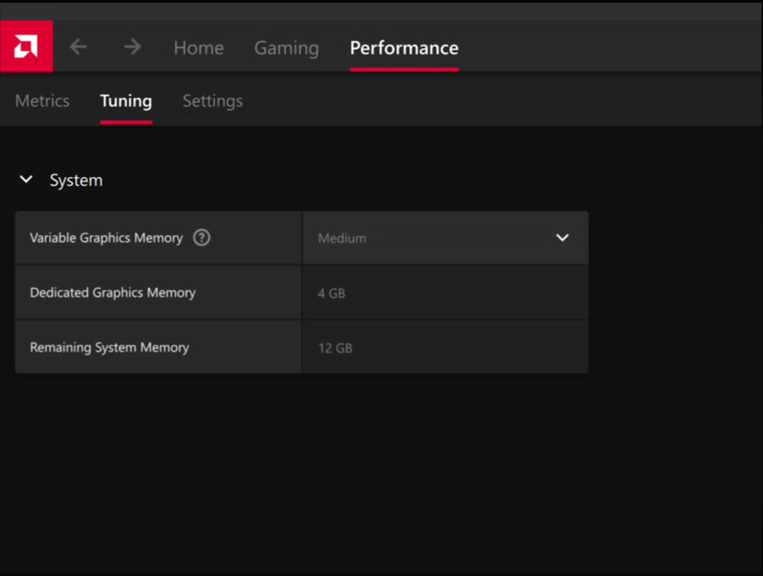
- Open AMD Software: Adrenalin Edition.
Note: The edition of AMD Software may vary.
- Go to Performance and then Tuning.
- Change Variable Graphics Memory from Minimum to Medium.
Affected Products
Dell 14S DS14265, Dell 16S DS16265, Dell Pro 3 14 P314265, Dell Pro 3 16 P316265, Dell Pro 5 14 P514265, Dell Pro 5 16 P516265, Dell Pro 7 13 2-in-1 P703265, Dell Pro 7 14 2-in-1 P704265, Dell Pro 7 13 P713265, Dell Pro 7 14 P714265
, Dell Pro Precision 5 14S PW514265, Dell Pro Precision 5 16S PW516265
...
Article Properties
Article Number: 000472116
Article Type: Solution
Last Modified: 02 Jun 2026
Version: 2
Find answers to your questions from other Dell users
Support Services
Check if your device is covered by Support Services.