Keyboard Trays
Discover the perfect solution for enhancing your workspace with our selection of keyboard trays. Designed to promote ergonomic comfort and optimize desk space, these versatile accessories are ideal for both home and office environments. Whether you're setting up a new workstation or upgrading an existing one, keyboard trays offer the flexibility and convenience you need to maintain a tidy and efficient work area. Explore our range to find the ideal match that complements your setup while supporting your productivity goals.
This product is not available
Check out the following recommendations.



Keyboard Trays
Keyboard trays are under-desk platforms designed to place a keyboard and mouse at a lower, more comfortable position while leaving the desktop available for a monitor, notebook, lamp or other everyday essentials. By moving the typing surface closer to elbow height, a tray can help support a more neutral wrist position and encourage relaxed shoulders during long work, study or creative sessions. It also gives a desk a cleaner appearance: when typing is finished, many trays slide beneath the desktop, making room for writing, sketching, sorting paperwork or setting down a cup of coffee. This extra flexibility is especially useful in compact home offices, shared work areas and multipurpose rooms where one desk may need to serve as a workstation in the morning and a homework or hobby surface later in the day. A keyboard tray can be a practical addition for anyone building a more comfortable computer setup, including remote professionals, students, gamers, designers and family members who share a desk. It can also make a thoughtful gift for someone spending more time at a computer, particularly when paired with a comfortable keyboard, mouse or monitor. During the cooler months, when more work and study may take place indoors, small changes that make a desk feel less crowded and more inviting can have an outsized effect on daily comfort.
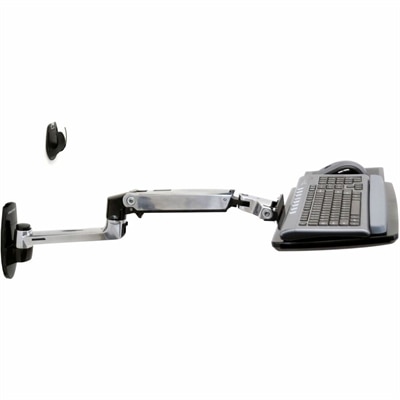
The main keyboard tray styles differ in how they attach and how much movement they provide. Clamp-on trays secure to the front or underside of a desk with clamps, making them useful for renters, temporary workspaces or anyone who prefers to avoid drilling into furniture. Before choosing one, check the desk’s thickness and underside clearance, and look for drawers, support rails, cable channels or crossbars that could interfere with the clamps. Track-mounted or screw-mounted trays attach beneath the desk and glide along rails, offering a stable platform that can be pushed in when not in use. These are well suited to a permanent workstation, provided the desktop material and underside construction can accept mounting hardware. Adjustable and articulating trays add height adjustment, tilt and swivel movement, allowing the keyboard to be positioned for different users, seating arrangements and desk heights. Some support a slight negative tilt, with the front edge of the keyboard lower than the back, which may help keep the wrists straighter for certain typing styles. A simple sliding tray can be a good fit when the main goal is to clear surface space, while a fully adjustable arm may be more appropriate for a sit-stand setup or a desk used by people of different heights. Consider how often the platform will move, whether the keyboard needs to be stored completely under the desk and how much weight the mounting system is designed to support. A steady tray should feel secure while typing and should not wobble, scrape or drift as the mouse moves across its surface.
Size and fit deserve just as much attention as mounting style. Measure the full width and depth of the keyboard, including any number pad, wrist rest or attached controls, then allow additional room for the mouse and comfortable hand movement. A platform that technically fits but leaves the mouse pressed against the edge can feel cramped, while an oversized tray may limit legroom or extend beyond the desk. Check the clearance between the underside of the desktop and your knees, especially with a thick keyboard or a tray that includes a raised lip. If the desk has a beveled edge, a modest apron or an unusually deep front panel, confirm that the chosen mounting approach will sit flush and operate smoothly. For a sit-stand desk, look for a design that can move with the changing desk height without pulling on cables or striking nearby furniture. Cable routing features can help keep the keyboard and mouse cords from catching when the tray slides, swivels or tilts. A smooth travel path, rounded edges and a surface that is easy to wipe are small details that matter when the tray is used every day. Think about the complete workstation as well: the monitor should sit at a comfortable viewing height, the chair should allow feet to rest securely on the floor, and the keyboard should be close enough that the elbows can remain near the body. As someone who has worked at a crowded desk where every open inch became valuable, I appreciate the quiet difference a well-fitted tray makes—the keyboard disappears beneath the surface, the desktop opens up, and the whole workspace feels calmer. For additional organization around a printer area, explore Printer Trays. With careful measurements and a clear idea of how the desk is used, a keyboard tray can become a lasting part of a comfortable, organized computer setup rather than an attachment that gets in the way.
FAQs:
A keyboard tray helps create a more ergonomic workspace by allowing users to position their keyboard and mouse at an optimal height and angle. This can lead to improved posture, reduced wrist and shoulder strain, and a tidier desk surface, making it easier to work comfortably for longer periods.
Keyboard trays are ideal for anyone who spends significant time typing, such as students, remote workers, writers, designers, and professionals. They are also a great addition for shared workspaces or multi-user environments where adjustability and personalized comfort are important.
Look for a keyboard tray with adjustable height and tilt, smooth sliding mechanisms, and durable construction. Additional features like built-in wrist rests and ample space for both keyboard and mouse can further enhance comfort and usability.
Yes, keyboard trays that mount under the desk help free up valuable desktop space, allowing you to keep your work area less cluttered. This can make it easier to organize other essentials like notebooks, devices, or decor.
Absolutely. Keyboard trays are a thoughtful and practical gift for anyone creating or upgrading a workspace, especially for students, remote workers, or anyone interested in ergonomic comfort and organization.