$4613.99
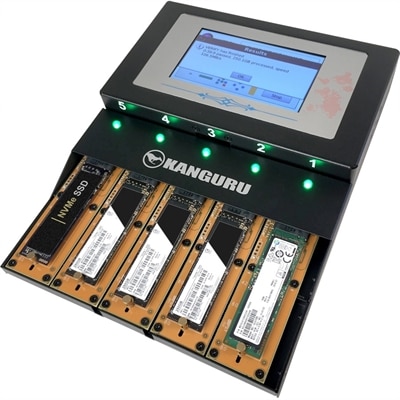
A standalone duplicator cloning up to four M.2 NVMe SSDs simultaneously at speeds reaching 12GB/min with touchscreen controls.
Solid state drives (SSDs) have revolutionized data storage by offering faster performance, increased reliability, and greater energy efficiency compared to traditional hard drives. Ideal for both personal and professional use, SSDs provide a seamless experience whether you're upgrading your computer, enhancing your gaming setup, or optimizing your business operations. Explore our extensive selection of solid state drives to find the perfect match for your needs and enjoy the benefits of cutting-edge technology that keeps your data secure and accessible.
A standalone duplicator cloning up to four M.2 NVMe SSDs simultaneously at speeds reaching 12GB/min with touchscreen controls.
Solid-state drives, commonly called SSDs, use flash memory to hold operating systems, applications, photos, videos, and other files without the spinning platters or moving read heads found in traditional hard drives. That difference makes them a practical upgrade for compatible laptops and desktops: startup can feel quicker, applications can open with less hesitation, and large folders can become easier to work with. The improvement is often most noticeable in familiar moments, such as opening a computer before the first meeting of the morning or switching between a photo library, a browser, and a presentation. An SSD cannot fix every performance limitation, but replacing a mechanical hard drive can make an otherwise capable computer feel much more responsive. Internal SSDs fit inside a computer, while external portable SSDs connect through an available port and offer a convenient place for files that travel with you. Both types operate without the whirring or clicking associated with mechanical drives, although the computer itself may still produce fan noise. With no moving mechanical parts, SSDs are also less vulnerable to certain bumps and vibrations than hard drives, a useful quality for a laptop carried between home, work, and campus. They are not immune to damage or failure, so important files still need a separate backup. Capacity, compatibility, and sustained performance matter more than choosing the highest advertised speed alone. A student keeping assignments and lecture recordings has different needs from a photographer working through hundreds of high-resolution images, and a household desktop used for documents may not need the same drive as a gaming computer. Across those uses, the appeal is straightforward: quicker access to the files and software that make a computer useful, in formats suited to everything from a compact notebook to a desktop with room for additional components. The right fit depends as much on the computer and the daily routine as it does on the drive’s specifications.
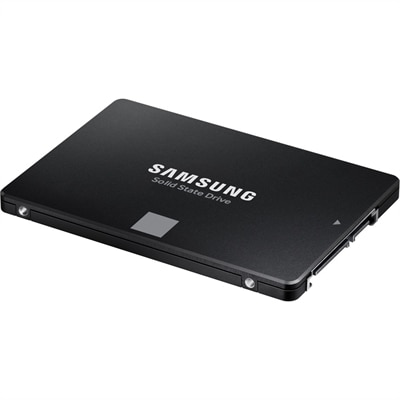
Internal solid-state drives come in several formats, and the connector is just as important as the capacity printed on the package. A 2.5-inch SATA SSD is a common option for compatible laptops and desktops with a SATA connection and a suitable drive bay. These drives typically reach sequential transfer speeds of around 500 to 550 megabytes per second, though actual results vary with the workload and system. Their strength is often the noticeable improvement over a mechanical hard drive rather than competing with the fastest newer interfaces. M.2 SSDs are narrow circuit boards that fit into a matching motherboard slot, saving space and usually eliminating separate data cables. M.2 describes the physical format, not the performance standard: an M.2 drive may use SATA or PCIe with the NVMe protocol, and the computer must support the particular type. NVMe SSDs use PCIe connections to deliver substantially higher potential transfer speeds, especially when moving large files. The supported PCIe generation and lane configuration affect what a system can achieve, so a newer drive will not automatically deliver its full rated speed in an older computer. Physical length, mounting position, drive thickness, and space for a heatsink can also determine whether an SSD fits. For notebook upgrades, Laptop SSDs are worth considering alongside the computer’s documented requirements, particularly in slim systems where clearance is limited or the existing drive is not replaceable. Desktop buyers may have more installation flexibility, but an open slot or bay still needs the correct connection and mounting hardware. Replacing a primary drive also means planning for an operating system installation or a compatible cloning process, along with a backup of existing files. Those practical details help distinguish a straightforward upgrade from a purchase that requires additional parts or technical support. For everyday computing, a well-matched drive with sufficient capacity is usually more useful than paying for peak performance the system cannot take advantage of.
Capacity choices become easier when they reflect both the files already on hand and the ones likely to accumulate. A 500 GB SSD can suit a lighter collection of applications and documents, while 1 TB offers more breathing room for mixed everyday use. Capacities of 2 TB and above can be useful for large game libraries, extensive photo collections, and video projects that quickly fill smaller drives. Usable space will be lower than the advertised capacity after formatting and system files, and leaving some free space helps accommodate updates, temporary files, and future additions. External portable SSDs bring a different kind of flexibility: a compact drive can carry a portfolio to a client meeting, keep project files together between compatible computers, or hold a separate copy of family photographs. Connection details deserve attention here, too. A USB-C connector describes the plug shape rather than guaranteeing a particular speed; the drive, cable, and host port must all support the necessary standard to reach the expected performance. Compatibility with the operating system and file format also matters when sharing a drive between devices. For sustained tasks such as transferring lengthy video footage, performance after the drive’s fast cache fills can be more revealing than a brief peak-speed rating. Heat management matters during extended use, especially in compact enclosures, and some drives reduce speed when temperatures rise. Warranty coverage and endurance ratings provide additional context for frequent writing workloads, though neither replaces a backup routine. An SSD can also make a thoughtful gift for a college student, creative hobbyist, or computer enthusiast when the recipient’s device requirements are known. An external model may avoid the need to open a computer, while an internal upgrade calls for a closer compatibility check. Whether the priority is a quieter everyday computer, room for a growing library, or a portable workspace that slips into a bag, matching the drive to its intended use keeps the purchase practical long after the first file transfer.
Add the products you would like to compare, and quickly determine which is best for your needs.