PowerProtect: Virtual Machine Restore stops responding at 0 percent
Summary: Virtual machine (VM) restore jobs remain in queued status with 0% progress.
This article applies to
This article does not apply to
This article is not tied to any specific product.
Not all product versions are identified in this article.
Symptoms
The PowerProtect solution is used to protect the vSphere environment. Full and Instant Access VM restore jobs remain in queued status with 0% progress. The VM backups complete successfully.
The /var/log/brs/vmdm/vmdm.log log shows:
YYYY-MM-DD HH:MM:SS INFO [] [request-dispatch-service-1] [][][][][] [c.e.b.d.c.r.c.DdRestClient.dataDomainLogin(159)] - hostname=datadomain.domain.com username=sysadmin url=https://datadomain.domain.com:3009/rest/v1.0/auth
YYYY-MM-DD HH:MM:SS INFO [] [request-dispatch-service-1] [][][][][] [c.e.b.d.c.r.c.DdRestClient.executeDataDomainAuthRequest(198)] - Executed login to hostname: datadomain.domain.com, username: sysadmin
YYYY-MM-DD HH:MM:SS ERROR [] [request-dispatch-service-1] [][][][][] [c.e.b.d.c.r.c.DdRestClient.checkStatus(233)] - Return code = 401 UNAUTHORIZED, expected = 201 CREATED.
YYYY-MM-DD HH:MM:SS ERROR [] [request-dispatch-service-1] [][][][][] [c.e.b.d.c.r.c.DdRestClient.checkStatus(234)] - PowerProtect DD System Details = "**** Invalid user name or password.",  code = 5094
YYYY-MM-DD HH:MM:SS ERROR [] [request-dispatch-service-1] [][][][][] [c.e.b.d.c.r.c.DdRestClient.dataDomainLogin(164)] - Failed to login to PowerProtect DD System host datadomain.domain.com with user sysadmin
YYYY-MM-DD HH:MM:SS ERROR [] [request-dispatch-service-1] [][][][][] [c.e.b.d.c.u.DDCommonUtils.getRestConnectionFromCache(507)] - getRestConnectionFromCache failed
java.util.concurrent.ExecutionException: com.emc.brs.datadomain.common.rest.connection.DdRestClientException: "**** Invalid user name or password."
Cause
The Data Domain credentials have changed on the Data Domain and are not up to date in PowerProtect.
Resolution
Update the Data Domain credential password in PowerProtect under Administration > Credentials > Select the DATADOMAIN checkbox and click Edit.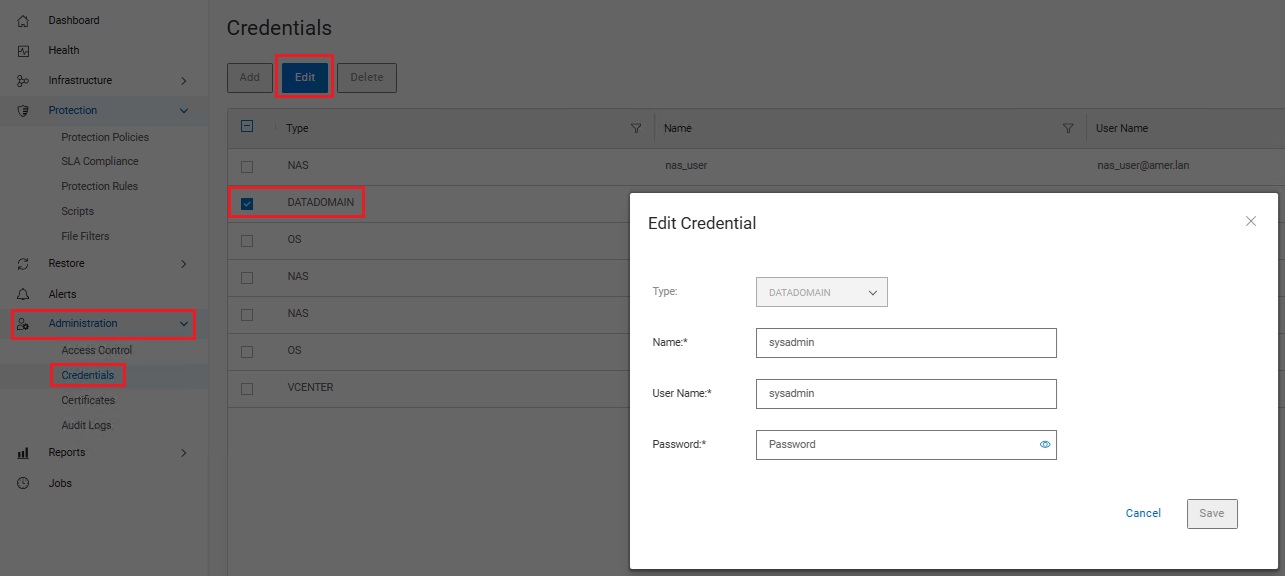
Additional Information
A similar symptom is documented in KB article PowerProtect: VM Restore Stuck at Queued with Zero Percent Progress.
Affected Products
PowerProtect Data ManagerArticle Properties
Article Number: 000415219
Article Type: Solution
Last Modified: 21 كانون الثاني 2026
Version: 1
Find answers to your questions from other Dell users
Support Services
Check if your device is covered by Support Services.