IDPA: Unable to sync DDBoost user password in the ACM Dashboard.
Summary: Integrated Data Protection Appliance (IDPA) ACM dashboard flags in the Data Domain panel that the DDBoost user password is out of sync when the password works and matches the common password. ...
This article applies to
This article does not apply to
This article is not tied to any specific product.
Not all product versions are identified in this article.
Symptoms
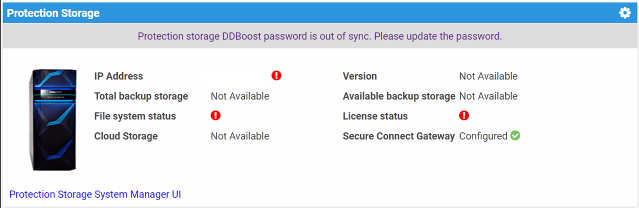
- Data Domain shows that the DDBoost user password is out of sync in the ACM dashboard.
- The DDboost password works and it matches the ACM common password.
- No Avamar backups are failing in the Data Domain
- Avamar is not complaining about having no communication with the Data Domain.
Cause
DDBoost username is not called 'DDboostUser' as it is predefined in the ACM.
For example: DDBoost_User
ACM uses "DDBoostUser" to authenticate into the Data Domain. Since the username created on customer's Data Domain is different than the expected, it fails and marks the DDBoost user as Out Of Sync.
ACM server.log shows the following error:
16042:2024-04-23 19:34:18,098 INFO  [Thread-88485]-util.SSHUtil: Creating session using SSH parameters:          Host     : [x.x.x.x]       User     : [DDBoostUser]        Password : [**********]
17537:2024-04-23 19:34:23,230 ERROR [Thread-88485]-dashboard.DataDomainDashboard: Auth failed to DDBoost user, so marking DDBoost user as OOS.
17538:2024-04-23 19:34:23,230 ERROR [Thread-88485]-dashboard.DataDomainDashboard: Exception occurred while connecting to DDBoost using sshUtil. 17539:com.emc.vcedpa.common.exception.ApplianceException: Protection storage DDBoost password is out of sync. Please update the password.
Resolution
Update or create a DDBoost username that matches the username that ACM is expecting.
Additional Information
If the ddboost user is modified, edit the "DDBoost user" on the Avamar to match the "DDBoost user" retrieved from the Data Domain.
a. Log in to the Avamar Administrator UI.
b. Server --> Server Management tab --> Select Data Domain hostname
c. Actions --> Edit Data Domain system
d. Enter the correct "DDBoost user" in the user-name field.
Affected Products
Integrated Data Protection Appliance FamilyArticle Properties
Article Number: 000225369
Article Type: Solution
Last Modified: 28 Jan 2025
Version: 1
Find answers to your questions from other Dell users
Support Services
Check if your device is covered by Support Services.