Avamar: All the virtual machines are greyed out in Avamar GUI
Summary: Avamar: All the virtual machines are greyed out in Avamar GUI
This article applies to
This article does not apply to
This article is not tied to any specific product.
Not all product versions are identified in this article.
Symptoms
Customer found all the vms are greyed out ( possibly able to see very few vms but almost every vm is greyed out) in GUI and no vm deletion in the vcenter has been done.
Backup any virtual machine in the vcenter will result a failed backup with code 10005.
The vcenter connection restart showed ok but after refresh you can see the connection showing down.
Go to Administration in Avamar GUI and choose vcenter client and then click edit client. then click ok you can see a "Failed to connect to vcenter" pop-up window. 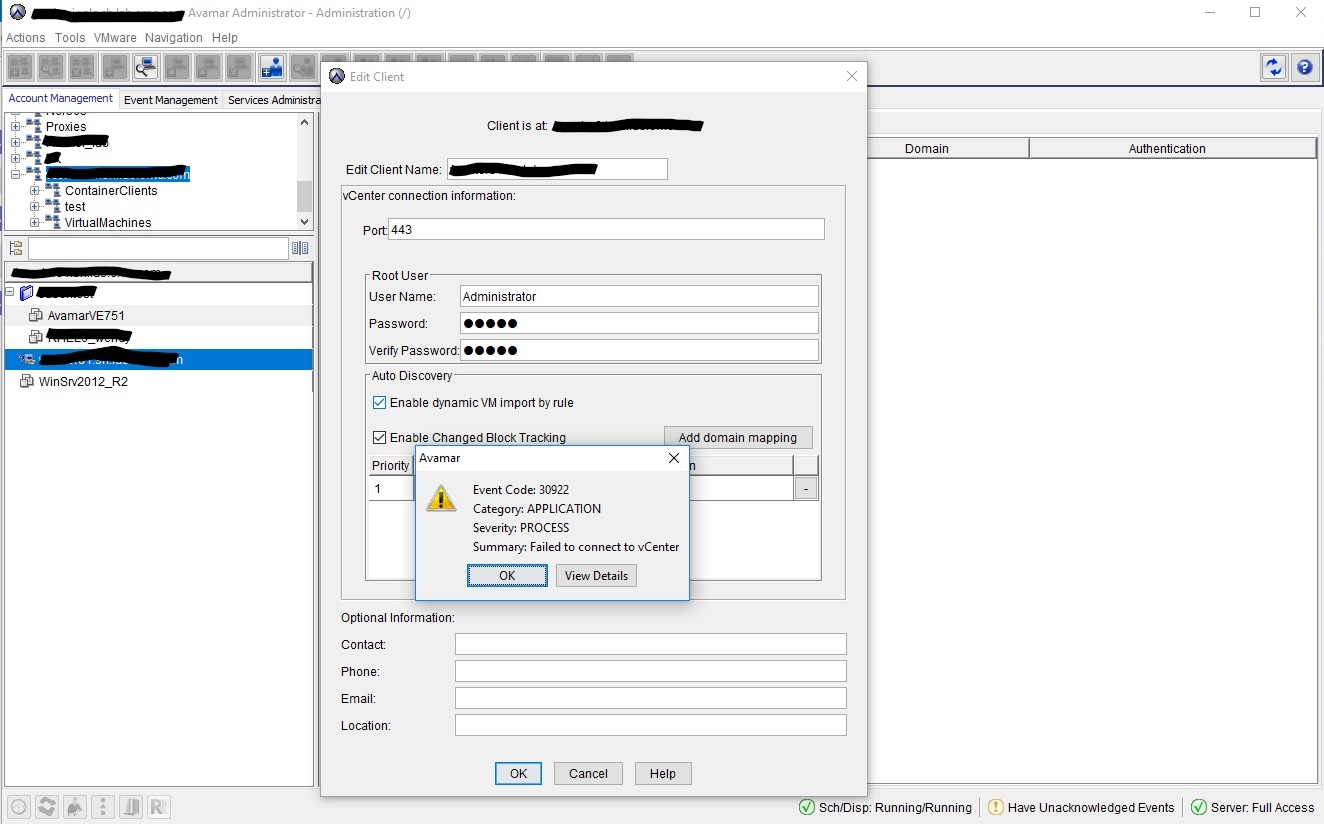
Use the same account in vcenter to login (Don't use admin account as customer might mix them) and vcenter will come up with" invalid credential"
Cause
Either the login account was locked or expired even the password is not changed.
Resolution
Advise to create a new vSphere account or fixing the account permission issue can resolve the issue.
Affected Products
AvamarProducts
Avamar, Avamar Data Store Gen4Article Properties
Article Number: 000052996
Article Type: Solution
Last Modified: 29 Jul 2025
Version: 4
Find answers to your questions from other Dell users
Support Services
Check if your device is covered by Support Services.