ECS: Unable to log in to ECS UI using Active Directory user: Local user with id domain user not found
Summary: This knowledge base explains why a user is unable to log in using Active Directory.
This article applies to
This article does not apply to
This article is not tied to any specific product.
Not all product versions are identified in this article.
Symptoms
Username format
Active Directory user login is failing on the ECS UI.
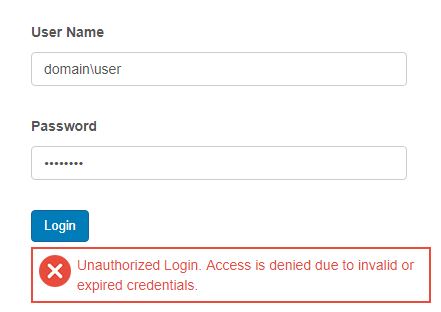
The following error can be seen in the authsvc (pre 3.2) or objcontrolsvc (post 3.2) logs:
Active Directory user login is failing on the ECS UI.
The following error can be seen in the authsvc (pre 3.2) or objcontrolsvc (post 3.2) logs:
2019-07-09T10:01:39,898 [qtp1186841950-348101] ERROR  LocalClient.java (line 59) Exception occurred while interacting with the API server.
com.emc.storageos.objcontrol.object.exception.ObjectAccessException: local user with id : [ domain\user ]  not found
2019-07-09T10:01:39,900 [qtp1186841950-348101]  INFO  CustomAuthenticationManager.java (line 135) com.emc.storageos.auth.local.StorageOSLocalAuthenticationHandler failed to authenticate domain\user
2019-07-09T10:01:39,900 [qtp1186841950-348101] ERROR  CustomAuthenticationManager.java (line 140) Failed to authenticate domain\user
2019-07-09T10:01:39,998 [qtp1186841950-348101] ERROR  AuthenticationResource.java (line 651) User was null after authentication for credential: domain\user
Cause
Incorrect format used for the username
Resolution
The format <domain>\<username> cannot be used when logging in using an Active Directory user.
The username must be used under the format <username>@<domain>.
The username must be used under the format <username>@<domain>.
Affected Products
ECS ApplianceProducts
ECS ApplianceArticle Properties
Article Number: 000056307
Article Type: Solution
Last Modified: 23 Sep 2025
Version: 5
Find answers to your questions from other Dell users
Support Services
Check if your device is covered by Support Services.