NetWorker: nsrauthtrust: Failed to retrieve certificate: GET failed with HTTP-ERROR: 404
Summary: This KB applies when a NetWorker/AUTHC server is a Linux based operating system. Logging into the NMC fails with message "Make sure Authentication Service Is Running."
This article applies to
This article does not apply to
This article is not tied to any specific product.
Not all product versions are identified in this article.
Symptoms
- NetWorker/AUTHC Server is a Linux server or NetWorker Virtual Edition (NVE) appliance.
- NetWorker Management Console (NMC) logins fail with:
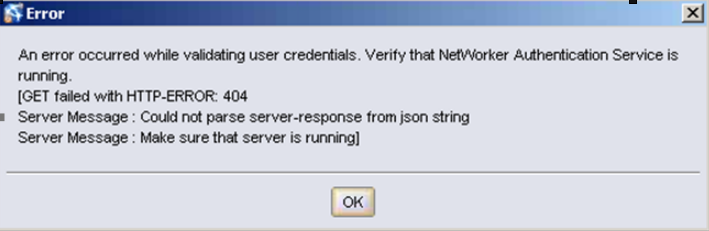
- The nsrauthtrust command on the NetWorker server fails with the message:
# nsrauthtrust -H authc_server_hostname -P 9090
125927:nsrauthtrust: Failed to retrieve certificate: GET failed with HTTP-ERROR: 404
Server Message : Could not parse server-response from json string
- The /opt/lgtonmc/gst/logs/gstd.raw has the following error:
0 1506905469 2 0 0 3131729664 32427 0 nmc_server_hostname gstd NSR warning 85 Unable to get token for service account of NMC server from authentication service. %s 1 0 145 GET failed with HTTP-ERROR: 404Server Message : Could not parse server-response from json stringServer Message : Make sure that server is running
- All authentication attempts through NetWorker Management Console (NMC), NetWorker Web User Interface (NWUI), and nsrlogin prompt fail
Cause
There is an issue with the authentication database in the /nsr/authc/ directory. In this situation, the authentication port (default: 9090) may be up and respond to connection tests:
nsrports -t authc_server_hostname -p 9090
Resolution
- Log in to the NetWorker server using SSH, and switch to the root user:
sudo su -
- Stop NetWorker services on the authc server:
nsr_shutdown
- Verify that the services have stopped:
ps -ef | grep nsr
NOTE: some NMC (gst) services may be reported if the host is also the NMC server, but these do not have to be stopped.
- Rename the authc directory:
mv /nsr/authc /nsr/authc_`date -I`
WARNING: renaming the authc folder removes the authc database, the subsequent commands reconfigure the authc database. The process involves re-creating a new authc keystore and default NetWorker Administrator password. Any local NetWorker user accounts or external authority (AD/LDAP) integration must be re-added. NetWorker: How To Set up AD/LDAP Authentication
- Run the following command to reconfigure authc:
/opt/nsr/authc-server/scripts/authc_configure.sh
- Startup networker service:
systemctl start networker
- Log in to the NMC with the NetWorker Administrator account.
Additional Information
If following this process on a Windows NetWorker authentication server, there is no script to reconfigure the authentication service. On Linux hosts, the authentication service is configured post install. On Windows hosts, the authentication service is configured during install. This means that in order to reconfigure the authc database NetWorker must be uninstalled. After NetWorker has been uninstalled, rename the C:\Program Files\EMC NetWorker\nsr\authc-server directory. The path shown is the default installation path and may differ if NetWorker is installed in a non-default location. Once the authc-server folder has been renamed, reinstall NetWorker. During the install, the authc service creates a new authc database.
Affected Products
NetWorkerProducts
NetWorker SeriesArticle Properties
Article Number: 000060912
Article Type: Solution
Last Modified: 17 Mar 2025
Version: 5
Find answers to your questions from other Dell users
Support Services
Check if your device is covered by Support Services.