Avamar: Data Domain Integration: Adding a Data Domain to Avamar fails with the error "Failed to configure certificate on Data Domain system"
Summary: From Avamar 7.3, to add a Data Domain system to an Avamar 7.3 (or higher) system, a passphrase must be set on the DD. If the passphrase is not set, the error "Failed to configure certificate on Data Domain system" is received. ...
This article applies to
This article does not apply to
This article is not tied to any specific product.
Not all product versions are identified in this article.
Symptoms
Adding a Data Domain (DD) to Avamar fails with "Failed to configure certificate on Data Domain system" error:
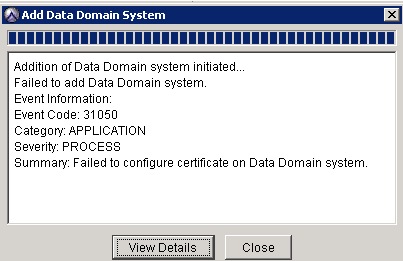
Selecting "View Details" displays the detailed error message:

The following warning is logged in the mcserver.log.0 (/usr/local/avamar/var/mc/server_log/mcserver.log.0) on the Avamar Utility Node:
grep -A1 "Failed to generate certificate" /usr/local/avamar/var/mc/server_log/mcserver.log.0
Failed to generate certificate signing request. Error message from DD:
**** System does not have any passphrase. System passphrase needs to be set to proceed.
Cause
A passphrase is required to add a Data Domain system to Avamar 7.3 or higher.
If a passphrase is not set on the Data Domain, the DD add process fails with this error: 'Failed to configure certificate on Data Domain system'.
Resolution
Note: This article assumes that there are no connectivity issues between Avamar and DD, and Avamar can reach the DD hostname using ports 2049, 2052, and 111.
1. Log in to the Data Domain with an account with admin or root privileges.
2. Set the passphrase on the Data Domain using the following command:
system passphrase set
3. Enter a passphrase.
Warning: Remember this passphrase. It is required to change the passphrase in the future.
Note: If the Data Domain system has a passphrase already set, the following message is seen:
**** The system passphrase is already set.
4. Attempt to add the Data Domain after setting the passphrase.
If the Data Domain cannot be added even after following these steps, engage the Professional Services team through your account manager or your Dell Technologies partner.
Additional Information
For more information, see the Avamar and Data Domain Integration Guide relevant to the software versions in the environment.
Affected Products
AvamarProducts
Avamar, Avamar Server, Data Domain, Data Domain BoostArticle Properties
Article Number: 000063800
Article Type: Solution
Last Modified: 17 Jun 2025
Version: 6
Find answers to your questions from other Dell users
Support Services
Check if your device is covered by Support Services.