NetWorker: Backups fail with error "save: Unable to close save session: Can't create index directory for client"
Summary: Backups fail with error "save: Unable to close save session: Can't create index directory for client"
This article applies to
This article does not apply to
This article is not tied to any specific product.
Not all product versions are identified in this article.
Symptoms
Backup fails with error:
The action log shows:
save: Unable to close save session: can't create index directory for client
The action log shows:
129292:save:Successfully established Client direct save session for save-set ID '2055369197' (Client_name:C:\) with Data Domain volume 'Volume'.
174922:save: Step (5 of 6) for PID-1664: Successfully connected to the target media device through the nsrmmd process on the host 'Server' for the save set 'C:\'.
174422:save: Step (6 of 6) for PID-1664: Reading the save sets and writing to the target device.
90099:save: Unable to close save session: can't create index directory for client 'Client_name'


CLIENT_NAME: E:\                  level=incr,      0 KB 00:00:09      0 files
Completed savetime=1719824873
90015:save: The backup of VSS emit save set '\\?\GLOBALROOT\Device\HarddiskVolume1\' succeeded.
94694:save: The backup of save set '\\?\GLOBALROOT\Device\HarddiskVolume1\' succeeded.
90099:save: Unable to close save session: can't create index directory for client 'ClientName'\
...
90014:save: The backup of VSS emit save set 'C:\' failed.
99123:save: Handling an abort while processing Windows backup.
90117:save: Unable to perform the ASR backup: cannot obtain the VSS MBS status.
Cause
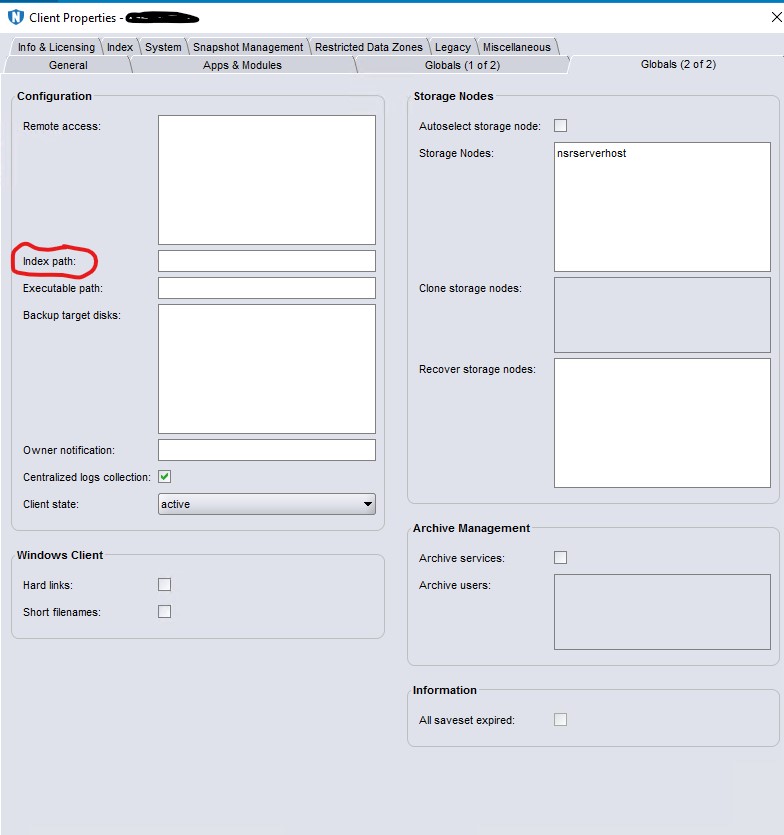
The server was migrated to new hardware with a different drive configuration. Indexes were moved back to their default location, but the Index Path field is configured for multiple clients.
Resolution
Ensure that the Index path shows the correct path or is clear to indicate the default location.
Affected Products
NetWorkerArticle Properties
Article Number: 000226860
Article Type: Solution
Last Modified: 14 Aug 2024
Version: 1
Find answers to your questions from other Dell users
Support Services
Check if your device is covered by Support Services.