Dell Encryption Uninstaller Fails with a Generic Error Due to active Pre-Boot Authentication
Summary: This article describes the failure of the Dell Encryption Uninstaller on endpoints with active Pre-Boot Authentication (PBA).
This article applies to
This article does not apply to
This article is not tied to any specific product.
Not all product versions are identified in this article.
Symptoms
Affected Products:
- Dell Encryption Self-Encrypting Drive Manager
- Dell Full Disk Encryption
Affected Versions:
- v10.6 and Later
Affected Operating Systems:
- Windows
Cause
If you are attempting to uninstall Dell Encryption, using the Dell Encryption Uninstaller executable (C:\Program Files (x86)\Dell\Dell Data Protection\DataSecurityUninstaller.exe) on endpoints with active Pre-Boot Authentication, the uninstaller exits immediately with a generic error.
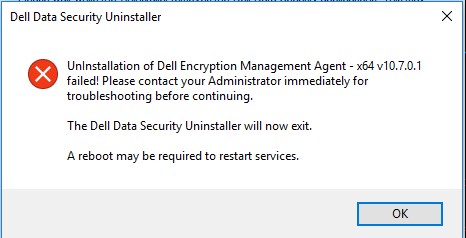
The DDPUninstall_Main.log in C:\ProgramData\Dell\Dell Data Protection\ does not show any additional information about the error.
2021-07-22 14:31:24,873 [3] INFO  CommonLib.Log - Worker.UninstallApps: Beginning uninstall for Dell Encryption Management Agent - x64 v10.7.0.1

2021-07-22 14:31:24,873 [3] DEBUG CommonLib.Log - MSIPackage.InstallApplication: Starting install of Dell Encryption Management Agent - x64 v10.7.0.1 version  with command line - C:\Windows\system32\msiexec.exe /x "{2D4F7762-D922-4F2C-85FB-07B0E17EA5F8}" /qn REBOOT=ReallySuppress  /l*v "C:\ProgramData\dell\Dell Data Protection\DDP_ClientSecurityFramework_Uninstall_MSI.log"

2021-07-22 14:31:28,373 [3] INFO  CommonLib.Log - MSIPackage.InstallApplication: Installation of Dell Encryption Management Agent - x64 v10.7.0.1 complete. Return code = 1603

2021-07-22 14:31:28,373 [3] ERROR CommonLib.Log - UnInstallation of Dell Encryption Management Agent - x64 v10.7.0.1 failed! Please contact your Administrator immediately for troubleshooting before continuing.
Checking the DDP_ClientSecurityFramework_Uninstall_MSI.log, it is possible to read the below error at the time of the uninstall attempt.
MSI (s) (C4:F4) [14:31:28:279]: Product: Dell Encryption Management Agent - x64 -- The PBA must be deactivated prior to uninstall. Retry this uninstallation after the PBA is deactivated.

The PBA must be deactivated prior to uninstall. Retry this uninstallation after the PBA is deactivated.
Resolution
To run the Dell Encryption Uninstaller on an endpoint that is protected with Dell Full Disk Encryption or Dell Encryption Self-Encrypting Drive Manager, you must first deactivate Pre-Boot Authentication.
To deactivate Pre-Boot Authentication reference Dell Encryption Enterprise Advanced Installation Guide.
Affected Products
Dell EncryptionArticle Properties
Article Number: 000190605
Article Type: Solution
Last Modified: 08 Aug 2024
Version: 8
Find answers to your questions from other Dell users
Support Services
Check if your device is covered by Support Services.