NetWorker: BMR Wizard Fails with "Error trying to validate NetWorker Server credentials"
Summary: Bare Metal Restore (BMR) Wizard fails with error "Error trying to validate NetWorker Server credentials: No response from server"
This article applies to
This article does not apply to
This article is not tied to any specific product.
Not all product versions are identified in this article.
Symptoms
Impact Description:
| Product (and version) | Dell Technologies Software: NetWorker BMR ISO pre-19.4 when NetWorker Server uses nsrauth only. Dell Technologies Software: NetWorker BMR ISO 19.4 and above always |
| Running this Core Software (Operating System (OS) or Operating Environment (OE)) |
NetWorker Server on all Linux OS supported NetWorker BMR Client recovery for all Windows OS supported |
| When this condition is true | When NetWorker Server and NetWorker BMR client being restored uses nsrauth as the auth method to communicate. |
Issue:
During Bare Metal Restore (BMR) of NetWorker Client, you see the following error when you click "Next" on the "Select Server" page in the BMR Wizard.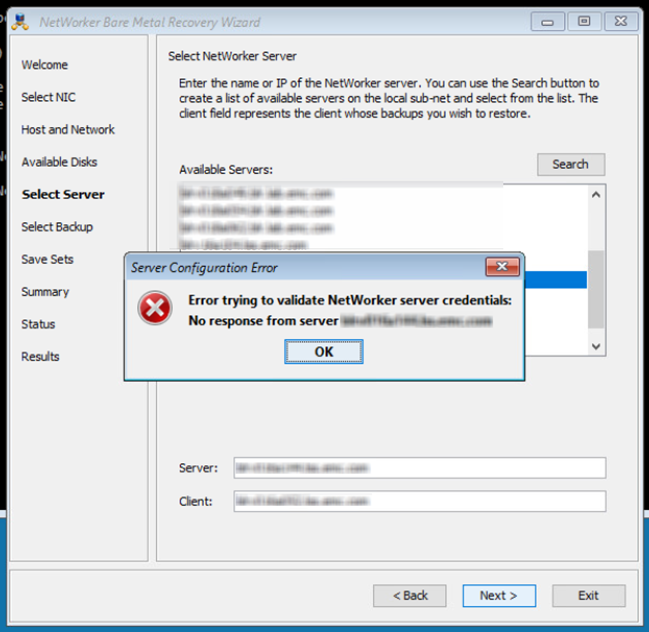
You see the following errors logged in daemon.raw on NetWorker Server and NetWorker Client being restored.
- Server log
Unable to complete SSL handshake with nsrexecd on host '<client_name>': An error occurred as a result of an SSL protocol failure. To complete this request, ensure that the certificate attributes for <client_name> and <server_name >match in the NSRLA database on each host.
- Client log
Unable to initiate SSL handshake with nsrexecd on host '<server_name>': An I/O error ocurred. To complete this request, ensure that the certificate attributes for <server_name> and <client_name> match in the NSRLA database on each host.
This error is seen when the BMR client tries to connect to NetWorker Server for authentication using nsrauth, to fetch the required DR backups to be used for restoring.
Cause
The first Welcome page of the BMR Wizard populates the fields "The current date is," "The current time is" and "The local time zone is" by default based on the host date and time settings.
The date and time that was populated may have a clock skew regarding the local time zone being used. This clock skew may be such that the BMR client is ahead of the NetWorker server. This causes the certificate generated when nsrexecd starts on the BMR client to be valid in future or yet to be valid on the NetWorker server.
The NetWorker server sees this client peer certificate as not valid currently and hence rejects the connection.
Resolution
| Product (and Operating System or Operating Environment) | Dell Technologies Software: NetWorker BMR ISO for NetWorker Windows Client Recovery Dell Technologies Software: NetWorker Server for Linux |
| Action Type | Pre-requisite Configuration check |
| Action Needed | On the Welcome page of the BMR Wizard, ensure the fields "The current date is" and "The current time is" are populated with the correct date and time as per the time zone value in the time zone field. If not correct, edit the date and time fields accordingly by checking the correct date-time using online apps or websites. For instance, If the correct date and time is "January 17, 2022 1:00:00 AM" as per the time zone "(UTC-8) Pacific Time (US & Canada)" in the wizard, the same should be set in the date and time fields in the wizard. After verifying and editing (if required) the date and time fields, proceed by clicking Next. |
| Who Can Complete the Action | CUSTOMER |
| Issue Addressed in this OS, OE, or Software | Dell Technologies Software: Will be part of the NetWorker Administration Guide under BMR Recovery documentation in the upcoming NetWorker release. |
| Resolution Detail | Recommend the customer to correct or rectify any clock skew on the BMR Client Wizard Welcome page before proceeding further. |
| Solution Considerations | This DTA is applicable only when using the NetWorker versions and scenarios mentioned in the impact description. |
Affected Products
NetWorker FamilyArticle Properties
Article Number: 000196593
Article Type: Solution
Last Modified: 07 Feb 2024
Version: 6
Find answers to your questions from other Dell users
Support Services
Check if your device is covered by Support Services.