SIM Card Is Not Detected in Certain Latitude Rugged and Dell Pro Rugged Systems
Summary: Information about certain Latitude Rugged and Dell Pro Rugged systems not detecting SIM cards.
This article applies to
This article does not apply to
This article is not tied to any specific product.
Not all product versions are identified in this article.
Symptoms
Sim cards are not detected or recognized when inserted into certain Latitude Rugged and Dell Pro Rugged systems.
Affected Systems:
- Latitude 5430 Rugged
- Latitude 7330 Rugged
- Dell Pro Rugged 13 RA13250
- Dell Pro Rugged 14 RB14250
Cause
This happens because the SIM card is not properly or fully inserted into the SIM slot.
- Reason 1: Inserted SIM has the incorrect orientation.
✔ SIM Card in the Correct Orientation: 
✖ Sim Card in the Wrong Orientation:
The SIM card is flush with the chassis or protrude.

- Reason 2: The SIM card did not fully insert, and the SIM card is not locked.
✔ SIM Card Fully Inserted and Locked:
The SIM card is fully inserted and recessed into the chassis.
✖ SIM Card Not Fully Inserted and Locked:
The SIM card is flush with the chassis or protrude.

Resolution
Insert the SIM Card Fully
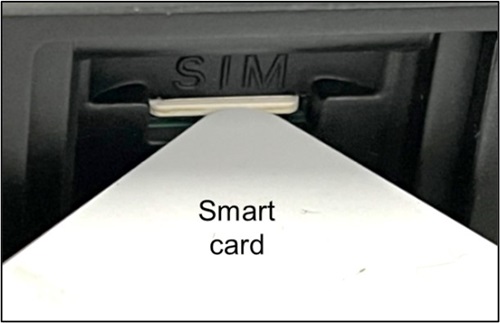
Ensure that the SIM card is fully inserted into the correct position and use a tool if necessary. (Example: ID Card, Smart Card, and so forth…)
✔ SIM card is fully inserted and locked.
Affected Products
Dell Pro Rugged 13 RA13250, Dell Pro Rugged 14 RB14250, Latitude 7330 Rugged Extreme, Latitude 5430 RuggedArticle Properties
Article Number: 000335094
Article Type: Solution
Last Modified: 10 Jul 2025
Version: 1
Find answers to your questions from other Dell users
Support Services
Check if your device is covered by Support Services.