Dell Unity: How to find the Serial Number to log a case when using CTA-VE with Dell Unity
Summary: This article shows how to find the Dell Unity Serial Number (SN) when looking for CTA Virtual Edition (VE) support, since CTA VE, when implemented with Unity, has no SN to open a case with, instead the Unity SN is used. ...
This article applies to
This article does not apply to
This article is not tied to any specific product.
Not all product versions are identified in this article.
Instructions
Cannot find CTA-VE (virtual edition) to open a case with CTA support.
Command to get SN on CTA returns nothing:
cta:~ # rffm getEmcSerialNumber
To get the Unity SN, use one of the below three methods:
Either by using UEMCLI, or by connecting through SSH to the management IP and logging in with the service account and running the command: svc_diag or by using Unisphere user interface if SSH is disabled.
UEMCLI Example:
uemcli -d 10.10.X.Y -u admin -securePassword -noHeader /sys/general show

      Password:

      1:    System name           = Friendly-HostName

            Model                 = Unity 300

            Platform type         = EMC Storage System

            Product serial number = APM00100000XXX

            Auto failback         = on

            Health state          = OK (5)
SSH Example:
09:03:16 service@Friendly-HostName spb:~/user# svc_diag

      ======== Now executing basic state ========

      * System Serial Number is: APM00100000XXX

      * System Model Number is: Unity 300

      * System Friendly Host Name is: Friendly-HostName

      * Current Software version: c4dev_PIE_4249R-5.0.0.0.5.116.1558096928-GNOSIS_RETAIL

      * Unisphere IP address(es): 10.10.X.Y

      * SSH Enabled: true

      * FIPS mode: Disabled

      * Boot Mode: Normal Mode

      * Post Faults:  0x0000

      * Backend Faults:       0x0000

      * Boot Faults:  0x0000

      * Rescue Reason:        0x0000

      * Rescue reason for code 0x0000 - No faults detected.

      * SP Service Hint Code: <None>
Unisphere user interface Example:
Log in to the Unisphere user interface with an admin account and go to Dashboard > System > System View > Summary
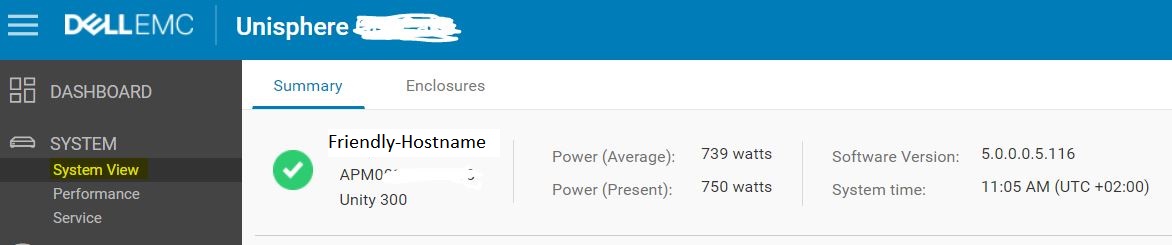
Leverage the Unity SN (shown above three methods on how to obtain it) to open a case with Unity support and make a clear the CTA-VE is bundled with Dell Unity and you need CTA support.
Additional Information
CTA enables cloud integration with the Dell Unity system by moving file and block data to and from the cloud.
CTA is supported with any Dell Unity system, including All-Flash, Hybrid, and Dell Unity VSA PE systems. It is available at no additional cost with a Dell Unity system. No additional license is needed.
CTA supports the following features with Dell Unity systems:
File Tiering
Block Snapshot Archiving
Repository Migration
File Migration
Encryption and Compression
Source must be a Dell Unity system.
- File Tiering:
Dell Unity OE 4.1.x or later
CTA11 or greater
- Block Snapshot Archiving:
Dell Unity OE 4.2.x or later
CTA12 or greater
- File Migration:
Dell Unity OE 4.2.x or later
CTA12 SP1 or later
For more details, review the CTA Interoperability Matrix.
CTA Documentation available Support for Cloud Tiering Appliance | Documentation | Dell US
Affected Products
Dell Unity 300, Dell EMC Unity 300F, Dell EMC Unity 350F, Dell EMC Unity XT 380, Dell EMC Unity XT 380F, Dell EMC Unity 400, Dell EMC Unity 400F, Dell EMC Unity 450F, Dell EMC Unity XT 480, Dell EMC Unity XT 480F, Dell EMC Unity 500F
, Dell EMC Unity 550F, Dell EMC Unity 600, Dell EMC Unity 600F, Dell EMC Unity 650F, Dell EMC Unity XT 680, Dell EMC Unity XT 680F, Dell EMC Unity XT 880F, Dell EMC Unity Family |Dell EMC Unity All Flash, Dell EMC Unity Family, Dell EMC Unity Hybrid, Dell EMC UnityVSA Professional Edition/Unity Cloud Edition
...
Article Properties
Article Number: 000022645
Article Type: How To
Last Modified: 23 Oct 2025
Version: 7
Find answers to your questions from other Dell users
Support Services
Check if your device is covered by Support Services.