Avamar: AVI Installer hangs when installing AVP package due to locked database
Summary: Avamar Installer (AVI) stops responding when installing an AVP package due to locked database.
This article applies to
This article does not apply to
This article is not tied to any specific product.
Not all product versions are identified in this article.
Symptoms
Environment: Avamar server release v7.2.1-32, but may apply to later releases.
When installing an AVP package, the Avamar Installer interface (AVI) stops responding.
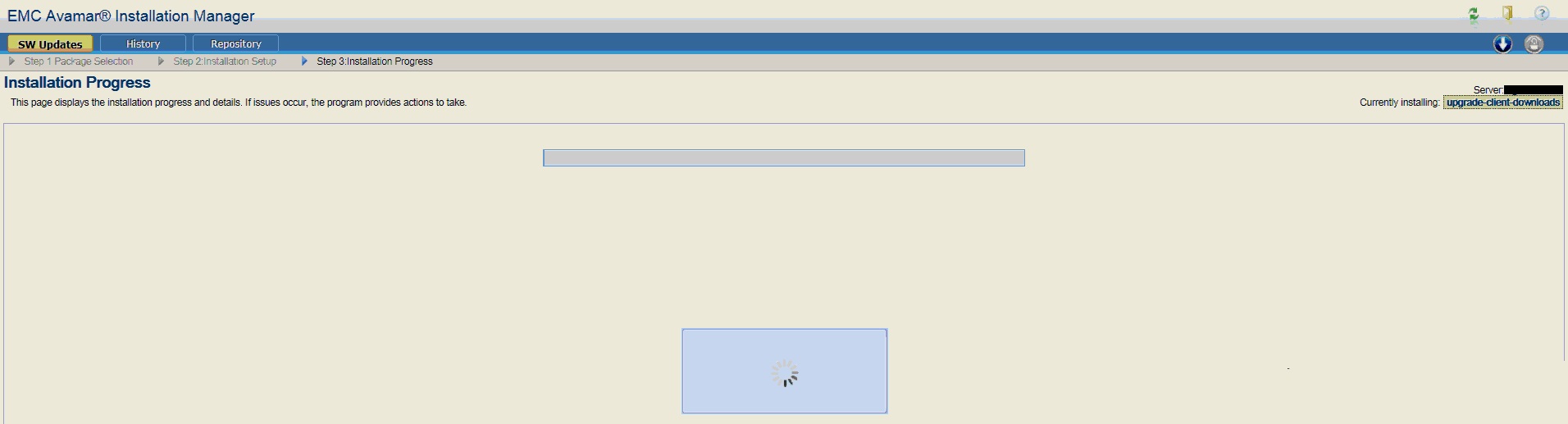
Restarting the browser shows that AVI is 'currently installing' the package.
Selecting continue results in no progress.

When installing an AVP package, the Avamar Installer interface (AVI) stops responding.
Restarting the browser shows that AVI is 'currently installing' the package.
Selecting continue results in no progress.
Cause
The Avamar Installer log /usr/local/avamar/var/avi/server_log/avinstaller.log* shows;
As implied by the avinstaller log entries, the PosgreSQL avi database is locked.
The root cause is not known. Engineering bug 272057 documents a similar scenario where AVinstaller failed to write to the AVI database.
This occurred during the hourly MCS flush operation.
Multiple simultaneous operations we cause the database is locked situation.
Jun 15, 2017 4:50:01 PM com.avamar.avinstaller.process.InstallManager install
INFO: Starting a new process instance.
Jun 15, 2017 4:50:01 PM com.avamar.avinstaller.process.UserInputManager getCurrentUserInput
INFO: Returned cached user input for checksum: bdc8a9876130f3199be845ca1d7866a5
Jun 15, 2017 4:50:01 PM com.avamar.avinstaller.process.PVM startProcessInstanceByKey
INFO: Starting processKey: upgrade-client-downloads20161009Oct101476054930 with userInputs: {}
Jun 15, 2017 4:50:01 PM org.hibernate.transaction.JDBCTransaction commit
SEVERE: JDBC commit failed
java.sql.SQLException: database is locked
at org.sqlite.DB.throwex(DB.java:855)
at org.sqlite.DB.exec(DB.java:138)
at org.sqlite.SQLiteConnection.commit(SQLiteConnection.java:512)
at org.hibernate.transaction.JDBCTransaction.commitAndResetAutoCommit(JDBCTransaction.java:170)
.
. -----------8<---------- SNIP!-----------8<----------
.
at com.avamar.avinstaller.process.InstallManager.install(InstallManager.java:125)
at com.avamar.avinstaller.monitor.Installer.run(Installer.java:46)
at java.lang.Thread.run(Unknown Source)
Caused by: java.sql.SQLException: database is locked
As implied by the avinstaller log entries, the PosgreSQL avi database is locked.
The root cause is not known. Engineering bug 272057 documents a similar scenario where AVinstaller failed to write to the AVI database.
This occurred during the hourly MCS flush operation.
Multiple simultaneous operations we cause the database is locked situation.
Resolution
Workaround:
Restarting AVI may remove the database lock.
The commands below show how to stop and then start AVIDB and tomcat.
If the behavior persists, contact Dell Support.
Restarting AVI may remove the database lock.
The commands below show how to stop and then start AVIDB and tomcat.
If the behavior persists, contact Dell Support.
admin@avamar:~/>: sudo avinstaller.pl --help | grep "stop\|start"
--start                   starts avidb and tomcat if not up
--stop                    stops avidb and tomcat

Example:-
admin@avamar:~/>: sudo avinstaller.pl --stop
INFO: Waiting for Tomcat to shutdown
INFO: Shutting down avidb.
Stopping the database server.
Database server stopped.
INFO: Stopped the database.
admin@avamar:~/>: sudo avinstaller.pl --start
INFO: Starting avidb.
Starting the database server.
Waiting for postmaster to start .
Connected to DBI:Pg:dbname=postgres;port=5558.
INFO: Started the database.
/usr/local/avamar-tomcat/bin/startup.sh
Using CATALINA_BASE:   /usr/local/avamar-tomcat
Using CATALINA_HOME:   /usr/local/avamar-tomcat
Using CATALINA_TMPDIR: /usr/local/avamar-tomcat/temp
Using JRE_HOME:        /usr
Using CLASSPATH:       /usr/local/avamar-tomcat/bin/bootstrap.jar:/usr/local/avamar-tomcat/bin/tomcat-juli.jar
Tomcat started.
Affected Products
AvamarProducts
Avamar, Avamar ServerArticle Properties
Article Number: 000046163
Article Type: Solution
Last Modified: 06 Feb 2025
Version: 5
Find answers to your questions from other Dell users
Support Services
Check if your device is covered by Support Services.