データベースがロックされているためにAVPパッケージをインストールしようとするとAvamar Installer(AVI)が応答を停止する
Summary: Avamar Installer(AVI)は、データベースがロックされているため、AVPパッケージのインストール時に応答を停止します。
This article applies to
This article does not apply to
This article is not tied to any specific product.
Not all product versions are identified in this article.
Symptoms
環境: Avamarサーバー リリースv7.2.1-32ですが、以降のリリースに適用される場合があります。
AVPパッケージをインストールすると、AVamar Installerインターフェイス(AVI)が応答を停止します。
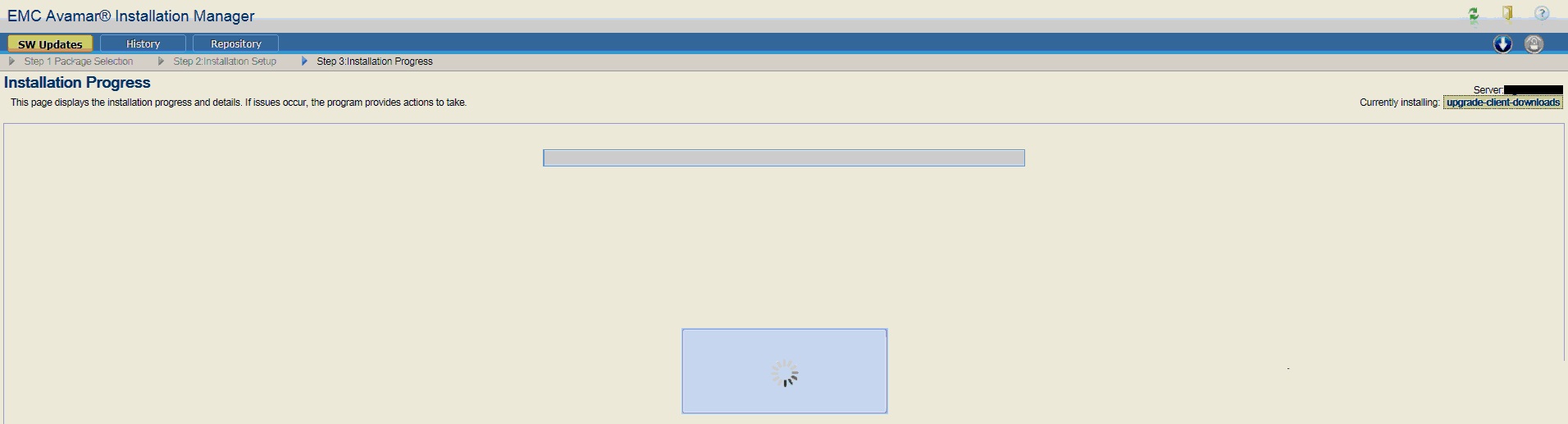
ブラウザを再起動すると、AVIがパッケージを「現在インストール中」であることが表示されます。
[続行]を選択しても、進行状況は表示されません。

AVPパッケージをインストールすると、AVamar Installerインターフェイス(AVI)が応答を停止します。
ブラウザを再起動すると、AVIがパッケージを「現在インストール中」であることが表示されます。
[続行]を選択しても、進行状況は表示されません。
Cause
Avamarインストーラー ログ /usr/local/avamar/var/avi/server_log/avinstaller.log*が表示されます。
avinstallerログ エントリーによって示されているように、PosgreSQL aviデータベースはロックされます。
根本原因は不明です。エンジニアリングバグ272057は、AVinstallerが AVI データベースへの書き込みに失敗した同様のシナリオをドキュメント化しています。
これは、毎時MCSフラッシュ操作中に発生しました。
データベースがロックされている状況を引き起こす複数の同時操作。
Jun 15, 2017 4:50:01 PM com.avamar.avinstaller.process.InstallManager install
INFO: Starting a new process instance.
Jun 15, 2017 4:50:01 PM com.avamar.avinstaller.process.UserInputManager getCurrentUserInput
INFO: Returned cached user input for checksum: bdc8a9876130f3199be845ca1d7866a5
Jun 15, 2017 4:50:01 PM com.avamar.avinstaller.process.PVM startProcessInstanceByKey
INFO: Starting processKey: upgrade-client-downloads20161009Oct101476054930 with userInputs: {}
Jun 15, 2017 4:50:01 PM org.hibernate.transaction.JDBCTransaction commit
SEVERE: JDBC commit failed
java.sql.SQLException: database is locked
at org.sqlite.DB.throwex(DB.java:855)
at org.sqlite.DB.exec(DB.java:138)
at org.sqlite.SQLiteConnection.commit(SQLiteConnection.java:512)
at org.hibernate.transaction.JDBCTransaction.commitAndResetAutoCommit(JDBCTransaction.java:170)
.
. -----------8<---------- SNIP!-----------8<----------
.
at com.avamar.avinstaller.process.InstallManager.install(InstallManager.java:125)
at com.avamar.avinstaller.monitor.Installer.run(Installer.java:46)
at java.lang.Thread.run(Unknown Source)
Caused by: java.sql.SQLException: database is locked
avinstallerログ エントリーによって示されているように、PosgreSQL aviデータベースはロックされます。
根本原因は不明です。エンジニアリングバグ272057は、AVinstallerが AVI データベースへの書き込みに失敗した同様のシナリオをドキュメント化しています。
これは、毎時MCSフラッシュ操作中に発生しました。
データベースがロックされている状況を引き起こす複数の同時操作。
Resolution
回避 策:
AVIを再起動すると、データベース ロックが削除される場合があります。
次のコマンドは、AVIDBとtomcatを停止してから開始する方法を示しています。
動作が続く場合は、Dellサポートにお問い合わせください。
AVIを再起動すると、データベース ロックが削除される場合があります。
次のコマンドは、AVIDBとtomcatを停止してから開始する方法を示しています。
動作が続く場合は、Dellサポートにお問い合わせください。
admin@avamar:~/>: sudo avinstaller.pl --help | grep "stop\|start"
--start                   starts avidb and tomcat if not up
--stop                    stops avidb and tomcat

Example:-
admin@avamar:~/>: sudo avinstaller.pl --stop
INFO: Waiting for Tomcat to shutdown
INFO: Shutting down avidb.
Stopping the database server.
Database server stopped.
INFO: Stopped the database.
admin@avamar:~/>: sudo avinstaller.pl --start
INFO: Starting avidb.
Starting the database server.
Waiting for postmaster to start .
Connected to DBI:Pg:dbname=postgres;port=5558.
INFO: Started the database.
/usr/local/avamar-tomcat/bin/startup.sh
Using CATALINA_BASE:   /usr/local/avamar-tomcat
Using CATALINA_HOME:   /usr/local/avamar-tomcat
Using CATALINA_TMPDIR: /usr/local/avamar-tomcat/temp
Using JRE_HOME:        /usr
Using CLASSPATH:       /usr/local/avamar-tomcat/bin/bootstrap.jar:/usr/local/avamar-tomcat/bin/tomcat-juli.jar
Tomcat started.
Affected Products
AvamarProducts
Avamar, Avamar ServerArticle Properties
Article Number: 000046163
Article Type: Solution
Last Modified: 06 Feb 2025
Version: 5
Find answers to your questions from other Dell users
Support Services
Check if your device is covered by Support Services.