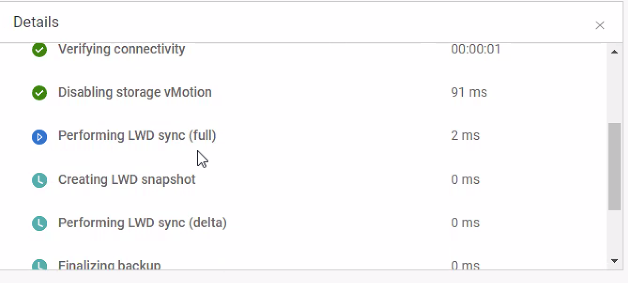
PowerProtect: PPDM VM TSDM backups stop responding during the 'Performing LWD sync (full)' step
Summary: PPDM VM TSDM backups are not completing. A few virtual machine (VM) backups stop responding when performing the full LWD sync for the virtual machine. Other VMs complete successfully on the same ESXi host. ...
This article applies to
This article does not apply to
This article is not tied to any specific product.
Not all product versions are identified in this article.
Symptoms
Affects: This issue was observed with PPDM 19.13 and ESXi hosts 7.0.3, but may affect other versions since it is environmental.
The PowerProtect Data Manager (PPDM) is used to protect the vSphere environment with the Transparent Snapshot Data Mover (TSDM) solution. The virtual machine (VM) backups show 'Performing LWD sync (full)' and do not progress. The symptom only occurs with some VMs. Other VM backups succeed.
Switching over to PPDM VADP backups shows that it stops responding at the "Moving disk" step.
The PowerProtect Data Manager (PPDM) is used to protect the vSphere environment with the Transparent Snapshot Data Mover (TSDM) solution. The virtual machine (VM) backups show 'Performing LWD sync (full)' and do not progress. The symptom only occurs with some VMs. Other VM backups succeed.
Switching over to PPDM VADP backups shows that it stops responding at the "Moving disk" step.
Cause
The environment has Intrusion Detection software that is preventing specific packets from the ESXi host (or VMDirect Engine) from reaching the target Data Domain.
The ESXi daemons (dpd and tsdm) wait for a TCP reply from the packets sent to the Data Domain.
Sometimes, the packets are detected as Metasploit attacks and blocked by the Intrusion Detection software and a reply is never received.
The PPDM Appliance is waiting for a progress update from the ESXi daemons and waits during the 'Performing LWD sync (full)' step.
The ESXi daemons (dpd and tsdm) wait for a TCP reply from the packets sent to the Data Domain.
Sometimes, the packets are detected as Metasploit attacks and blocked by the Intrusion Detection software and a reply is never received.
The PPDM Appliance is waiting for a progress update from the ESXi daemons and waits during the 'Performing LWD sync (full)' step.
Resolution
The Backup Administrator must work with the network team or security team to update the Intrusion Detection software and prevent TCP blocks between the two components.
Affected Products
PowerProtect SoftwareArticle Properties
Article Number: 000215467
Article Type: Solution
Last Modified: 12 Sep 2023
Version: 2
Find answers to your questions from other Dell users
Support Services
Check if your device is covered by Support Services.