PowerProtect - Multiple VM backups are failing with error "Cannot connect to backup server"
Summary: PowerProtect Data Manager Appliance DM5500: This article discusses a rare scenario with a heavily loaded system. A VMware VADP workload with specific settings enabled on the policy affects internal connections to the Storage System. ...
This article applies to
This article does not apply to
This article is not tied to any specific product.
Not all product versions are identified in this article.
Symptoms
Affected versions: The DM5500 5.13, 5.14 are affected.
The DM5500 and the vCenter are loaded with running hourly VADP backups with Swap File exclusion and metadata Indexing configured.
After some time, a system with the above configuration experiences VM backups failing with the error:
“Cannot connect to backup server : [5040]".
Symptoms found in the logs:
2023-07-03T05:03:00.219Z DEBUG:  [a7355c162f90883e] TaskEngine-0: Concurrent open DD Boost connections = 31.
2023-07-03T05:03:00.219Z DEBUG:  [a7355c162f90883e] TaskEngine-0: Access to DD Boost connection delayed by 8.756µs.
2023-07-03T05:03:00.219Z DEBUG:  [a7355c162f90883e] Sending state of 'Running' (last: state=Queued, progress=0).
2023-07-03T05:03:08.224Z ERROR:  [a7355c162f90883e] TaskEngine-0: Cannot connect to backup server :  [5040] calling system(), returns nonzero
2023-07-03T05:03:08.225Z DEBUG:  [a7355c162f90883e] TaskEngine-0: Task[1].Undo
2023-07-03T05:03:08.225Z DEBUG:  [a7355c162f90883e] TaskEngine-0: Task[0].Undo
2023-07-03T05:03:08.225Z DEBUG:  [a7355c162f90883e] TaskEngine-0: Releasing ProxyReservationSessions:53e5a903-afa9-467a-98ab-xxxxxxxxx
2023-07-03T05:03:08.225Z DEBUG:  [a7355c162f90883e] TaskEngine-0: Sending release reservation to VISD: release/vm/0
Cause
The system is heavily loaded from a VMware VADP workload perspective with "swapfile exclusion" option.
The "metadata indexing" may or may not be enabled on policies.Over time, the system exhausts all the internal connections to the Storage System.
When the VM Protection Engines or the vCenter runs out of resources, connections that are created to the Storage Systems are not cleaned up.
Over time, connection leakage occurs and this leads to backups stalling.
Resolution
Fix:
Contact Dell Support for the latest information.
Workaround:
1. Identify the VM Protection Engine where the error occurs. Restart the VM Protection Engines in the PowerProtect Data Manager UI:
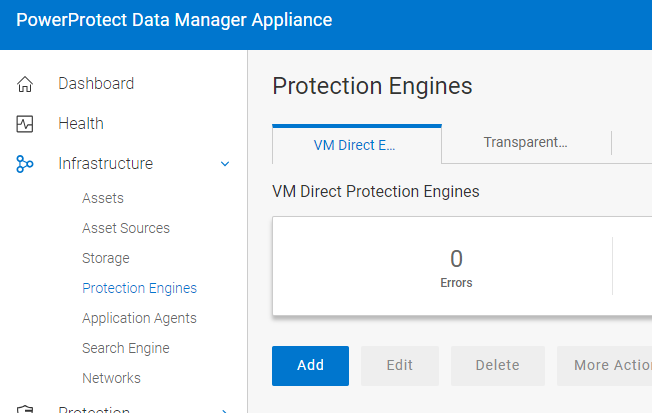
2. Add additional VM Protection Engines from the UI. This reduces load on the existing VM Protection Engines.
3. Disable the Swap File exclusion option from the Protection policies. This further reduces the load on the VM Protection Engines.
Contact Dell Support for the latest information.
Workaround:
1. Identify the VM Protection Engine where the error occurs. Restart the VM Protection Engines in the PowerProtect Data Manager UI:
2. Add additional VM Protection Engines from the UI. This reduces load on the existing VM Protection Engines.
3. Disable the Swap File exclusion option from the Protection policies. This further reduces the load on the VM Protection Engines.
Affected Products
PowerProtect DM5500Article Properties
Article Number: 000216108
Article Type: Solution
Last Modified: 21 Sep 2023
Version: 2
Find answers to your questions from other Dell users
Support Services
Check if your device is covered by Support Services.