PowerProtect - 多個 VM 備份失敗,並出現錯誤「無法連線至備份伺服器」
Summary: PowerProtect Data Manager Appliance DM5500:本文探討過重載系統的罕見情況。在原則上啟用特定設定的 VMware VADP 工作負載會影響與儲存系統的內部連線。
This article applies to
This article does not apply to
This article is not tied to any specific product.
Not all product versions are identified in this article.
Symptoms
受影響的版本:DM5500 5.13、5.14 會受到影響。
DM5500 和 vCenter 會載入每小時執行的 VADP 備份,並設定交換檔案排除和中繼資料索引。
經過一段時間後,具有上述組態的系統會遇到 VM 備份失敗,並出現錯誤:「
無法連線至備份伺服器: [5040]".
在記錄中找到的征狀:
2023-07-03T05:03:00.219Z DEBUG:  [a7355c162f90883e] TaskEngine-0: Concurrent open DD Boost connections = 31.
2023-07-03T05:03:00.219Z DEBUG:  [a7355c162f90883e] TaskEngine-0: Access to DD Boost connection delayed by 8.756µs.
2023-07-03T05:03:00.219Z DEBUG:  [a7355c162f90883e] Sending state of 'Running' (last: state=Queued, progress=0).
2023-07-03T05:03:08.224Z ERROR:  [a7355c162f90883e] TaskEngine-0: Cannot connect to backup server :  [5040] calling system(), returns nonzero
2023-07-03T05:03:08.225Z DEBUG:  [a7355c162f90883e] TaskEngine-0: Task[1].Undo
2023-07-03T05:03:08.225Z DEBUG:  [a7355c162f90883e] TaskEngine-0: Task[0].Undo
2023-07-03T05:03:08.225Z DEBUG:  [a7355c162f90883e] TaskEngine-0: Releasing ProxyReservationSessions:53e5a903-afa9-467a-98ab-xxxxxxxxx
2023-07-03T05:03:08.225Z DEBUG:  [a7355c162f90883e] TaskEngine-0: Sending release reservation to VISD: release/vm/0
Cause
從 VMware VADP 工作負載的角度來看,系統會大量載入「swapfile exclusion」選項。
原則上可能或可能不會啟用「中繼資料索引」。隨著時間推移,系統會耗盡與儲存系統的所有內部連線。
當 VM 保護引擎或 vCenter 資源用完時,不會清理與儲存系統建立的連線。
隨著時間推移,連線發生洩漏,導致備份停止。
Resolution
修復:
如需最新資訊,請聯絡 Dell 支援部門。
解決 方案:
1.識別發生錯誤的 VM 保護引擎。在 PowerProtect Data Manager UI 中重新開機 VM 保護引擎:
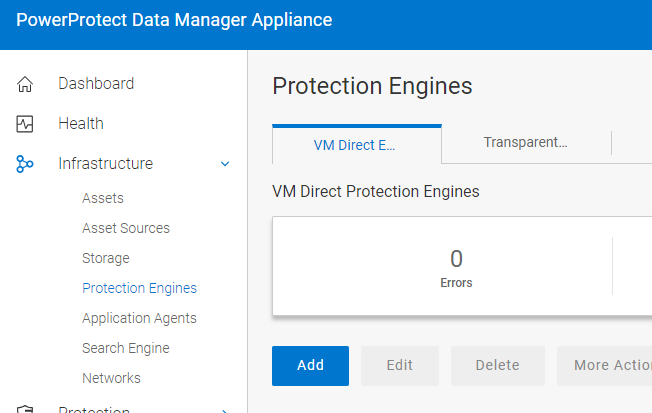
2.從 UI 新增額外的 VM 保護引擎。這樣可以降低現有 VM 保護引擎的負載。
3.停用保護原則中的交換檔案排除選項。這進一步降低 VM 保護引擎的負載。
如需最新資訊,請聯絡 Dell 支援部門。
解決 方案:
1.識別發生錯誤的 VM 保護引擎。在 PowerProtect Data Manager UI 中重新開機 VM 保護引擎:
2.從 UI 新增額外的 VM 保護引擎。這樣可以降低現有 VM 保護引擎的負載。
3.停用保護原則中的交換檔案排除選項。這進一步降低 VM 保護引擎的負載。
Affected Products
PowerProtect DM5500Article Properties
Article Number: 000216108
Article Type: Solution
Last Modified: 21 Sep 2023
Version: 2
Find answers to your questions from other Dell users
Support Services
Check if your device is covered by Support Services.