Data Protection Advisor: LAX error when trying to upgrade the datastore
Summary: A (LAX) error is observed when upgrading the DPA. A Fatal Application Error is generated.
This article applies to
This article does not apply to
This article is not tied to any specific product.
Not all product versions are identified in this article.
Symptoms
The following error appears shortly after an upgrade is attempted on the DPA datastore: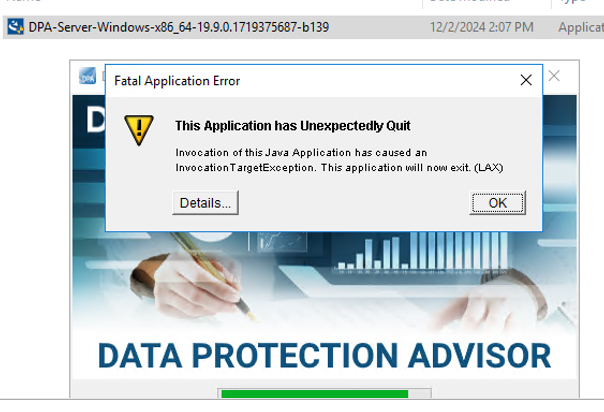
Complete Error message:
Invocation of this Java Application has caused and InvocationTargetException. This application will now exit (LAX)
The Details tab gives the Java Lang error:
java.lang.NullPointerException
                at com.zerog.ia.installer.LifeCycleManager.getEnable8dot3(Unknown Source)
                at com.zerog.ia.installer.LifeCycleManager.a6(Unknown Source)
                at com.zerog.ia.installer.LifeCycleManager.executeApplication(Unknown Source)
                at com.zerog.ia.installer.Main.main(Unknown Source)
                at sun.reflect.NativeMethodAccessorImpl.invoke0(Native Method)
                at sun.reflect.NativeMethodAccessorImpl.invoke(NativeMethodAccessorImpl.java:62)
                at sun.reflect.DelegatingMethodAccessorImpl.invoke(DelegatingMethodAccessorImpl.java:43)
                at java.lang.reflect.Method.invoke(Method.java:498)
                at com.zerog.lax.LAX.launch(Unknown Source)
                at com.zerog.lax.LAX.main(Unknown Source)
Cause
This is not a DPA issue.
This problem can be caused when the registry key has been changed.
This can occur if an internal policy that is enabled by the customer's security team that restricted the registry key.
Note the unknown above: getEnable8dot3(Unknown Source)
To confirm, run the following command on a command prompt:
C:\Windows\system32>reg query HKEY_LOCAL_MACHINE\SYSTEM\CurrentControlSet\Control\FileSystem\ /v NtfsDisable8dot3NameCreation
This command resulted with the same message on both the application and datastore servers:
ERROR: The system was unable to find the specified registry key or value
The correct output looks like:
HKEY_LOCAL_MACHINE\SYSTEM\CurrentControlSet\Control\FileSystem
    NtfsDisable8dot3NameCreation    REG_DWORD    0x2
Resolution
The customer's security/OS team must check and disable any internal policies on both the DPA application and datastore servers.
The Key (NtfsDisable8dot3NameCreation) must be created on the registries of both servers with the values "REG_DWORD 0x2."
The servers to be stopped and started in the correct sequence:
-
Stop the DPA application services:
<install dir>\dpa\services\bin> dpa svc stop
-
Stop the DPA datastore services:
<install dir>\dpa\services\bin> dpa svc stop
-
Start the DPA datastore services:
<install dir>\dpa\services\bin> dpa svc start
-
Start the DPA application services:
<install dir>\dpa\services\bin> dpa svc start
Allow some minutes before trying to access the UI and attempting the upgrade again.
Affected Products
Data Protection Advisor, Data Protection Suite SeriesArticle Properties
Article Number: 000286299
Article Type: Solution
Last Modified: 18 Feb 2025
Version: 1
Find answers to your questions from other Dell users
Support Services
Check if your device is covered by Support Services.