PowerEdge: iDRAC9: SWC5008: Unable to access Front LED Panel because hardware condition
Summary: This article describes an issue affecting PowerEdge servers running iDRAC9 in which the error SWC5008 asserts in the SEL multiple times.
This article applies to
This article does not apply to
This article is not tied to any specific product.
Not all product versions are identified in this article.
Symptoms
Dell PowerEdge servers running iDRAC9 may exhibit excessive SWC5008 errors referencing the front LED in the System Event Logs (SEL). SWC5008 events may also be present in the iDRAC9 Lifecycle Log. These errors occur for various reasons. The article provides background information regarding the LED controller board and methods to diagnose error sightings.
Description:
The SWC5008 error appears as below in Figure 1 and Tables 1 and 2.
Figure 1: iDRAC9 Dashboard Critical System Health Example
Table 1: System Event Log (SEL) Example
|
2020-06-02 07:08:15 |
2 |
Unable to access Front LED Panel because of a hardware error condition. |
Table 2: Lifecycle Log Example
|
2020-06-02 07:08:15 |
677 |
SWC5008 |
Unable to access Front LED Panel because of a hardware error condition. |
Cause
The front left LED control panel is monitored and managed by the iDRAC (BMC) controller embedded on PowerEdge servers. Regular status queries occur every five seconds to verify the presence and current health of the front LED panel. The iDRAC also maintains current installed firmware on this controller board. If there is an applicable update in the iDRAC firmware, the iDRAC attempts to push the LED firmware update during iDRAC boot cycles. In either of these sequences, the iDRAC uses an i2c circuit to communicate with this LED controller board. Timeouts in communication between iDRAC and the Left Control Panel during these sequences lead to the SWC5008 error events logged in the SEL and Lifecycle Log.
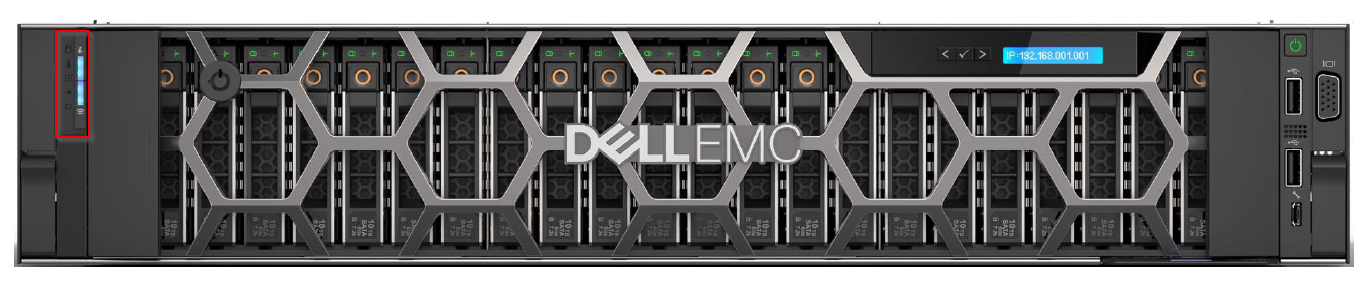
Figure 2: Front LED Panel PowerEdge R740XD
The Left Control Panel (LCP) is intended to support at-the-box-management or system health at a glance. It is located on the left ear of the chassis when viewing from the front of the system.
On most PowerEdge servers, the LCP is offered in two options:
- Quick Sync 2 button or
- Status LED 1 button
In either of these control panel configurations, there are five status LED indicators to provide a real-time, at the box indication of a hardware fault affecting the server. An explanation of these indicator LEDs can be seen below in Figure 3.
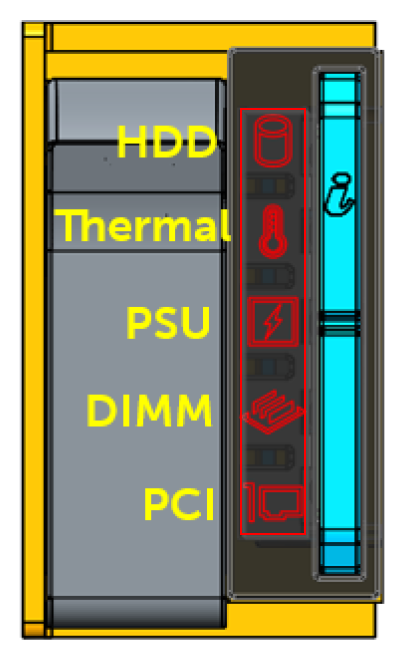
Figure 3: LED Health Status Indicators PowerEdge
Under normal server health conditions, these five LEDS appear off.
When a hardware fault is detected on one of the subsystems that are aligned with these LEDs, the backlight will illuminate in a solid amber state.These LEDs are controlled by the iDRAC (BMC) controller through communication on the i2c circuit. The light bars for both the Quick Sync and System ID are not managed through this same i2c circuit and operate independently of the status LEDs.
Resolution
Dell Technologies recommends upgrading to the latest iDRAC9 firmware to resolve this issue. See iDRAC9 Versions and Release Notes for the latest iDRAC9 firmware available for your system. Note, the iDRAC9 firmware can differ from one system to another.
iDRAC9 firmware version 4.22.00.53 introduced mechanisms to recover Front Panel LED controllers from a soft lockup condition. These changes are in all iDRAC9 releases starting with 4.32.10.00. The changes in this release will not mask true Front LED Panel hardware failures. If errors persist once this firmware has been implemented, continue to troubleshoot hardware.
If SWC5008 events continue to be recorded after applying iDRAC9 4.22.00.53 or 4.32.10.00 firmware, the front LED panel should be investigated for possible hardware fault. The following troubleshooting steps should be considered as a starting point:
- Check the Front LED Control Board cable for damage.
- Reseat the Front LED Control Board cable for connection issues.
- Replace the Front LED Control Board for LED failure.
- Replace the system board for any issues that continue to persist.
Affected Products
iDRAC9 - 3.0x Series, iDRAC9 - 3.1x Series, iDRAC9 - 3.2x Series, iDRAC9 - 3.3x Series, iDRAC9 - 3.4x Series, iDRAC9 - 4.xx Series, OEMR R340, OEMR R350, OEMR R360, OEMR R440Products
OEMR R450, OEMR R540, OEMR R550, OEMR R640, OEMR XL R640, OEMR R6415, OEMR R650, OEMR R650xs, OEMR R6515, OEMR R6525, OEMR R660, OEMR XL R660, OEMR R660xs, OEMR R6615, OEMR R6625, OEMR R740, OEMR XL R740, OEMR R740xd, OEMR XL R740xd, OEMR R740xd2
, OEMR R7415, OEMR R7425, OEMR R750, OEMR R750xa, OEMR R750xs, OEMR R7515, OEMR R7525, OEMR R760, OEMR R760xa, OEMR R760XD2, OEMR XL R760, OEMR R760xs, OEMR R7615, OEMR R7625, OEMR R840, OEMR R860, OEMR R940, OEMR R940xa, OEMR R960, OEMR T340, OEMR T350, OEMR T360, OEMR T440, OEMR T550, OEMR T560, OEMR T640, OEMR XL T640, OEMR XL R240, OEMR XL R340, OEMR XL R660xs, OEMR XL R6615, OEMR XL R6625, OEMR XL R760xs, OEMR XL R7615, OEMR XL R7625, PowerEdge R340, PowerEdge R350, PowerEdge R360, PowerEdge R440, PowerEdge R450, PowerEdge R540, PowerEdge R550, PowerEdge R640, PowerEdge R6415, PowerEdge R650, PowerEdge R650xs, PowerEdge R6515, PowerEdge R6525, PowerEdge R660, PowerEdge R660xs, PowerEdge R6615, PowerEdge R6625, PowerEdge R670, PowerEdge R740, PowerEdge R740XD, PowerEdge R740XD2, PowerEdge R7415, PowerEdge R7425, PowerEdge R750, PowerEdge R750XA, PowerEdge R750xs, PowerEdge R7515, PowerEdge R7525, PowerEdge R760, PowerEdge R760XA, PowerEdge R760xd2, PowerEdge R760xs, PowerEdge R7615, PowerEdge R7625, PowerEdge R770, PowerEdge R840, PowerEdge R860, PowerEdge R940, PowerEdge R940xa, PowerEdge R960, PowerEdge T340, PowerEdge T350, PowerEdge T360, PowerEdge T40, PowerEdge T440, PowerEdge T550, PowerEdge T560, PowerEdge T640
...
Article Properties
Article Number: 000181333
Article Type: Solution
Last Modified: 16 Jun 2025
Version: 10
Find answers to your questions from other Dell users
Support Services
Check if your device is covered by Support Services.