NetWorker: NWUI fails to get the list of groups with unable to parse the disk_uuid string
Summary: The NetWorker Web User Interface (NWUI) groups page returns no information. An error appears indicating that it failed to get the list of groups. Unable to parse the 'disk_uuid' string. ...
This article applies to
This article does not apply to
This article is not tied to any specific product.
Not all product versions are identified in this article.
Symptoms
The NWUI solution is being used to manage the NetWorker data zone. The navigation panel is used to select "Protection > Groups," and the details pane generates "Failed to get the list of groups. Unable to parse 'disk_uuid' string: '50301dd2-9032-1b04-eca2-c943c61fd55d.'" The VMware Protection Groups are configured with rules to select the protected virtual machines (VMs) using tags, and the referenced VM has a disk exclusion.
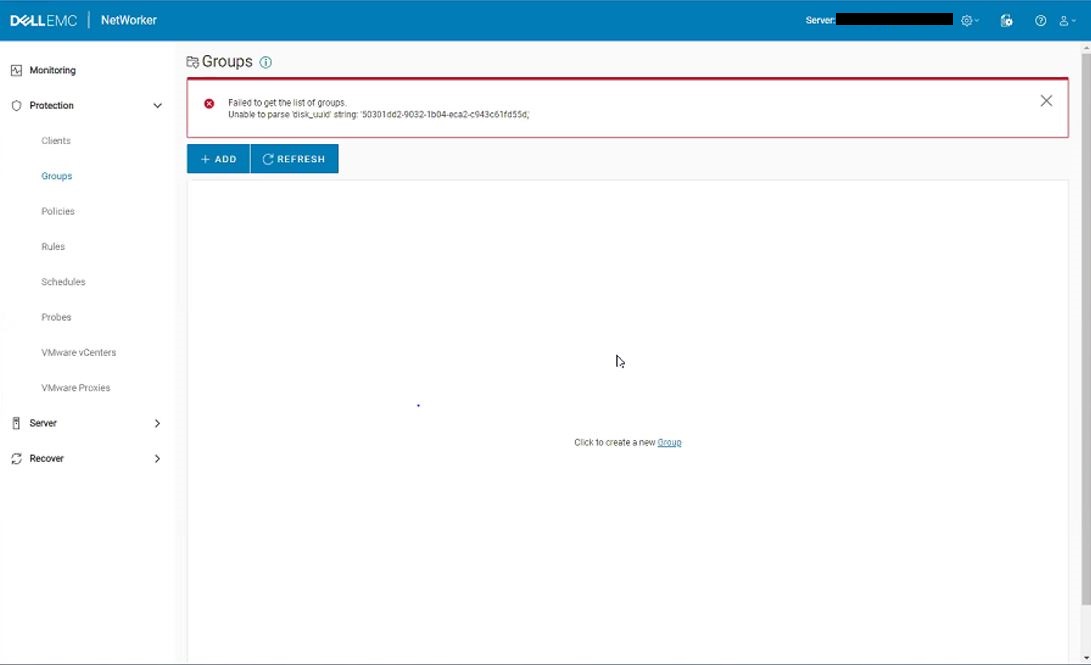
Figure 1: NWUI groups fail to load with "Unable to parse disk_uuid string"
The nwui.raw shows:
HH:MM:SS [https-jsse-nio-9090-exec-8] ERROR c.e.n.c.n.impl.PolicyApi - Could not fetch the list of groups.
- Linux:
/opt/nwui/logs/nwui.raw - Windows:
C:\Program Files\EMC NetWorker\nwui\logs\nwui.raw - NetWorker: How to use nsr_render_log
The localhost_access*.txt file shows:
XXX.XXX.XXX.XXX - - [DD/MM/YYYY:HH:MM:SS -0500] "GET /nwrestapi/v3/global/protectiongroups HTTP/1.1" 500 487
- Linux:
/nsr/authc/logs/localhost_access*.txt - Windows:
C:\Program Files\EMC NetWorker\nsr\authc-server\tomcat\logs\localhost_access*.txt
The NetWorker Server restapi.log shows:
YYYY-MM-DD HH:MM:SS INFO  [https-jsse-nio-9090-exec-2] c.e.n.w.WebApiRequest - Request method 'GET', URL 'v3/global/protectiongroups
YYYY-MM-DD HH:MM:SS ERROR [https-jsse-nio-9090-exec-2] c.e.n.w.WebApiExceptionMapper - Status 'Internal Server Error', msg: Unable to parse 'disk_uuid' string: '50301dd2-9032-1b04-eca2-c943c61fd55d,'
com.emc.nw.webapi.exception.InternalServerErrorException: Unable to parse 'disk_uuid' string: '50301dd2-9032-1b04-eca2-c943c61fd55d,'
	at com.emc.nw.webapi.adapter.VMwareVmDataAdapter.convertJsonToXmlVmWorkItem(VMwareVmDataAdapter.java:639) ~[nwrestapi.jar:na]
	at com.emc.nw.webapi.adapter.ProtectionGroupDataAdapter.expandVMwareAllWorkItemSelection(ProtectionGroupDataAdapter.java:137) ~[nwrestapi.jar:na]
	at com.emc.nw.webapi.adapter.ProtectionGroupDataAdapter.getItems(ProtectionGroupDataAdapter.java:115) ~[nwrestapi.jar:na]
	at com.emc.nw.webapi.common.WebLogic.getItemList(WebLogic.java:173) ~[nwrestapi.jar:na]
	at com.emc.nw.webapi.common.WebLogic.getItemList(WebLogic.java:160) ~[nwrestapi.jar:na]
	at com.emc.nw.webapi.resource.ProtectionGroups.get(ProtectionGroups.java:101) ~[nwrestapi.jar:na]
	at sun.reflect.NativeMethodAccessorImpl.invoke0(Native Method) ~[na:1.8.0_211]
	at sun.reflect.NativeMethodAccessorImpl.invoke(Unknown Source) ~[na:1.8.0_211]
	at sun.reflect.DelegatingMethodAccessorImpl.invoke(Unknown Source) ~[na:1.8.0_211]
	at java.lang.reflect.Method.invoke(Unknown Source) ~[na:1.8.0_211]
...
YYYY-MM-DD HH:MM:SS INFO  [https-jsse-nio-9090-exec-2] c.e.n.w.WebApiResponse - Response status Method: 'GET', URI:'v3/global/protectiongroups', Status '500'
- Linux:
/nsr/logs/restapi/restapi.log - Windows:
C:\Program Files\EMC NetWorker\nsr\logs\restapi\restapi.log
Cause
A VMware Protection Group has a VM null entry for an excluded .vmdk disk. The null .vmdk disk entry is causing the RESTAPI to fail when retrieving the Protection Group information. The null entry in the VMware Protection Group resource shows as backspaces and quotes (\"\"). Here is an example of the null entry in the VMware Protection Group:
{\"moref-id\":\"vm-1024536\",\"uuid\":\"50301dd2-9032-1b04-eca2-c943c61fd55d\",\"type\":\"VMDisk\",\"disks\":[\"\",\"6000C292-524d-1baa-f10b-5e780833a1ed\",\"6000C29c-75b5-ad1f-27d3-602b6d5da260\"]}
The cause of the null entry is not known.
Resolution
Use the NetWorker administrative program (nsradmin) to remove the null .vmdk disk entry from the NetWorker Resource Database (nsrdb).
- Perform a Server Protection backup job and ensure that a bootstrap backup is obtained:
mminfo -B
- Create a copy of the nsrdb directory on the NetWorker server.
- Linux:
/nsr/res/nsrdb - Windows:
C:\Program Files\EMC NetWorker\nsr\res\nsrdb
3. From a command line or Linux shell, open the nsradmin command-line utility and access visual mode by entering visual. This loads an interactive command-line utility from which you can navigate through and modify NetWorker resources:
nsradmin > visual mode > NSR Protection Group > Select the "NSR Protection Group" > Edit > delete the NULL Disk entry in the "vproxy group exclude items" > save > Exit
Before:
{\"moref-id\":\"vm-1024536\",\"uuid\":\"50301dd2-9032-1b04-eca2-c943c61fd55d\",\"type\":\"VMDisk\",\"disks\":[\"\",\"6000C292-524d-1baa-f10b-5e780833a1ed\",\"6000C29c-75b5-ad1f-27d3-602b6d5da260\"]}
After:
{\"moref-id\":\"vm-1024536\",\"uuid\":\"50301dd2-9032-1b04-eca2-c943c61fd55d\",\"type\":\"VMDisk\",\"disks\":[\"6000C292-524d-1baa-f10b-5e780833a1ed\",\"6000C29c-75b5-ad1f-27d3-602b6d5da260\"]}
If any issues are observed, you can revert to the nsrdb copy created before the changes were applied.
Article Properties
Article Number: 000173881
Article Type: Solution
Last Modified: 17 Nov 2025
Version: 4
Find answers to your questions from other Dell users
Support Services
Check if your device is covered by Support Services.