Windows Defender threat when installing or updating Alienware Command Center
Summary: Windows Defender may show you a warning saying that OCControl.Service.exe or XtuService.exe are Trojan programs.
This article applies to
This article does not apply to
This article is not tied to any specific product.
Not all product versions are identified in this article.
Symptoms
 |
Description |
This warning comes after installing the Alienware Command Center from dell.com, Microsoft Store, and updating it through the Dell Update tool. |
|
Supported Systems:
| All Alienware Systems Supporting Alienware Command Center 5.0 and higher | |||||||
What is the error message?
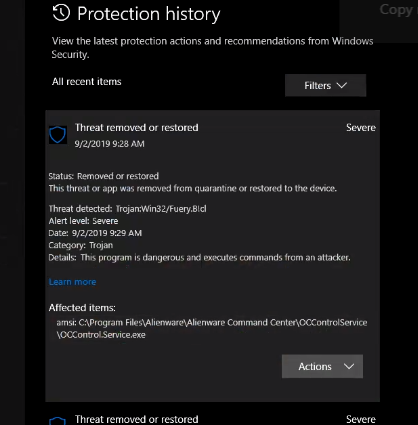 |
| Figure 1 (English Only): Protection history showing the warning about OCControl.Service.exe |
Cause
The warning is a false positive from Microsoft caused by the malware definitions for Windows Defender.
Resolution
Solution
You must clear the Windows Defender cache and update its definitions by following the steps below:
-
Open a Command Prompt as administrator
- Click the Windows Start button at the bottom left of the screen
- Type CMD
- On the search results, Right-click Command Prompt
- Click Run as administrator
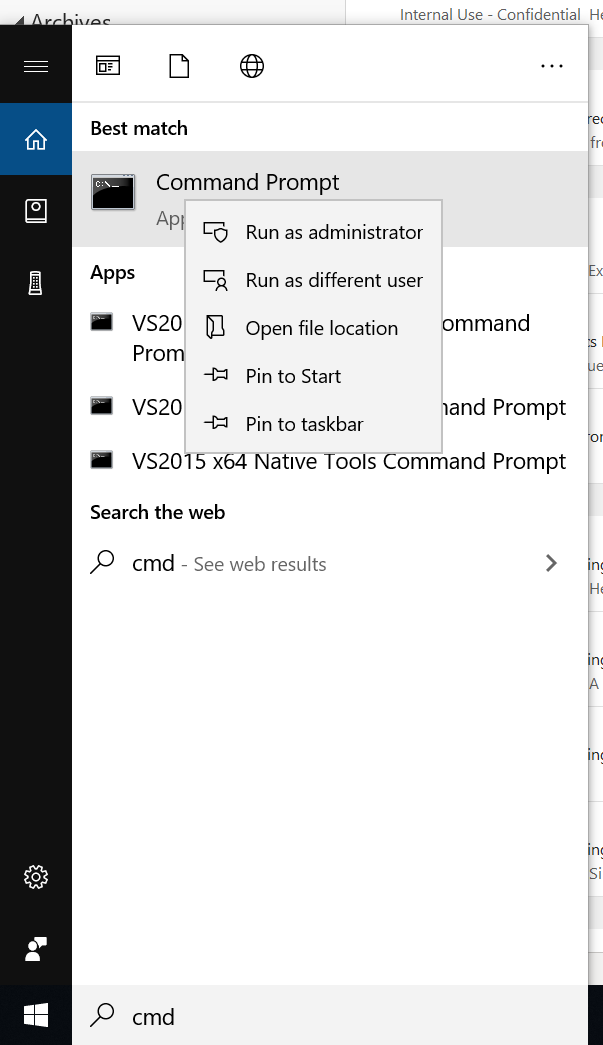
Figure 2 (English Only): Launching a Command Prompt as administrator -
Click Yes on the prompt that comes up
-
At the Command Prompt type the following commands in the order shown below:
- cd\ and press Enter
- cd c:\Program Files\Windows Defender\ and press Enter
- MpCmdRun.exe -removedefinitions -dynamicsignatures and press Enter
- MpCmdRun.exe -SignatureUpdate and press Enter
-
Uninstall the Alienware Command Center
-
Download and reinstall Alienware Command Center from the Dell Drivers Page
Additional Information
 Out of warranty? No problem click here, enter your Service Tag and view our offers.
Offers are only available for US, Canada, UK, and France personal computer Customers. Server and Storage not applicable
Affected Products
Alienware 13, Alienware 13 R3, Alienware 13 R2, Alienware 15, Alienware 15 R3, Alienware 15 R2, Alienware 15 R4, Alienware 17, Alienware Area-51m, Alienware 17 R4, Alienware 17 R2, Alienware 17 R3, Alienware 17 R5, Alienware Area-51m R2
, Alienware M15, Alienware M15 R2, Alienware M15 R3, Alienware m15 R4, Alienware m15 Ryzen Edition R5, Alienware m15 R6, Alienware m15 R7 AMD, Alienware m15 R7, Alienware m16 R1 AMD, Alienware m16 R1, Alienware m16 R2, Alienware M17, Alienware M17 R2, Alienware M17 R3, Alienware m17 R4, Alienware m17 R5 AMD, Alienware m18 R1 AMD, Alienware m18 R1, Alienware m18 R2, Alienware x14, Alienware x14 R2, Alienware x15 R1, Alienware x15 R2, Alienware x16 R1, Alienware x16 R2, Alienware x17 R1, Alienware x17 R2
...
Article Properties
Article Number: 000178146
Article Type: Solution
Last Modified: 22 Apr 2025
Version: 8
Find answers to your questions from other Dell users
Support Services
Check if your device is covered by Support Services.