NetWorker: nsrdr를 사용한 후 모든 클라이언트의 클라이언트 ID를 볼 수 없음
Summary: nsrdr를 사용하여 NetWorker 서버를 마이그레이션하거나 복구한 후 모든 클라이언트에 대해 클라이언트 ID 속성이 더 이상 표시되지 않습니다.
This article applies to
This article does not apply to
This article is not tied to any specific product.
Not all product versions are identified in this article.
Symptoms
NetWorker 서버가 새 호스트로 마이그레이션되었거나 nsrdr 명령을 사용하여 부트스트랩 백업에서 복구되었습니다. 재해 복구 후 NMC(NetWorker Management Console) 보기에서 클라이언트 ID 값이 누락됩니다. 호스트 이름 속성은 NetWorker 서버 이름을 갖는 대신 빈 상태로 표시됩니다.

그림 1: NetWorker Management Console 보기

그림 2: 클라이언트 속성
클라이언트 ID는 미디어 데이터베이스에서 새 백업에서도 사용할 수 있으며 아래 명령을 사용하여 확인할 수 있습니다.
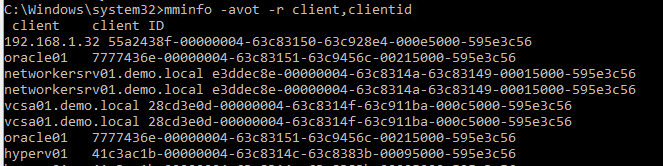
그림 3: mminfo 명령을 사용하여 클라이언트 ID를 확인합니다.
아래를 사용하여 확인하면 리소스 데이터베이스에서 클라이언트 ID가 누락됩니다.
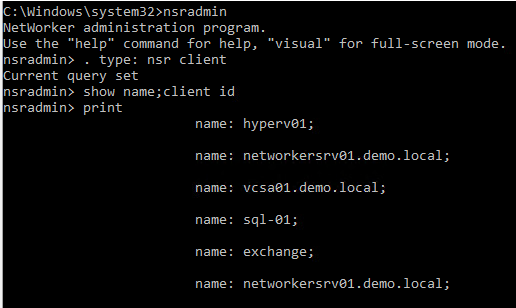
그림 4: nsradmin 유틸리티를 사용하여 클라이언트 ID를 확인합니다.
NetWorker 서버의 데몬 로그에서 서비스 시작 중에 다음 메시지가 기록됩니다.
그림 1: NetWorker Management Console 보기
그림 2: 클라이언트 속성
클라이언트 ID는 미디어 데이터베이스에서 새 백업에서도 사용할 수 있으며 아래 명령을 사용하여 확인할 수 있습니다.
mminfo
그림 3: mminfo 명령을 사용하여 클라이언트 ID를 확인합니다.
nsradmin
그림 4: nsradmin 유틸리티를 사용하여 클라이언트 ID를 확인합니다.
NetWorker 서버의 데몬 로그에서 서비스 시작 중에 다음 메시지가 기록됩니다.
DD/MM/YYYY HH:MM:SS  1 5 0 11092 11088 0 networkersrv01.demo.local nsrd NSR notice The fast system restart of NetWorker is enabled. DNS cache will not be populated and RAP check of the clients will be skipped.
DD/MM/YYYY HH:MM:SS  1 5 0 11092 11088 0 networkersrv01.demo.local nsrd NSR notice Skipping populating DNS cache as disaster recovery is in progress ...
Cause
nsr_disaster_recovery_mode 파일이 /nsr/debug 디렉토리 아래에 있습니다. 이 파일은 nsrdr 절차의 일부로 생성됩니다. DNS 조회를 비활성화하여 NetWorker 서버의 파일 시스템을 재시작할 수 있으며, 이로 인해 서비스 시작 중에 클라이언트 ID가 누락되거나 리소스 데이터베이스에 로드되지 않습니다.
일반적인 DR 작업에서는 시작 프로세스가 끝날 때 이 파일을 삭제해야 합니다. 그러나 장애가 발생했거나 nsrdr가 제대로 완료되지 않는 경우 이 파일은 수동 제거가 필요한 /nsr/디버그 디렉토리에 남을 수 있습니다.
일반적인 DR 작업에서는 시작 프로세스가 끝날 때 이 파일을 삭제해야 합니다. 그러나 장애가 발생했거나 nsrdr가 제대로 완료되지 않는 경우 이 파일은 수동 제거가 필요한 /nsr/디버그 디렉토리에 남을 수 있습니다.
Resolution
다음 단계를 수행하여 실행 중인 NetWorker 활동이 없을 때 DR 모드를 비활성화하거나 시스템을 빠르게 재시작합니다.
- NetWorker 서비스를 중지합니다.
Windows:    net stop nsrd
Linux:      systemctl stop networker
- /nsr/debug 디렉토리에서 "nsr_disaster_recovery_mode" 파일의 이름을 바꾸거나 삭제합니다.
- 다시 시작할 NetWorker 서비스:
Windows:    net start nsrd
Linux:      systemctl start networker
Additional Information
참조:
"Disable DNS cache population for NetWorker Server" 섹션의 Dell NetWorker Server Disaster Recovery and Availability 19.9 모범 사례 가이드
https://dl.dell.com/content/manual24893255-dell-networker-server-disaster-recovery-and-availability-19-9-best-practices-guide.pdf?language=en-us
"Disable DNS cache population for NetWorker Server" 섹션의 Dell NetWorker Server Disaster Recovery and Availability 19.9 모범 사례 가이드
https://dl.dell.com/content/manual24893255-dell-networker-server-disaster-recovery-and-availability-19-9-best-practices-guide.pdf?language=en-us
Affected Products
NetWorkerArticle Properties
Article Number: 000218693
Article Type: Solution
Last Modified: 31 Oct 2023
Version: 2
Find answers to your questions from other Dell users
Support Services
Check if your device is covered by Support Services.