NetWorker:使用 nsrdr 后无法查看所有客户端的客户端 ID
Summary: 使用 nsrdr 迁移或恢复 NetWorker 服务器后,客户端 ID 属性不再对所有客户端可见。
This article applies to
This article does not apply to
This article is not tied to any specific product.
Not all product versions are identified in this article.
Symptoms
NetWorker 服务器已迁移到新主机或使用 nsrdr 命令从 bootstrap 备份中恢复。灾难恢复后,NetWorker Management Console (NMC) 视图中缺少客户端 ID 值。主机名属性也会显示为空,而不是具有 NetWorker 服务器名称:
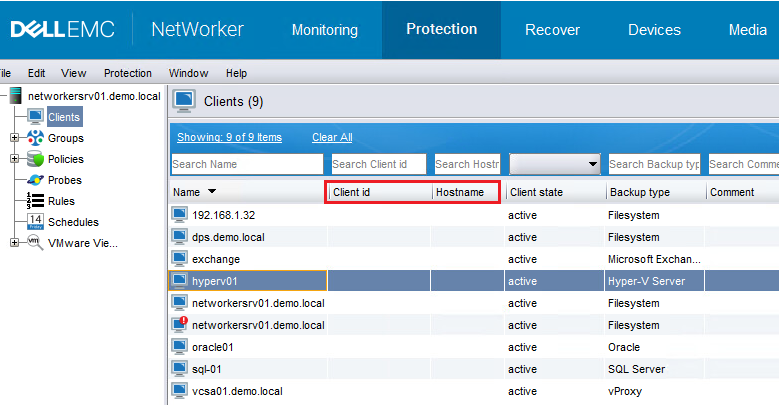
图 1:NetWorker Management Console 视图

图 2:客户端属性
客户端 ID 即使在介质数据库中也可用于新备份,并且可以使用以下命令进行检查:
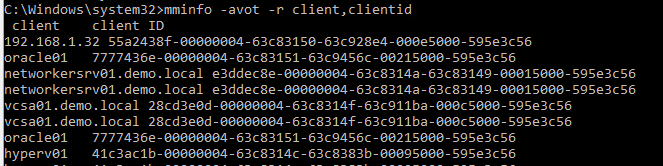
图 3:使用 mminfo 命令检查客户端 ID。
使用以下选项进行检查时,资源数据库中缺少客户端 ID:
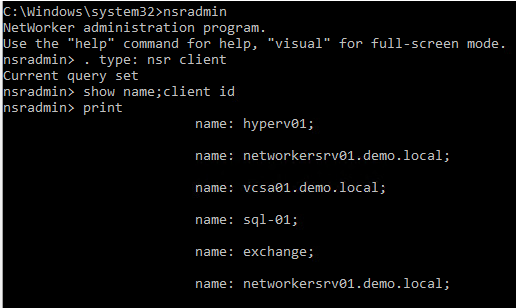
图 4:使用 nsradmin 实用程序检查客户端 ID。
在 NetWorker 服务器的守护程序日志中,在服务启动期间记录以下消息:
图 1:NetWorker Management Console 视图
图 2:客户端属性
客户端 ID 即使在介质数据库中也可用于新备份,并且可以使用以下命令进行检查:
mminfo
图 3:使用 mminfo 命令检查客户端 ID。
nsradmin
图 4:使用 nsradmin 实用程序检查客户端 ID。
在 NetWorker 服务器的守护程序日志中,在服务启动期间记录以下消息:
DD/MM/YYYY HH:MM:SS  1 5 0 11092 11088 0 networkersrv01.demo.local nsrd NSR notice The fast system restart of NetWorker is enabled. DNS cache will not be populated and RAP check of the clients will be skipped.
DD/MM/YYYY HH:MM:SS  1 5 0 11092 11088 0 networkersrv01.demo.local nsrd NSR notice Skipping populating DNS cache as disaster recovery is in progress ...
Cause
nsr_disaster_recovery_mode 文件存在于 /nsr/debug 目录下。此文件作为 nsrdr 过程的一部分创建。它通过禁用 DNS 查找来启用 NetWorker 服务器的文件系统重新启动,这会导致客户端 ID 在服务启动过程中丢失或未加载到资源数据库中。
在正常的灾难恢复操作中,应在启动过程结束时删除此文件。但是,如果遇到故障或 nsrdr 无法正确完成,此文件可能会保留在需要手动删除的 /nsr/debug 目录中。
在正常的灾难恢复操作中,应在启动过程结束时删除此文件。但是,如果遇到故障或 nsrdr 无法正确完成,此文件可能会保留在需要手动删除的 /nsr/debug 目录中。
Resolution
执行以下步骤以禁用 DR 模式或 在没有 NetWorker 活动运行时快速重新启动系统:
- 停止 NetWorker 服务:
Windows:    net stop nsrd
Linux:      systemctl stop networker
- 从 /nsr/debug 目录重命名或删除“nsr_disaster_recovery_mode”文件。
- 重新 启动 NetWorker 服务:
Windows:    net start nsrd
Linux:      systemctl start networker
Additional Information
参考:
Dell NetWorker Server 灾难恢复和可用性 19.9 最佳做法指南
中的“Disable DNS cache population for NetWorker Server”部分https://dl.dell.com/content/manual24893255-dell-networker-server-disaster-recovery-and-availability-19-9-best-practices-guide.pdf?language=en-us
Dell NetWorker Server 灾难恢复和可用性 19.9 最佳做法指南
中的“Disable DNS cache population for NetWorker Server”部分https://dl.dell.com/content/manual24893255-dell-networker-server-disaster-recovery-and-availability-19-9-best-practices-guide.pdf?language=en-us
Affected Products
NetWorkerArticle Properties
Article Number: 000218693
Article Type: Solution
Last Modified: 31 Oct 2023
Version: 2
Find answers to your questions from other Dell users
Support Services
Check if your device is covered by Support Services.