PowerStore: What to Do if the Data Reduction Ratio is Less Than Expected
Summary: As part of the Dell Future-Proof Program, customers can make claims against DELL TECHNOLOGIES POWERSTORE-POWERMAX DATA REDUCTION GUARANTEE TERMS AND CONDITIONS. These claims are made by submitting a support service request. This article outlines validation steps, remediation requirements, and how to submit a claim. In addition, it explains Data Reduction Ratio (DRR) and specifics about the guarantee requirements. ...
This article applies to
This article does not apply to
This article is not tied to any specific product.
Not all product versions are identified in this article.
Instructions
Data Reduction Guarantees are defined either in a Guarantee Letter or in the standard DELL TECHNOLOGIES POWERSTORE/POWERMAX DATA REDUCTION GUARANTEE TERMS AND CONDITIONS. This document reflects the requirements outlined in the standard guarantee and in no way supersedes any standard or custom data reduction guarantees. PowerStore purchased and installed after October 01, 2024 are subject to the standard terms and conditions.
Quick Check
Ensure that you are seeing the correct information when considering a claim. Go to the Eligibility section for additional claim requirements and data reduction information.
- Identify the current Reducible Data Reduction Ratio (DRR); this is the guaranteed DRR value shown when you hover over the Data Savings graph on the PowerStore Dashboard. Then compare it to your expectation (depending on your system 4:1, 5:1 or the Custom DRR)
- Identify the physical capacity used, and ensure that at least 50% of the physical drive space has been written.
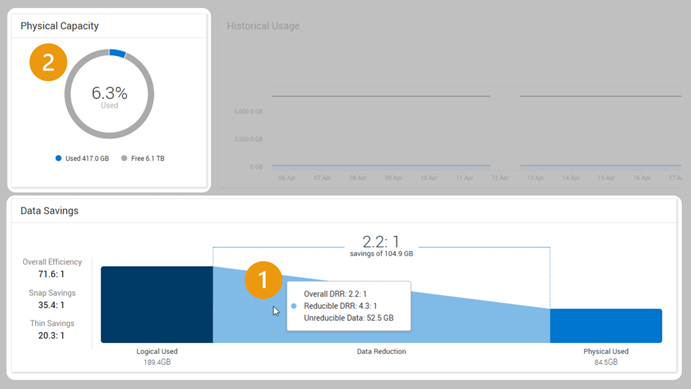
The image shows the current Reducible Data Reduction Ratio with the number one and the physical capacity used with the number two.
Data Reduction Ratio Claims
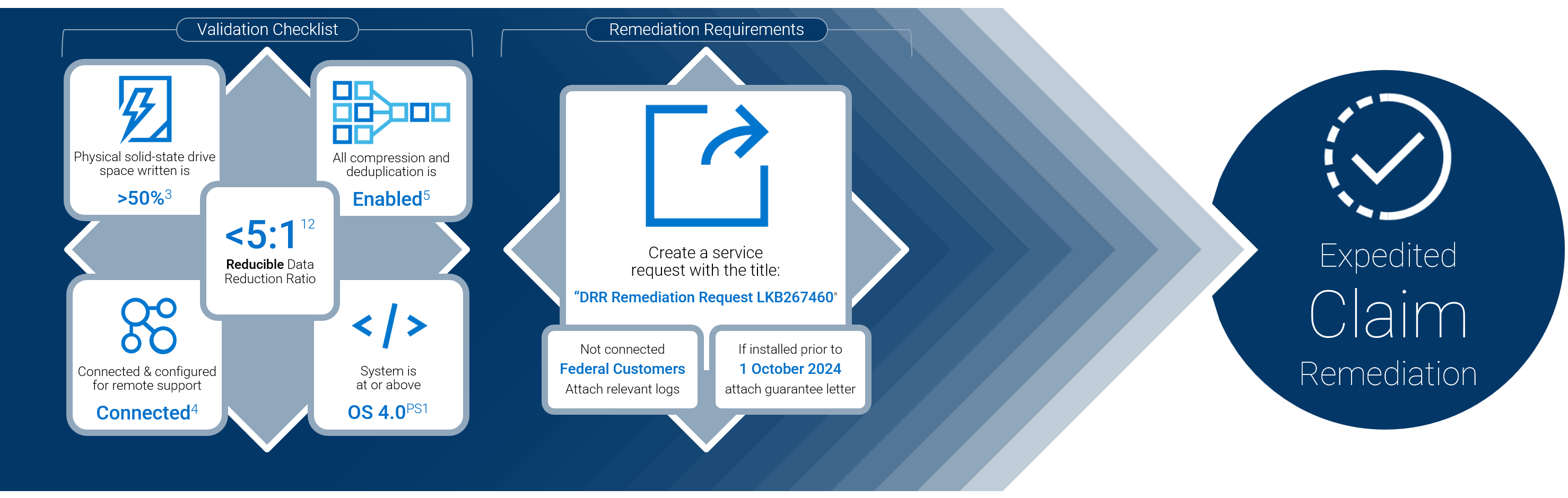
Image Reference
1 The Guarantee applies only to Reducible Data. 2 The Guarantee does not apply to Unreducible Data. Examples of Unreducible Data include but are not limited to host-compressed data, host-encrypted data, Audio, Image, PDF, and Video files. 3 The Guarantee does not apply until data is written to at least 50% of the physical solid state drive space. 4 Except regarding Federal End Users, Products should be connected to an active SRS or SCG gateway with functioning remote support for the Guarantee Period, which enables streamlined remediation. PM1 The Guarantee applies to new Products initially installed and continuously running with PowerStoreOS 4.0 and above. Reference: DELL TECHNOLOGIES POWERSTORE/POWERMAX DATA REDUCTION GUARANTEE
If the Data Reduction Ratio (DRR) on your PowerStore is lower than expected as noted in the guarantee letter or DELL TECHNOLOGIES POWERSTORE/POWERMAX DATA REDUCTION GUARANTEE, review the following steps.
Eligibility
Confirm that you are experiencing a valid claim (the following reference the DELL TECHNOLOGIES POWERSTORE/POWERMAX DATA REDUCTION GUARANTEE. (The linked guarantee or a signed and dated guarantee letter supersedes this information):
- The Guarantee applies only to Reducible Data
- The Guarantee does not apply to Unreducible Data. Examples of Unreducible Data include but are not limited to host-compressed data, host-encrypted data, Audio, Image, PDF, and Video files
- The Guarantee does not apply until data is written to at least 50% of the physical solid state drive space
- Except concerning Federal End Users, Products should be connected to an active SRS or SCG gateway with functioning remote support for the Guarantee Period, which enables streamlined remediation
- All compression and data deduplication functionality must be enabled where supported for the Guarantee to apply; and
- All compression and data deduplication functionality sees the features on the PowerStore appliance. It is not recommended to enable host side compression as this can increase irreducible data stored on the PowerStore appliance.
- The Guarantee applies to new PowerStore Products initially installed and continuously running with PowerStoreOS 4.0 and later,
- Unless otherwise indicated in your agreement
- Only one PowerStore serial number-service tag can be submitted per Service Request.
Required Information
If applicable, gather the following required information:
- Guarantee letter: If the system was purchased before October 01, 2024 or under a custom agreement
- If the system was purchased after October 01, 2024, the linked future proof guarantee automatically applies.
- Manual logs or proof of circumstance and adherence to requirements: Only if the system meets the federal connectivity clause in the terms and conditions document or is otherwise defined in the guarantee letter.
Submitting a claim
- Go to Contact Technical Support:
- Important: Ensure you use the Service Tag for the storage appliance that the claim is being made on.
- When prompted, select the issue type Storage
- When presented with contact options, select Create Service Request.
- In the Request Summary area, enter DRR Remediation Request LKB267460, adding any other relevant details.
- If applicable, attach the Required Information using the Added Attachments feature.
- For multiple claims, submit the requests separately, using the Service Tag for each PowerStore to submit a claim for each system.
- Claim requests are acknowledged within 24 hours and typically processed within five business days.
Understanding the Data Reduction Ratio
The Data Reduction Ratio (DRR) is a metric that represents the efficiency of data reduction techniques such as compression and deduplication in a storage environment.
- Overall DRR: The measure of how the PowerStore is reducing the physical storage required for a given amount of data, expressed as a ratio of units of data per unit of space (such as 3:1). The Overall DRR value is the same value as the Data Reduction Ratio from releases prior to version 4.0.
- Reducible DRR: The Data Reduction Ratio of the reducible data within the cluster, appliance, or resource - This metric ignores any Unreducible Data in the calculation.
- Unreducible Data: The amount of data written within the cluster, appliance, or resource that PowerStore's deduplication and compression logic cannot reduce.
For more detailed information, review these documents:
- Data Efficiencies Overview
- Data Reduction Demystified
- CloudIQ: PowerStore Onboarding Overview, Cybersecurity Onboarding
- If you are running PowerStoreOS 4.0 and later, you can see your reducible DRR by going to Dashboard > Capacity and hovering over the Data Savings graph.
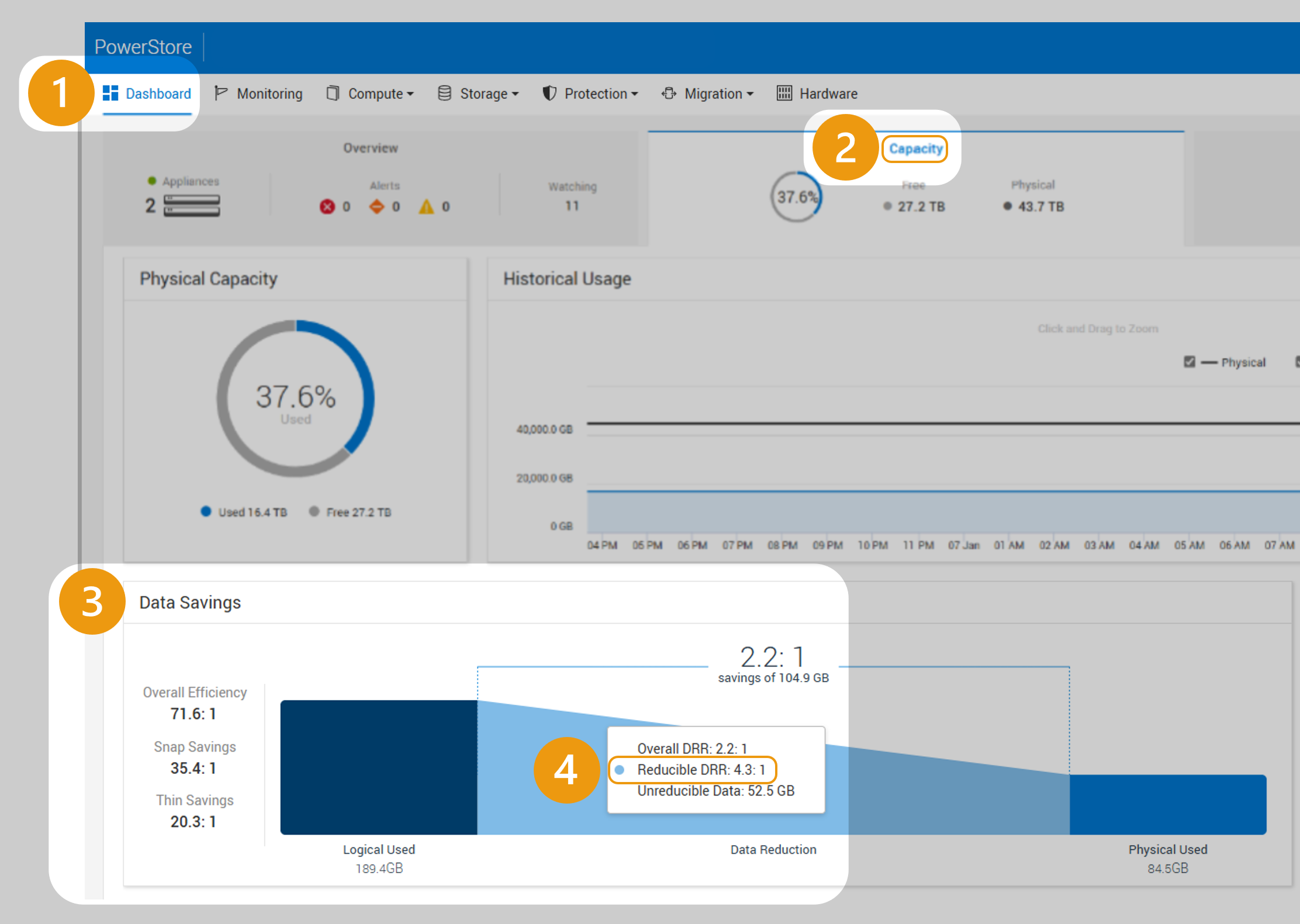
The image shows the steps described for finding the reducible Data Reduction Ratio through the dashboard.
Determining Written Space
To check written space on the solid state drives:
- Go to the Dashboard and Capacity tab in PowerStore Manager
- See Physical Capacity donut graph
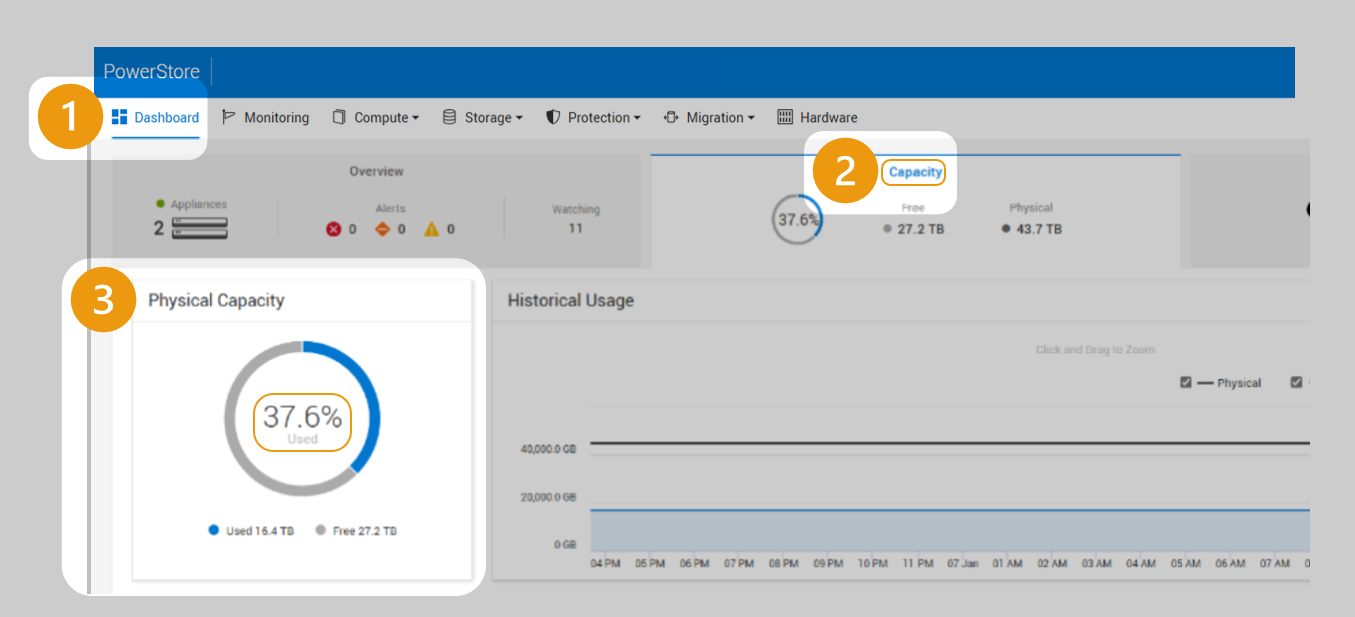
The image shows the steps described for finding the written space in the physical capacity graphic through the dashboard.
Verifying Connectivity
You can verify that the PowerStore is connected to Dell SupportAssist either directly or using a gateway. Instructions to enable: SupportAssist Infrastructure Observability
Verifying PowerStore Operating System
You can verify your operating system code by:
- Go to Settings in the PowerStore management user interface
- Select Upgrades from the Cluster menu
- Find the PowerStoreOS (Software Release) line item
- Reference the information in the Version field (in this case 4.1.0.0)
Note: Although the DRR guarantees can require 4.0 and later, Dell maintains Minimum-Supported Code requirements. Target Code is highly recommended: PowerStore: PowerStoreOS Matrix
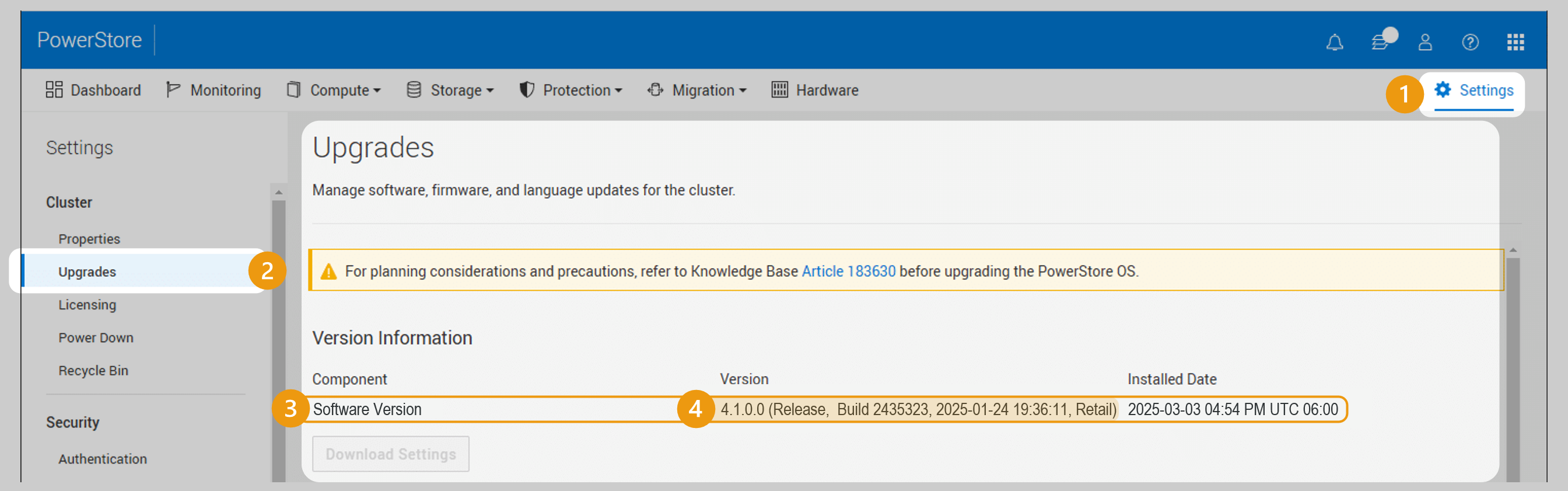
The image shows the steps described for verifying the PowerStore Operating System.
Affected Products
PowerStoreArticle Properties
Article Number: 000267460
Article Type: How To
Last Modified: 20 Nov 2025
Version: 26
Find answers to your questions from other Dell users
Support Services
Check if your device is covered by Support Services.