PowerStore: Drive firmware upgrade fails with error Received response from platform: java.lang.NullPointerException
Summary: Drive upgrade fails with: Received response from platform: java.lang.NullPointerException (0xE04030010003 or 0xE04030010044)
This article applies to
This article does not apply to
This article is not tied to any specific product.
Not all product versions are identified in this article.
Symptoms
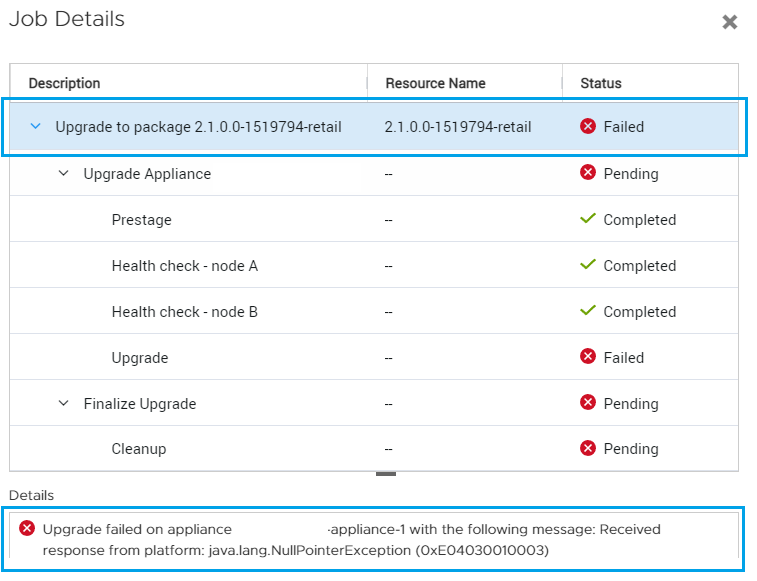
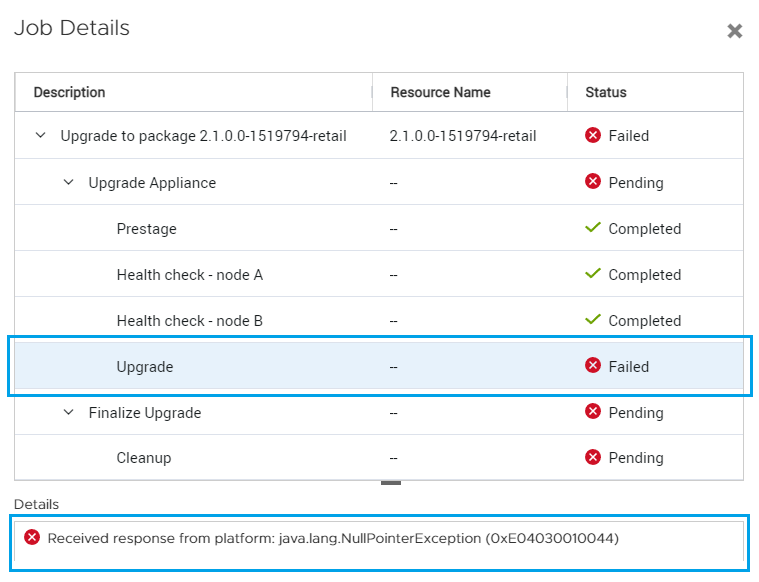
Drive upgrade fails with errors:
As seen from the PowerStore Manager user interface (UI):
And:
- Upgrade failed on appliance X with the following message: Received response from platform: java.lang.NullPointerException (0xE04030010003)
- Received response from platform: java.lang.NullPointerException (0xE04030010044)
As seen from the PowerStore Manager user interface (UI):
And:
Cause
This issue happens when this sequence of events takes place:
During the upgrade to v2, the drive package uuid is set to null in the management database.
When the disk firmware upgrade is attempted, the null package uuid causes the upgrade to fail with the error java.lang.NullPointerException.
- The drive firmware package is uploaded but not used.
- The cluster is upgraded from PowerStoreOS v1 to PowerStoreOS v2.
- A disk firmware upgrade is attempted with the package that was uploaded before the PowerStoreOS upgrade.
During the upgrade to v2, the drive package uuid is set to null in the management database.
When the disk firmware upgrade is attempted, the null package uuid causes the upgrade to fail with the error java.lang.NullPointerException.
Resolution
The references to the old drive firmware package must be manually deleted and the upgrade state cleared. Once this is done, the drive firmware upgrade package can be uploaded again and the upgrade may proceed.
Contact Dell EMC Technical Support or your Authorized Service Representative, and quote this Knowledgebase article ID.
Contact Dell EMC Technical Support or your Authorized Service Representative, and quote this Knowledgebase article ID.
Affected Products
PowerStore, PowerStore 1000X, PowerStore 1000T, PowerStore 3000X, PowerStore 3000T, PowerStore 5000X, PowerStore 5000T, PowerStore 500T, PowerStore 7000X, PowerStore 7000TProducts
PowerStore 9000X, PowerStore 9000TArticle Properties
Article Number: 000196852
Article Type: Solution
Last Modified: 13 May 2026
Version: 7
Find answers to your questions from other Dell users
Support Services
Check if your device is covered by Support Services.