Brandväggen och webbskyddet för Dell Endpoint Security Suite Enterprise aktiveras inte på slutpunkten
Summary: Brandväggen och webbskyddet för Dell Endpoint Security Suite Enterprise Client kan kräva undantag till Dell Security Management Server (tidigare Dell Data Protection Server) för korrekt produktfunktion. ...
This article applies to
This article does not apply to
This article is not tied to any specific product.
Not all product versions are identified in this article.
Symptoms
Obs!
- Från och med maj 2022 har Dell Endpoint Security Suite Enterprise nått slutet på underhållet. Den här artikeln uppdateras inte längre av Dell. Mer information finns i Policy för produktlivscykel (slut på support/slut på livscykel) för Dell Data Security. Om du har frågor om alternativa artiklar kan du kontakta ditt försäljningsteam eller endpointsecurity@dell.com.
- Mer information om aktuella produkter finns i Endpoint Security.
Berörda produkter:
- Dell Endpoint Security Suite Enterprise
Berörda operativsystem:
- Windows
Berörda versioner:
- v1.3 och tidigare
Brandväggen och webbskyddet för Dell Endpoint Security Suite Enterprise-klienten kan vara inaktiverade om:
- Policyer är inte aktiverade i Dell Security Management Server.
- Klienten kör Dell Endpoint Security Enterprise v1.3 eller tidigare.
- Om Memory Protection är aktiverat och rätt undantag inte läggs till i Dell Security Management Server.
- Undantag läggs automatiskt till i Dell Endpoint Security Suite Enterprise v1.4 och senare.
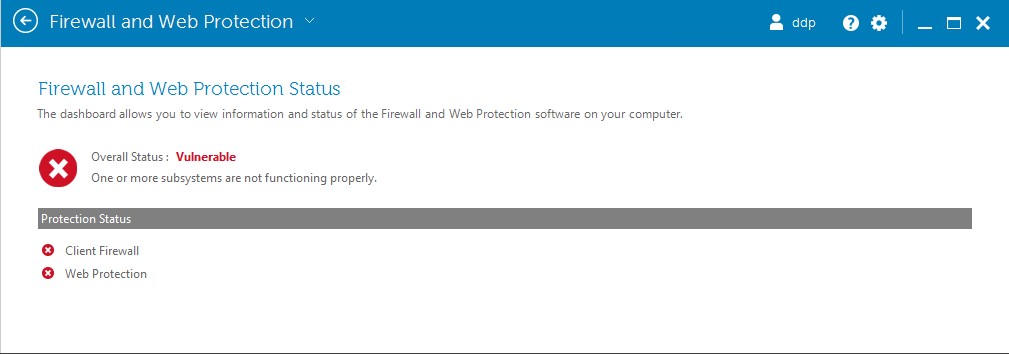
Bild 1: (Endast på engelska) Brandvägg och webbskydd
Cause
Gäller ej
Resolution
Kontrollera:
- Klienten kör Dell Endpoint Security Suite Enterprise v1.4 eller senare.
Obs! Hjälp med att hitta produktversionen finns i Identifiera versionen av Dell Endpoint Security Suite Enterprise.
- Gå till administrationskonsolen på
https://FQDN.domain.com:8443/webui/login
Obs!
- FQDN.domain.com är det fullständigt kvalificerade domännamnet eller IP-adressen för din Dell Security Management Server.
- 8443 är standardporten och kan skilja sig från din miljö.
- Expandera populationer och klicka sedan på antingen Enterprise, Endpoint Groups eller Endpoints.
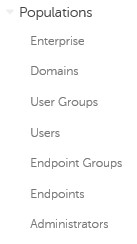
Bild 2: (Endast på engelska) Befolkningar
Obs! Om slutpunktsgrupper eller slutpunkter väljs måste rätt grupp eller slutpunkt väljas innan du fortsätter till steg 3.
- Klicka på Web Protection.
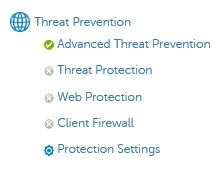
Bild 3: (Endast på engelska) Webbskydd
- Slå på webbskydd.
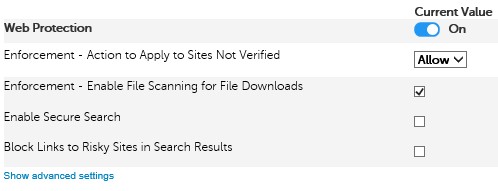
Bild 4: (Endast på engelska) Slå på webbskydd
- Klicka på Spara längst upp till höger.

Bild 5: (Endast på engelska) Spara
- Klicka på Retur.

Bild 6: (Endast på engelska) Återvända
- Klicka på Klientbrandväggen.
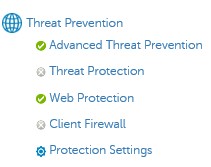
Bild 7: (Endast på engelska) Klientbrandvägg
- Slå på klientbrandväggen.

Bild 8: (Endast på engelska) Aktivera klientbrandväggen
- Klicka på Spara längst upp till höger.

Bild 9: (Endast på engelska) Spara
- Klicka på Retur.

Bild 10: (Endast på engelska) Återvända
- Expandera Hantering i den vänstra menyn och klicka sedan på Genomför.
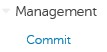
Bild 11: (Endast på engelska) Begå
- Du kan även ange en kommentar om policyändringarna och sedan klicka på Genomför principer.
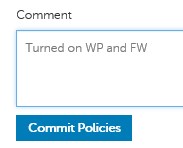
Bild 12: (Endast på engelska) Genomför policyer
Obs! Den berörda slutpunkten kan kräva en omstart innan de uppdaterade principerna träder i kraft.
Obs! Det här steget krävs endast om Memory Protection är aktiverat och slutpunkten kör Dell Endpoint Security Suite Enterprise v1.6 eller tidigare.
- Öppna en webbläsare och gå till administrationskonsolen på
https://FQDN.domain.com:8443/webui/login
Obs!
- FQDN.domain.com är det fullständigt kvalificerade domännamnet eller IP-adressen för din Dell Security Management Server.
- 8443 är standardporten och kan skilja sig från din miljö.
- Expandera populationer och klicka sedan på antingen Enterprise, Endpoint Groups eller Endpoints.
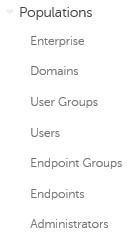
Bild 13: (Endast på engelska) Befolkningar
Obs! Om slutpunktsgrupper eller slutpunkter väljs måste rätt grupp eller slutpunkt väljas innan du fortsätter till steg 3.
- Under Threat Prevention klickar du på Advanced Threat Prevention.

Bild 14: (Endast på engelska) Avancerat hotförebyggande
- Visa avancerade inställningar för ytterligare principalternativ.

Bild 15: (Endast på engelska) Visa avancerade inställningar
- Under Memory Actions (minnesåtgärder) markerar du Enable Exclude executable files (aktivera undantag för körbara filer).

Bild 16: (Endast på engelska) Kontrollera Enable Exclude executable files (aktivera undantag för körbara filer)
- Under Memory Actions (minnesåtgärder) lägger du till Undantag för körbara filer :
\Program Files\McAfee\Agent\cmdagent.exe
\Program Files\McAfee\Agent\FrmInst.exe
\Program Files\McAfee\Agent\macmnsvc.exe
\Program Files\McAfee\Agent\macompatsvc.exe
\Program Files\McAfee\Agent\maconfig.exe
\Program Files\McAfee\Agent\masvc.exe
\Program Files\McAfee\Agent\x86\FrmInst.exe
\Program Files\McAfee\Agent\x86\macompatsvc.exe
\Program Files\McAfee\Agent\x86\marepomirror.exe
\Program Files\McAfee\Agent\x86\McScanCheck.exe
\Program Files\McAfee\Agent\x86\McScript_InUse.exe
\Program Files\McAfee\Agent\x86\mctray_back.exe
\Program Files\McAfee\Agent\x86\Mue.exe
\Program Files\McAfee\Agent\x86\policyupgrade.exe
\Program Files\McAfee\Agent\x86\UpdaterUI.exe
\Program Files\McAfee\Endpoint Security\Endpoint Security Platform\ESConfigTool.exe
\Program Files\McAfee\Endpoint Security\Endpoint Security Platform\MFEConsole.exe
\Program Files\McAfee\Endpoint Security\Endpoint Security Platform\mfeesp.exe
\Program Files\McAfee\Endpoint Security\Endpoint Security Platform\mfeProvisionModeUtility.exe
\Program Files\McAfee\Endpoint Security\Endpoint Security Platform\PwdUninstall.exe
\Program Files\McAfee\Endpoint Security\Endpoint Security Platform\RepairCache\CCUninst.exe
\Program Files\McAfee\Endpoint Security\Endpoint Security Platform\RepairCache\McAfee_Common_x64.exe
\Program Files\McAfee\Endpoint Security\Endpoint Security Platform\RepairCache\McAfee_Common_x64.msi
\Program Files\McAfee\Endpoint Security\Endpoint Security Platform\RepairCache\McAfee_Common_x86.msi
\Program Files\McAfee\Endpoint Security\Endpoint Security Platform\RepairCache\setupCC.exe
\Program Files\McAfee\Endpoint Security\Endpoint Security Platform\VSCore_ENS_10.1\Release\aacinfo.exe
\Program Files\McAfee\Endpoint Security\Endpoint Security Platform\VSCore_ENS_10.1\Release\cacheinfo.exe
\Program Files\McAfee\Endpoint Security\Endpoint Security Platform\VSCore_ENS_10.1\Release\fwinfo.exe
\Program Files\McAfee\Endpoint Security\Endpoint Security Platform\VSCore_ENS_10.1\Release\mfecanary.exe
\Program Files\McAfee\Endpoint Security\Endpoint Security Platform\VSCore_ENS_10.1\Release\mfefire.exe
\Program Files\McAfee\Endpoint Security\Endpoint Security Platform\VSCore_ENS_10.1\Release\mfehidin.exe
\Program Files\McAfee\Endpoint Security\Endpoint Security Platform\VSCore_ENS_10.1\Release\mfemms.exe
\Program Files\McAfee\Endpoint Security\Endpoint Security Platform\VSCore_ENS_10.1\Release\mfevtps.exe
\Program Files\McAfee\Endpoint Security\Endpoint Security Platform\VSCore_ENS_10.1\Release\mmsinfo.exe
\Program Files\McAfee\Endpoint Security\Endpoint Security Platform\VSCore_ENS_10.1\Release\vtpinfo.exe
\Program Files\McAfee\Endpoint Security\Endpoint Security Platform\VSCore_ENS_10.1\x64\aacinfo.exe
\Program Files\McAfee\Endpoint Security\Endpoint Security Platform\VSCore_ENS_10.1\x64\cacheinfo.exe
\Program Files\McAfee\Endpoint Security\Endpoint Security Platform\VSCore_ENS_10.1\x64\fwinfo.exe
\Program Files\McAfee\Endpoint Security\Endpoint Security Platform\VSCore_ENS_10.1\x64\mfecanary.exe
\Program Files\McAfee\Endpoint Security\Endpoint Security Platform\VSCore_ENS_10.1\x64\mfefire.exe
\Program Files\McAfee\Endpoint Security\Endpoint Security Platform\VSCore_ENS_10.1\x64\mfehidin.exe
\Program Files\McAfee\Endpoint Security\Endpoint Security Platform\VSCore_ENS_10.1\x64\mfemms.exe
\Program Files\McAfee\Endpoint Security\Endpoint Security Platform\VSCore_ENS_10.1\x64\mfevtps.exe
\Program Files\McAfee\Endpoint Security\Endpoint Security Platform\VSCore_ENS_10.1\x64\mmsinfo.exe
\Program Files\McAfee\Endpoint Security\Endpoint Security Platform\VSCore_ENS_10.1\x64\vtpinfo.exe
\Program Files\McAfee\Endpoint Security\Firewall\FWInstCheck.exe
\Program Files\McAfee\Endpoint Security\Firewall\FwWindowsFirewallHandler.exe
\Program Files\McAfee\Endpoint Security\Firewall\mfefw.exe
\Program Files\McAfee\Endpoint Security\Firewall\RepairCache\McAfee_Firewall_x64.msi
\Program Files\McAfee\Endpoint Security\Firewall\RepairCache\McAfee_Firewall_x86.msi
\Program Files\McAfee\Endpoint Security\Firewall\RepairCache\setupFW.exe
\Program Files\McAfee\Endpoint Security\Web Control\McChHost.exe
\Program Files\McAfee\Endpoint Security\Web Control\mfewc.exe
\Program Files\McAfee\Endpoint Security\Web Control\mfewch.exe
\Program Files\McAfee\Endpoint Security\Web Control\mfewcui.exe
\Program Files\McAfee\Endpoint Security\Web Control\RepairCache\McAfee_Web_Control_x86.msi
\Program Files\McAfee\Endpoint Security\Web Control\RepairCache\setupWC.exe
\Program Files\McAfee\marepomirror.exe
\Program Files\McAfee\McScanCheck.exe
\Program Files\McAfee\McScript_InUse.exe
\Program Files\McAfee\mctray_back.exe
\Program Files\McAfee\Mue.exe
\Program Files\McAfee\policyupgrade.exe
\Program Files\McAfee\UpdaterUI.exe
\Program Files (x86)\McAfee\Endpoint Security\Endpoint Security Platform\MaComServer.exe
\Program Files (x86)\McAfee\Endpoint Security\Endpoint Security Platform\MFEConsole.exe
\Program Files (x86)\McAfee\Endpoint Security\Endpoint Security Platform\mfeProvisionModeUtility.exe
\Program Files (x86)\McAfee\Endpoint Security\Endpoint Security Platform\RepairCache\CCUninst.exe
\Program Files (x86)\McAfee\Endpoint Security\Endpoint Security Platform\VSCore_ENS_10.1\Release\aacinfo.exe
\Program Files (x86)\McAfee\Endpoint Security\Endpoint Security Platform\VSCore_ENS_10.1\Release\cacheinfo.exe
\Program Files (x86)\McAfee\Endpoint Security\Endpoint Security Platform\VSCore_ENS_10.1\Release\fwinfo.exe
\Program Files (x86)\McAfee\Endpoint Security\Endpoint Security Platform\VSCore_ENS_10.1\Release\mfecanary.exe
\Program Files (x86)\McAfee\Endpoint Security\Endpoint Security Platform\VSCore_ENS_10.1\Release\mfefire.exe
\Program Files (x86)\McAfee\Endpoint Security\Endpoint Security Platform\VSCore_ENS_10.1\Release\mfehidin.exe
\Program Files (x86)\McAfee\Endpoint Security\Endpoint Security Platform\VSCore_ENS_10.1\Release\mfemms.exe
\Program Files (x86)\McAfee\Endpoint Security\Endpoint Security Platform\VSCore_ENS_10.1\Release\mfevtps.exe
\Program Files (x86)\McAfee\Endpoint Security\Endpoint Security Platform\VSCore_ENS_10.1\Release\mmsinfo.exe
\Program Files (x86)\McAfee\Endpoint Security\Endpoint Security Platform\VSCore_ENS_10.1\Release\vtpinfo.exe
\Program Files (x86)\McAfee\Endpoint Security\Endpoint Security Platform\VSCore_ENS_10.1\x64\aacinfo.exe
\Program Files (x86)\McAfee\Endpoint Security\Endpoint Security Platform\VSCore_ENS_10.1\x64\cacheinfo.exe
\Program Files (x86)\McAfee\Endpoint Security\Endpoint Security Platform\VSCore_ENS_10.1\x64\fwinfo.exe
\Program Files (x86)\McAfee\Endpoint Security\Endpoint Security Platform\VSCore_ENS_10.1\x64\mfecanary.exe
\Program Files (x86)\McAfee\Endpoint Security\Endpoint Security Platform\VSCore_ENS_10.1\x64\mfefire.exe
\Program Files (x86)\McAfee\Endpoint Security\Endpoint Security Platform\VSCore_ENS_10.1\x64\mfehidin.exe
\Program Files (x86)\McAfee\Endpoint Security\Endpoint Security Platform\VSCore_ENS_10.1\x64\mfemms.exe
\Program Files (x86)\McAfee\Endpoint Security\Endpoint Security Platform\VSCore_ENS_10.1\x64\mfevtps.exe
\Program Files (x86)\McAfee\Endpoint Security\Endpoint Security Platform\VSCore_ENS_10.1\x64\mmsinfo.exe
\Program Files (x86)\McAfee\Endpoint Security\Endpoint Security Platform\VSCore_ENS_10.1\x64\vtpinfo.exe
\Program Files (x86)\McAfee\Endpoint Security\Web Control\McChHost.exe
\Program Files (x86)\McAfee\Endpoint Security\Web Control\mfewc.exe
\Program Files (x86)\McAfee\Endpoint Security\Web Control\mfewch.exe
\Program Files (x86)\McAfee\Endpoint Security\Web Control\mfewcui.exe
\Program Files (x86)\McAfee\Endpoint Security\Web Control\RepairCache\McAfee_Web_Control_x64.msi
\Program Files (x86)\McAfee\Endpoint Security\Web Control\RepairCache\setupWC.exe
\Program Files (x86)\McAfee\Endpoint Security\Web Control\x64\mfewch.exe
\Windows\System32\mfevtps.exe
\Program Files\McAfee\Endpoint Security\Endpoint Security Platform\LogDebugSetter.exe
Varning! Om innehållet i listan Undantag för körbara filer överskrids tas alla aktuella undantag bort. Vi rekommenderar starkt att du endast ändrar listan.
- Klicka på Spara längst upp till höger.

Bild 17: (Endast på engelska) Spara
- Expandera Hantering i den vänstra menyn och klicka sedan på Genomför.
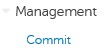
Bild 18: (Endast på engelska) Begå
- Du kan även ange en kommentar om policyändringarna och sedan klicka på Genomför principer.
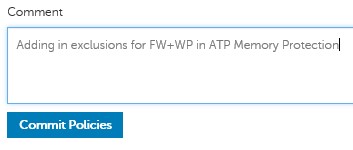
Bild 19: (Endast på engelska) Genomför policyer
Om du vill kontakta support, se Dell Data Security telefonnummer till internationell support.
Gå till TechDirect för att skapa en begäran om teknisk support online.
Om du vill ha mer information och resurser kan du gå med i Dell Security Community-forumet.
Additional Information
Videos
Affected Products
Dell Endpoint Security Suite EnterpriseArticle Properties
Article Number: 000125037
Article Type: Solution
Last Modified: 13 Nov 2023
Version: 8
Find answers to your questions from other Dell users
Support Services
Check if your device is covered by Support Services.