Goodix Touchpad Has No Cursor Movement or Movement Lags
Summary: This article talks about lag or no cursor movement on laptops with Goodix Touchpad.
This article applies to
This article does not apply to
This article is not tied to any specific product.
Not all product versions are identified in this article.
Symptoms
Cursor lags or does not move
End users may notice lag or no cursor movement when using the touchpad on affected laptops.
The issue happens with the Goodix touchpad on below platforms:
Affected Products
- Inspiron 3510
- Inspiron 3511
- Inspiron 3515
- Vostro 3510
- Vostro 3515
Goodix and ELAN touchpad can be identified based on its device ID as shown in Figure 1 and 2.

Figure 1: Goodix touchpad device ID shows OAAF
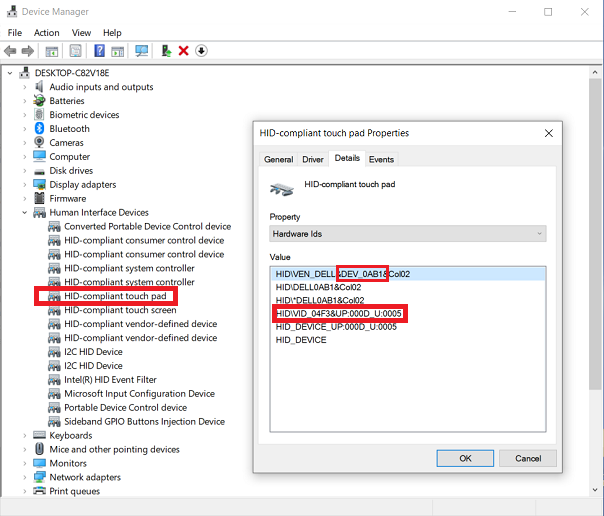
Figure 2: ELAN touchpad device ID shows 0AB1
Cause
Dell Touchpad Firmware issue
Resolution
Update touchpad firmware
Guide the customer to update the Dell Touchpad Firmware to V06 or newer.
- Go to Dell Touchpad Firmware Application.
- Click Download and save the file to your computer.
- Open File Explorer and browse to the location where the downloaded file is saved.
- Double-click the Dell Touchpad Firmware Application setup file and follow the on-screen instructions to complete the installation process.
Affected Products
Inspiron 15 3510, Inspiron 15 3511, Inspiron 15 3515, Vostro 15 3510, Vostro 15 3515Article Properties
Article Number: 000197493
Article Type: Solution
Last Modified: 08 Apr 2025
Version: 8
Find answers to your questions from other Dell users
Support Services
Check if your device is covered by Support Services.